

描述
Scribble out your content with a squiggly line instead of a boring strikethrough. You can easily customize your scribble settings via your WordPress admin > Settings > Scribble.
How to Use
There are two ways to define a scribble:
Credits
Thanks to Jean-Christophe Nicolas who made the original jQuery plugin.
螢幕截圖

Scribble in action 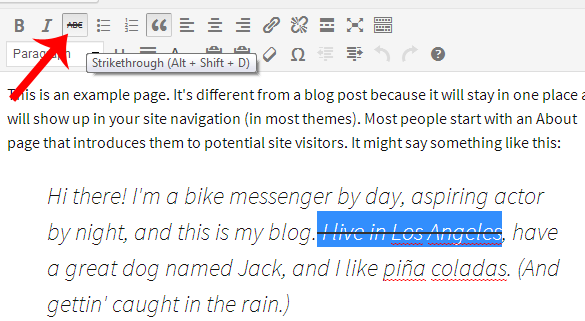
To set a scribble: Use the strikethrough icon in the WYSIWYG visual editor. 
You can also define a scribble by adding class “scribble” to html element. 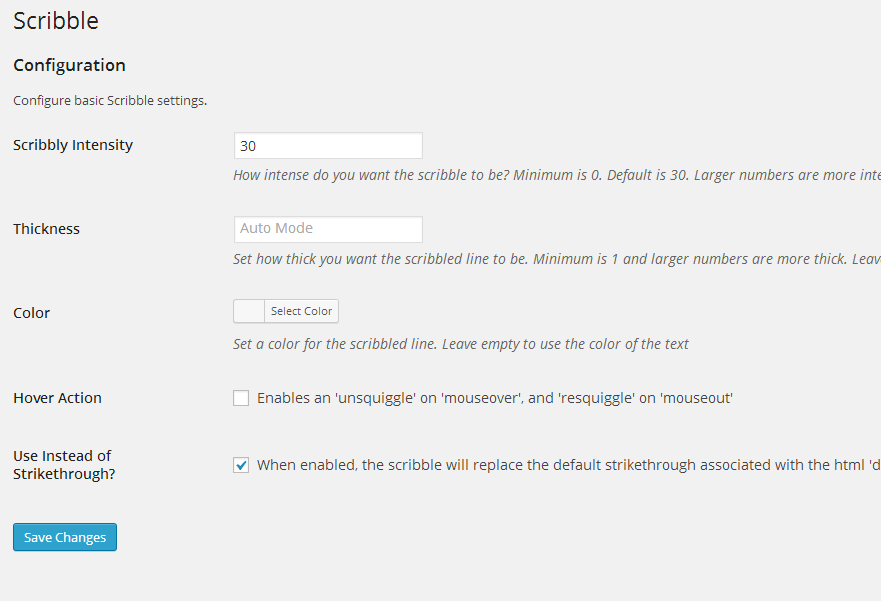
You can easily customize scribble settings in Settings > Scribble
安裝
- From WP admin > Plugins > Add New
- Search “Scribble” under search and hit Enter
- Click “Install Now”
- Click the Activate Plugin link
常見問題
- How do I add a scribble?
-
There are two ways to define a scribble. You can add scribbles via the strikethrough icon in the WYSIWYG visual editor(see screenshot). You can also add class “scribble” to the target html element (see screenshot).
- What if I want to keep my strikethroughs and just add scribbles seperarely?
-
Uncheck the box at Settings > Scribble > Use Instead of Strikethrough. You will now have to add class “scribble” to the target html scribble element (as the strikethrough icon in WYSIWYG visual editor will result in a normal strikethrough.)
- What other Scribble settings can I customize via Settings > Scribble?
-
Scribble intensity, thickness, color, and hover action.
評價
There are no reviews for this plugin.
貢獻者及開發者

修改日誌
1.0
- Initial version