

Àpèjúwe
This plugin adds a universal top menu among WordPress sister websites.
Administrators may manage menus from one central location (a master site) and use the client plugin (pending) on remaining sites to display the menus.
Or simply add the master menu to all sites that needs the top menu.
Create as many menus as you like. If you are using the client plugin to display the menus
on sisters sites you first need to add that site to the list of menus first on the master site.
After creating your menus choose from ten (10) color themes under settings and you’re all set to go.
Please feel free to request more themes and features (email @ kevonadonis.com )
Àwọn àwòrán ìbòjú
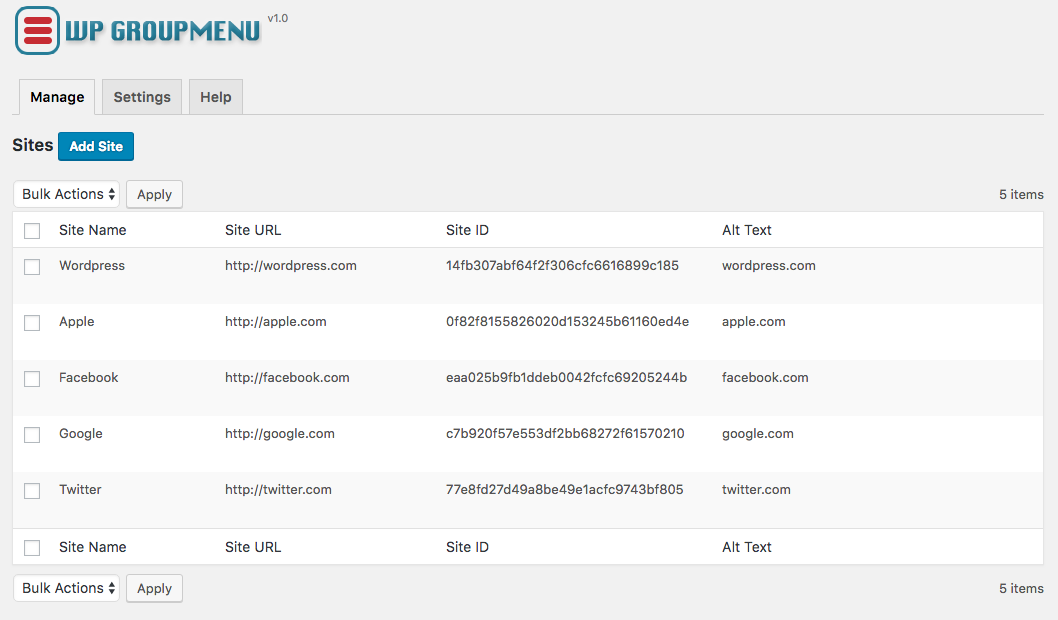

Ìgbéwọlẹ̀
- Upload
wpgroupmenuto the/wp-content/plugins/directory - Activate the plugin through the ‘Plugins’ menu in WordPress
- Go to setting, create your menus and customize your the look.
FAQ
- Installation Instructions
-
- Upload
wpgroupmenuto the/wp-content/plugins/directory - Activate the plugin through the ‘Plugins’ menu in WordPress
- Go to setting, create your menus and customize your the look.
- Upload
Àwọn àgbéyẹ̀wò
Kò sí àwọn àgbéyẹ̀wò fún plugin yìí.
Àwọn Olùkópa & Olùgbéejáde
“WP Group Menu” jẹ́ ètò ìṣàmúlò orísun ṣíṣí sílẹ̀. Àwọn ènìyàn wọ̀nyí ti ṣe ìkópa sí plugin yìí.
Àwọn Olùkópa
Túmọ̀ “WP Group Menu” sí èdè rẹ.
Ṣe o nífẹ̀ẹ́ sí ìdàgbàsókè?
Ṣàwárí koodu, ṣàyẹ̀wò ibi ìpamọ́ SVN, tàbí ṣe àgbékalẹ̀ sí àkọsílẹ̀ ìdàgbàsókè nípasẹ̀ RSS.
Àkọsílẹ̀ àwọn àyípadà
1.0
- Add ability to set custom colors and allignment
- Compatibility testing with WP 4.9.6
0.2
- Add eight (8) color themes
- Minor bug fixes
0.1
Initial Release