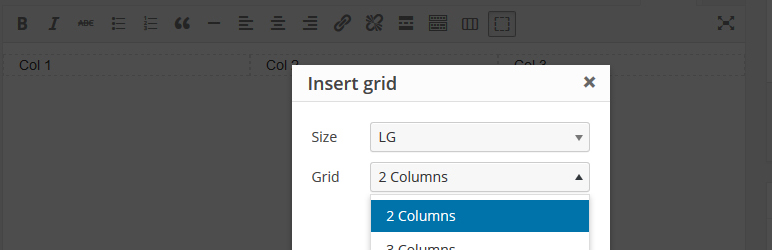

Àpèjúwe
With this plugin itÌtumọ̀ Yorùbá: ’s very easy to add the grid system from Twitter Bootstrap to the tinymce editor.
You can place your content wherether you want.
Credits
Feather Icons: http://colebemis.com/feather/
Àwọn àwòrán ìbòjú

Here you can see the new tinymce buttons
Ìgbéwọlẹ̀
- Upload the folder
tiny-gridto the/wp-content/plugins/directory - Activate the plugin through the ‘Plugins’ menu in WordPress
- Use the grid buttons at the tinymce
FAQ
- ToDo
-
- Select grid dynamic
Àwọn àgbéyẹ̀wò

Ṣẹrẹ 13, 2021
Ìtumọ̀ Yorùbá: – A great little plugin that allows you to add Bootstrap columns to the standard WP editor.
Ìtumọ̀ Yorùbá: – Works fine with WP 5.6 (I donÌtumọ̀ Yorùbá: ’t know why, but sometimes doesnÌtumọ̀ Yorùbá: ’t load correctly Ìtumọ̀ Yorùbá: – one of the buttons doesnÌtumọ̀ Yorùbá: ’t appear in the toolbar, but works well after page reload)
Thank you!

Ọwẹ́wẹ̀ 3, 2016
I just love this Plugin, and the grid-system is just perfect.
Great Work!

Ọwẹ́wẹ̀ 3, 2016
Very useful plugin and easy to install. This is exactly what I need!
Thanks

Ọwẹ́wẹ̀ 3, 2016
This is a great plugin, for everyone who want to use an website with fluid bootstrap grid.
IÌtumọ̀ Yorùbá: ’m really thankful for this!
Àwọn Olùkópa & Olùgbéejáde
“Tiny Grid” jẹ́ ètò ìṣàmúlò orísun ṣíṣí sílẹ̀. Àwọn ènìyàn wọ̀nyí ti ṣe ìkópa sí plugin yìí.
Àwọn Olùkópa
Ṣe o nífẹ̀ẹ́ sí ìdàgbàsókè?
Ṣàwárí koodu, ṣàyẹ̀wò ibi ìpamọ́ SVN, tàbí ṣe àgbékalẹ̀ sí àkọsílẹ̀ ìdàgbàsókè nípasẹ̀ RSS.
Àkọsílẹ̀ àwọn àyípadà
0.4
- Added options page
- Load grid system at frontend
- Change between Bootstrap 3 & 4
0.3
- Added lg, md, sm, xs selection
- Added popup window
- 2, 3, 4 grid layout
0.1
- Very first version of this plugin.