

Àpèjúwe
Speedora Total Website Speed Optimization is a powerful, all-in-one plugin designed to dramatically improve your WordPress siteÌtumọ̀ Yorùbá: ’s performance. Whether youÌtumọ̀ Yorùbá: ’re running a blog, e-commerce store, or corporate website, this plugin provides professional-grade optimization tools that work together seamlessly.
Key Features
⚡ Page Caching
Ìtumọ̀ Yorùbá: – Cache HTML output for lightning-fast page loads using a file-based cache
Ìtumọ̀ Yorùbá: – Browser cache-control headers for visitor devices
Ìtumọ̀ Yorùbá: – Automatic cache directory management and quick clear tools
🗜️ CSS & JavaScript Optimization
Ìtumọ̀ Yorùbá: – Lightweight HTML output minification for content and head markup
Ìtumọ̀ Yorùbá: – Preferential use of existing .min.css / .min.js files when available
Ìtumọ̀ Yorùbá: – Remove query strings from static resources for better edge/CDN caching
Ìtumọ̀ Yorùbá: – Optional defer and async attributes on non-critical JavaScript
🖼️ Image Optimization
Ìtumọ̀ Yorùbá: – Lazy load images for faster initial page load
Ìtumọ̀ Yorùbá: – Lazy load embedded iframes and videos
Ìtumọ̀ Yorùbá: – WebP-ready hooks that keep markup stable in the free version
Ìtumọ̀ Yorùbá: – Automatic large image resizing based on a configurable max width
Ìtumọ̀ Yorùbá: – Responsive image behavior via max-width and fluid sizing
📦 Database Optimization
Ìtumọ̀ Yorùbá: – Clean up old post revisions
Ìtumọ̀ Yorùbá: – Permanently delete trashed posts and pages
Ìtumọ̀ Yorùbá: – Remove spam comments
Ìtumọ̀ Yorùbá: – Optimize and repair WordPress database tables
Ìtumọ̀ Yorùbá: – One-click cleanup from the Tools page with a clear summary
🔌 Third-Party Script Control
Ìtumọ̀ Yorùbá: – Disable WordPress emoji detection script
Ìtumọ̀ Yorùbá: – Disable WordPress oEmbed functionality
Ìtumọ̀ Yorùbá: – Remove Dashicons CSS from the frontend for logged-out users
Ìtumọ̀ Yorùbá: – Control Heartbeat API frequency with a configurable interval
Ìtumọ̀ Yorùbá: – Reduce unnecessary HTTP requests and background activity
📊 Performance Diagnostics
Ìtumọ̀ Yorùbá: – Overall performance score (0-100) based on active optimizations
Ìtumọ̀ Yorùbá: – Detailed status panels for cache, minification, images, database, and scripts
Ìtumọ̀ Yorùbá: – Actionable recommendations based on your current configuration
Ìtumọ̀ Yorùbá: – System information display and cache statistics
Ìtumọ̀ Yorùbá: – Database statistics including size, tables, revisions, and spam
🎯 Easy-to-Use Interface
Ìtumọ̀ Yorùbá: – Organized settings by optimization type
Ìtumọ̀ Yorùbá: – One-click optimization tools
Ìtumọ̀ Yorùbá: – Import/export settings functionality
Ìtumọ̀ Yorùbá: – Reset to defaults option
Ìtumọ̀ Yorùbá: – Admin bar quick access menu
Performance Improvements
Expected results with all features enabled:
Ìtumọ̀ Yorùbá: – Page Load Time: 30-60% faster
Ìtumọ̀ Yorùbá: – First Contentful Paint (FCP): 25-45% improvement
Ìtumọ̀ Yorùbá: – Database Size: 15-30% reduction
Ìtumọ̀ Yorùbá: – Bandwidth Usage: 20-50% reduction
Ìtumọ̀ Yorùbá: – Server Load: Significantly reduced
Compatibility
- ✅ Works with all major WordPress themes
- ✅ Compatible with WooCommerce
- ✅ Works with custom post types
- ✅ Safe with other plugins
- ✅ No conflicts with popular cache plugins
- ✅ Works on shared hosting and dedicated servers
Requirements
- WordPress 5.0 or higher
- PHP 7.4 or higher
- No additional server configuration required
Support
For support, feature requests, or bug reports, visit the plugin support forum on WordPress.org.
Privacy
This plugin does NOT:
Ìtumọ̀ Yorùbá: – Collect any personal data
Ìtumọ̀ Yorùbá: – Send information to external servers
Ìtumọ̀ Yorùbá: – Track user activity
Ìtumọ̀ Yorùbá: – Store cookies for tracking
Ìtumọ̀ Yorùbá: – Display ads or promotions
This plugin is 100% privacy-focused and completely free.
License
This plugin is released under the GPL-2.0-or-later license. See LICENSE file for details.
Àwọn àwòrán ìbòjú
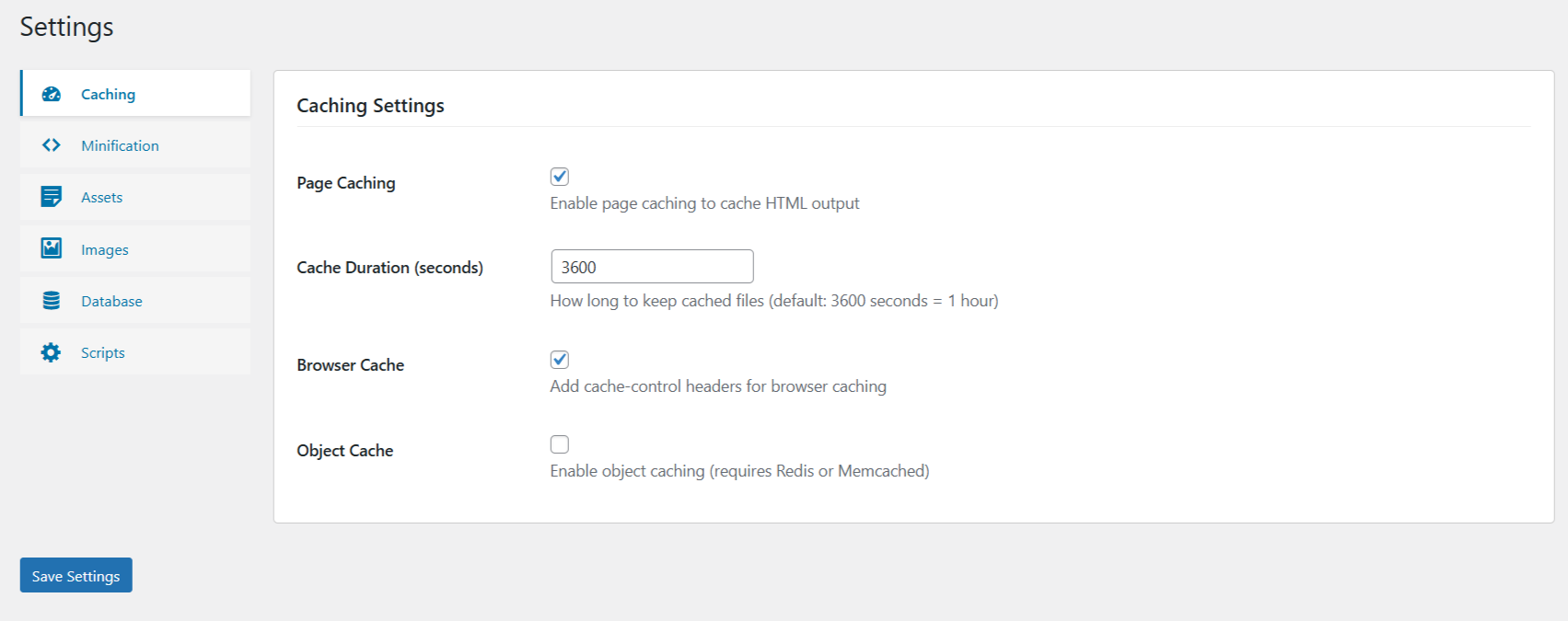
Settings – Caching: main caching options and cache duration. 
Settings – Minification: HTML, CSS, and JS optimization controls. 
Settings – Assets Management: defer/async, query-string removal, and unused CSS. 
Settings – Image Optimization: lazy load, WebP hooks, and resize settings. 
Settings – Database Optimization: cleanup toggles for revisions, trash, spam, and tables. 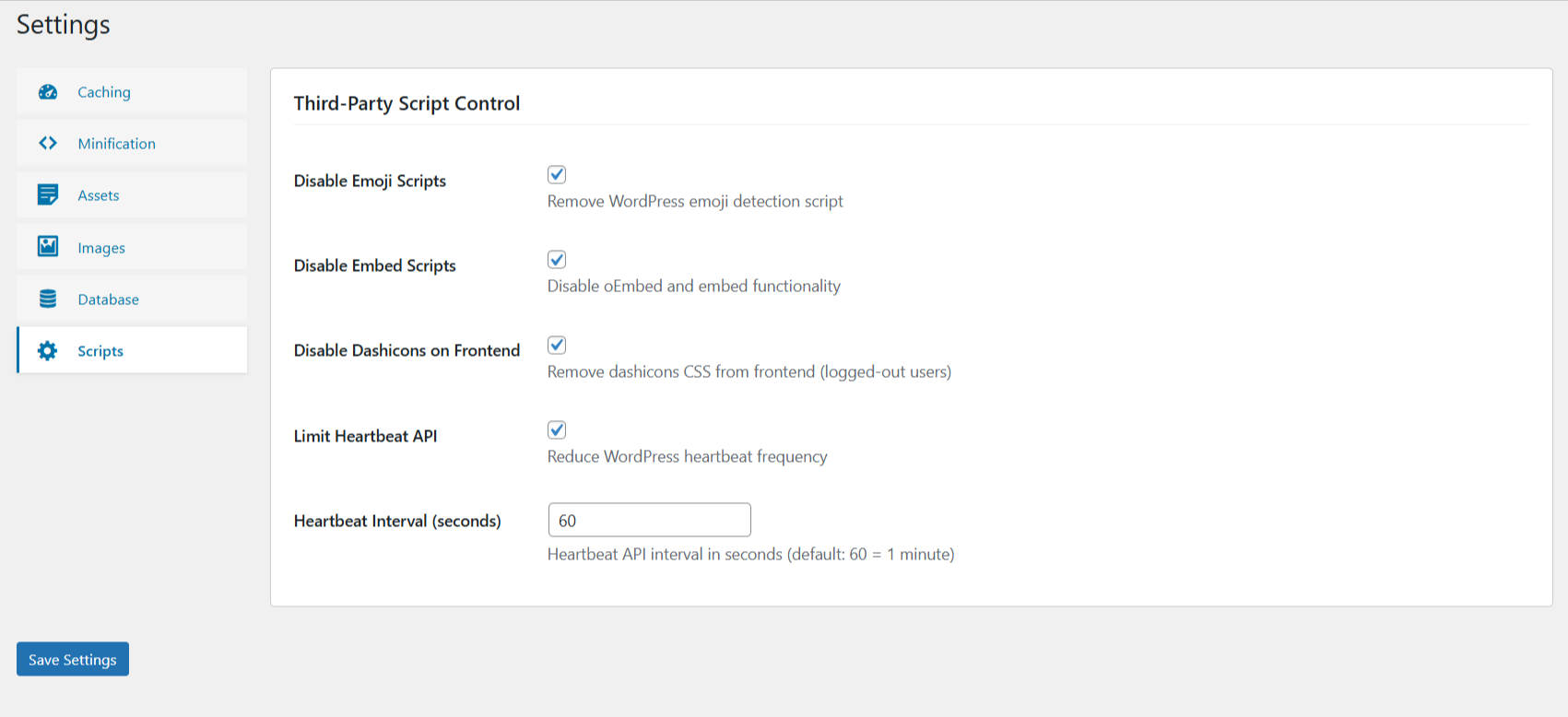
Settings – Third‑Party Script Control: emoji, embeds, Dashicons, and heartbeat options. 
Diagnostics Dashboard: performance score and status panels. 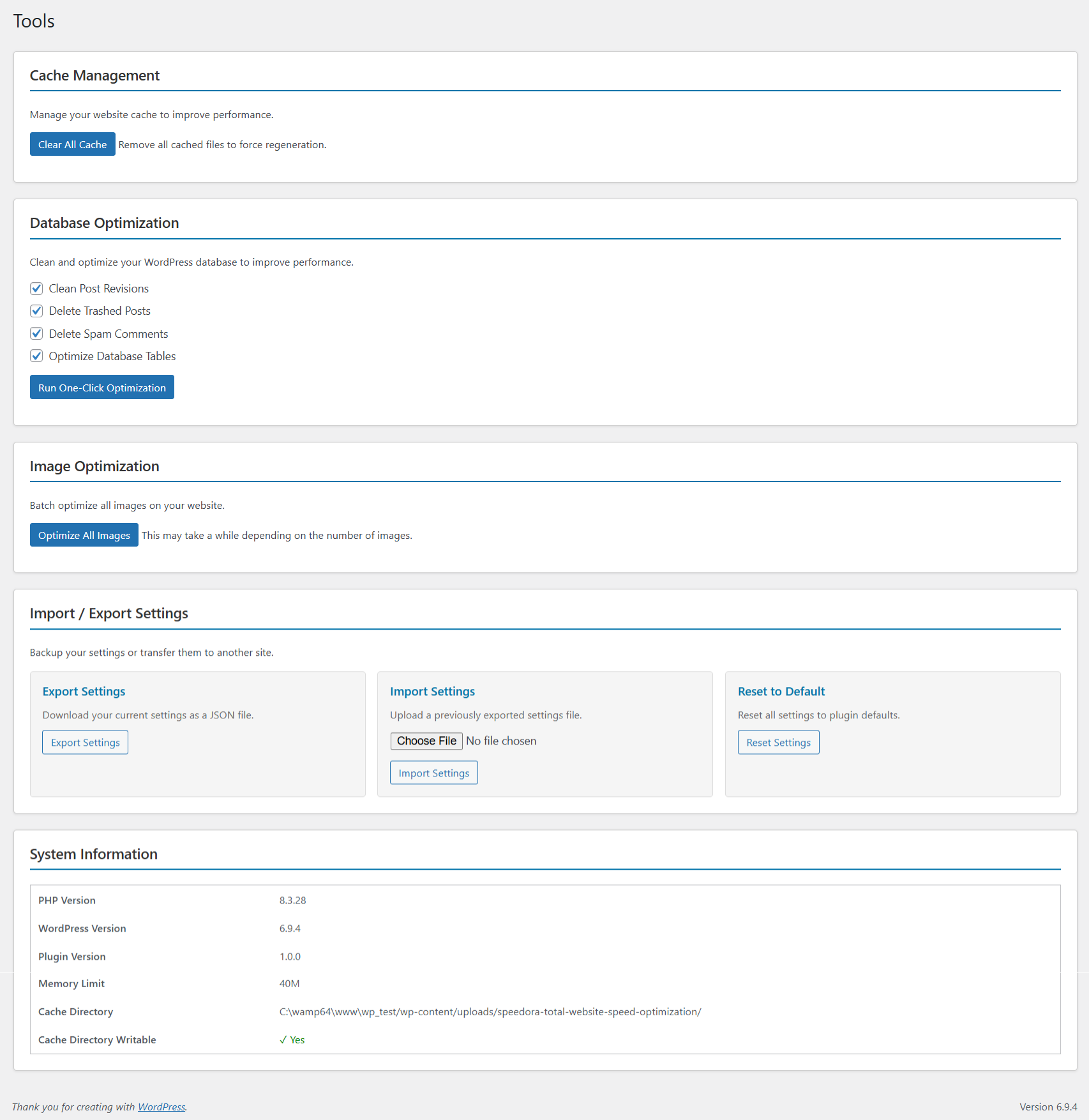
Tools Page: one‑click optimization, cache management, and import/export.
Ìgbéwọlẹ̀
- Upload the
total-website-speed-optimizationfolder to/wp-content/plugins/ - Activate the plugin through WordPress admin Plugins menu
- Navigate to Speed Optimizer in the left sidebar
- Review and configure settings as needed
- Visit Diagnostics to see your performance score
Quick Setup
After activation:
1. Go to Speed Optimizer > Settings
2. Keep the default recommended options enabled or fine-tune per tab (Caching, Minification, Assets, Images, Database, Scripts)
3. Visit your site to let page caching and browser caching start working
4. Optionally run Speed Optimizer > Tools > One-Click Optimization to clean the database and resize large images
5. Open Speed Optimizer > Diagnostics to review your performance score and recommendations
FAQ
-
Will this plugin slow down my site?
-
No. This plugin is designed specifically to speed up your WordPress site. It uses efficient caching, minification, and optimization techniques that improve performance immediately.
-
Can I use this with other cache plugins?
-
Yes. This plugin works safely alongside other cache plugins like WP Super Cache and W3 Total Cache. However, having multiple cache plugins may cause conflicts, so test thoroughly.
-
Will cached content be served to search engines?
-
No. Page caching is automatically disabled for:
Ìtumọ̀ Yorùbá: – Logged-in users
Ìtumọ̀ Yorùbá: – Search engine bots
Ìtumọ̀ Yorùbá: – Admin pages
Ìtumọ̀ Yorùbá: – Checkout pages (e-commerce) -
Is my data safe?
-
Yes. This plugin:
Ìtumọ̀ Yorùbá: – Only caches publicly visible content
Ìtumọ̀ Yorùbá: – Never caches sensitive information
Ìtumọ̀ Yorùbá: – Properly clears cache on updates
Ìtumọ̀ Yorùbá: – Uses standard WordPress security practices
Ìtumọ̀ Yorùbá: – Includes nonce verification on all admin actions -
Can I export my settings?
-
Yes. Go to Speed Optimizer > Tools > Import/Export to:
Ìtumọ̀ Yorùbá: – Backup your settings as JSON
Ìtumọ̀ Yorùbá: – Transfer settings between sites
Ìtumọ̀ Yorùbá: – Restore previous configurations -
How often should I run database optimization?
-
For most sites:
Ìtumọ̀ Yorùbá: – Weekly: Light cleanup (spam comments, trashed posts)
Ìtumọ̀ Yorùbá: – Monthly: Full optimization (revisions, table optimization)
Ìtumọ̀ Yorùbá: – As needed: Run manually when needed -
Does this work on multisite?
-
Currently, this plugin works on single-site WordPress installations. Multisite support is planned for future updates.
-
What if I notice issues after activation?
-
- The plugin automatically clears cache on deactivation
- All settings are reversible in the admin panel
- Use the “Reset Settings” option to restore defaults
- Deactivate the plugin to temporarily disable all optimizations
-
Will my website break if I disable the plugin?
-
No. You can safely:
Ìtumọ̀ Yorùbá: – Deactivate the plugin at any time
Ìtumọ̀ Yorùbá: – Cache is automatically cleared on deactivation
Ìtumọ̀ Yorùbá: – All settings are preserved (not deleted)
Ìtumọ̀ Yorùbá: – Website functions normally without the plugin -
How much storage does caching use?
-
Cache storage depends on:
Ìtumọ̀ Yorùbá: – Number of pages on your site
Ìtumọ̀ Yorùbá: – Average page size
Ìtumọ̀ Yorùbá: – Cache duration setting
Ìtumọ̀ Yorùbá: – Typical usage: 10MB Ìtumọ̀ Yorùbá: – 100MB for most sites -
Does it work with CDN services?
-
Yes. This plugin works with:
Ìtumọ̀ Yorùbá: – Cloudflare
Ìtumọ̀ Yorùbá: – Amazon CloudFront
Ìtumọ̀ Yorùbá: – Bunny CDN
Ìtumọ̀ Yorùbá: – KeyCDN
Ìtumọ̀ Yorùbá: – And other CDN providersCache headers are properly set for CDN compatibility.
Àwọn àgbéyẹ̀wò
Kò sí àwọn àgbéyẹ̀wò fún plugin yìí.
Àwọn Olùkópa & Olùgbéejáde
“Speedora Total Website Speed Optimization” jẹ́ ètò ìṣàmúlò orísun ṣíṣí sílẹ̀. Àwọn ènìyàn wọ̀nyí ti ṣe ìkópa sí plugin yìí.
Àwọn Olùkópa
Túmọ̀ “Speedora Total Website Speed Optimization” sí èdè rẹ.
Ṣe o nífẹ̀ẹ́ sí ìdàgbàsókè?
Ṣàwárí koodu, ṣàyẹ̀wò ibi ìpamọ́ SVN, tàbí ṣe àgbékalẹ̀ sí àkọsílẹ̀ ìdàgbàsókè nípasẹ̀ RSS.
Àkọsílẹ̀ àwọn àyípadà
1.0.0
- Initial release
- Page caching features
- CSS/JavaScript minification
- Image lazy loading and WebP support
- Database optimization tools
- Third-party script control
- Performance diagnostics and scoring
- Settings import/export functionality
- Admin interface with organized settings
- Comprehensive documentation and FAQs