
Àpèjúwe
Simple WordPress plugin to display onair song fetched from IceCast server (v2).
You just need to setup icecast server address and publish point name (via admin panel). Data are fetched using CRON.
Insert using shortcode to any post or directly to template using do_shortcode();
Usage example
[icecast live=0]
Parameters
live:
0 – simple text
1 – live update via JavaScript
NOTE
You need to update your IceCast web folder with “xml.xsl” file (included with plugin). See Installation for more information…
Àwọn àwòrán ìbòjú
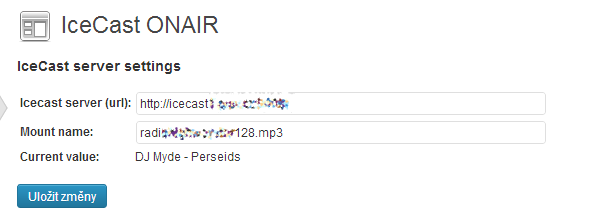
Settings of plugin
Ìgbéwọlẹ̀
- Upload
plugin-name.phpto the/wp-content/plugins/directory - Activate the plugin through the ‘Plugins’ menu in WordPress
- Go to plugin settings and set server address and publishpoint name
Icecast server configuration:
You need to update your IceCast configuration with one file “xml.xsl” (embeded with this plugin).
Just upload this file to “/web” folder of your IceCast installation dir. This will open XML stats to everyone… XML will output public data as the default IceCast page do.
This will allow this plugin to read publish point info without IceCast admin password. This is mainly for security of your IceCast instalation.
Àwọn àgbéyẹ̀wò
Kò sí àwọn àgbéyẹ̀wò fún plugin yìí.
Àwọn Olùkópa & Olùgbéejáde
“LS IceCast ONAIR” jẹ́ ètò ìṣàmúlò orísun ṣíṣí sílẹ̀. Àwọn ènìyàn wọ̀nyí ti ṣe ìkópa sí plugin yìí.
Àwọn Olùkópa
Túmọ̀ “LS IceCast ONAIR” sí èdè rẹ.
Ṣe o nífẹ̀ẹ́ sí ìdàgbàsókè?
Ṣàwárí koodu, ṣàyẹ̀wò ibi ìpamọ́ SVN, tàbí ṣe àgbékalẹ̀ sí àkọsílẹ̀ ìdàgbàsókè nípasẹ̀ RSS.
Àkọsílẹ̀ àwọn àyípadà
1.1.1
- error handling fix
- added error reporting
1.0
initial push