

Àpèjúwe
Some hosts are not optimized at the level of PHP, so the same site may use different amounts of RAM. This plug is suitable for the rapid test used and allocated memory.
Just activate the plugin. As a result, in the upper right corner there is the value of memory used in relation to dedicated hosting.
Àwọn àwòrán ìbòjú
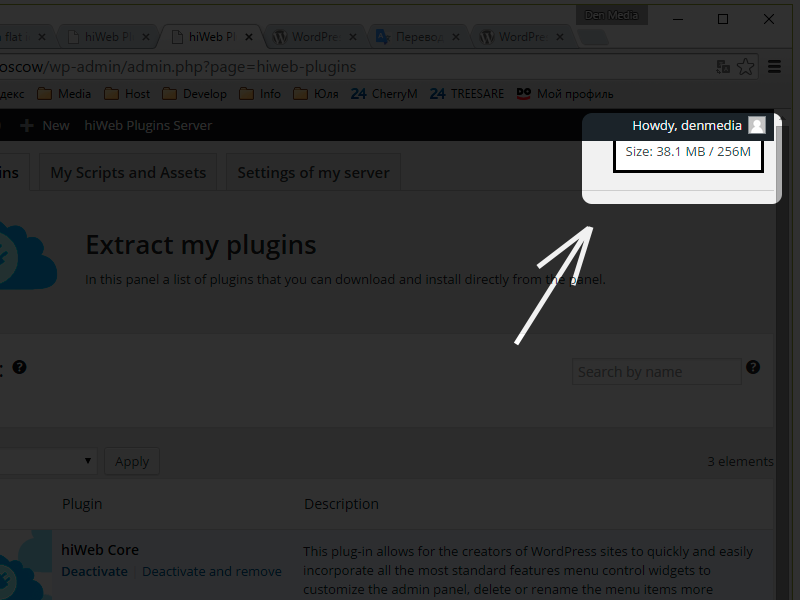
It looks like that this plugin))
Ìgbéwọlẹ̀
This section describes how to install the plugin and get it working.
- Upload folder
hiweb-coreto the/wp-content/plugins/directory - Activate the plugin through the ‘hiWeb Memory Usage’ and menu in WordPress
- Just activate the plugin. As a result, in the upper right corner there is the value of memory used in relation to dedicated hosting.
Àwọn àgbéyẹ̀wò

Ọwẹ́wẹ̀ 3, 2016
This plugin helped me to speed up my site.
Thanks!
Àwọn Olùkópa & Olùgbéejáde
“hiWeb Memory Usage” jẹ́ ètò ìṣàmúlò orísun ṣíṣí sílẹ̀. Àwọn ènìyàn wọ̀nyí ti ṣe ìkópa sí plugin yìí.
Àwọn Olùkópa
Túmọ̀ “hiWeb Memory Usage” sí èdè rẹ.
Ṣe o nífẹ̀ẹ́ sí ìdàgbàsókè?
Ṣàwárí koodu, ṣàyẹ̀wò ibi ìpamọ́ SVN, tàbí ṣe àgbékalẹ̀ sí àkọsílẹ̀ ìdàgbàsókè nípasẹ̀ RSS.
Àkọsílẹ̀ àwọn àyípadà
1.2.0.0
Independent plugin. It does not need the framework, hiWeb Core.
1.1.0.0
Developed class. I walked a violation of the AJAX call to the other plug-ins.