

Àpèjúwe
Eazy HTTP Headers provides three check boxes for settings on the general settings page.
Two of the check boxes, activate two functions built into WordPress, send_frame_options_header() & send_nosniff_header(), while the other sets a header for X-XSS Protection.
This allows you to control your sites HTTP Headers for X-Frame-Options & X-Content-Type-Options using functions built into WordPress functions.
Àwọn àwòrán ìbòjú
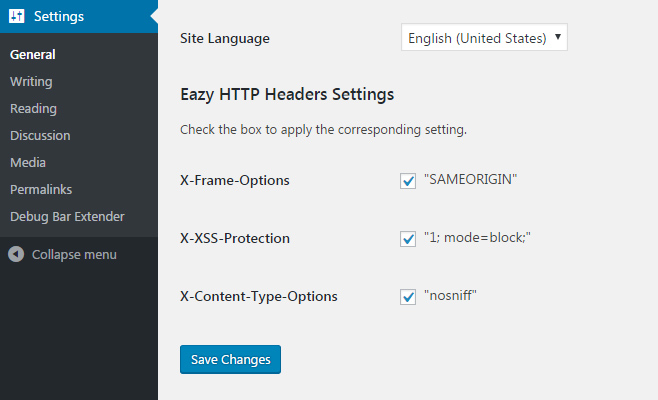
The Eazy HTTP Headers Settings section on the general settings page
Ìgbéwọlẹ̀
- Install and activate Eazy HTTP Headers.
- Navigate to the General Settings page in the admin.
- Look for the Eazy HTTP Settings section towards the bottom.
- Check the boxes for the corresponding headers you want to set.
FAQ
- Installation Instructions
-
- Install and activate Eazy HTTP Headers.
- Navigate to the General Settings page in the admin.
- Look for the Eazy HTTP Settings section towards the bottom.
- Check the boxes for the corresponding headers you want to set.
- How do I know if my sites headers changes?
-
You can request your sites HTTP Headers by looking at the response to an HTTP request.
securityheaders.io provides an easy to use interface to verify your sites headers.
Àwọn àgbéyẹ̀wò
Kò sí àwọn àgbéyẹ̀wò fún plugin yìí.
Àwọn Olùkópa & Olùgbéejáde
“Eazy HTTP Headers” jẹ́ ètò ìṣàmúlò orísun ṣíṣí sílẹ̀. Àwọn ènìyàn wọ̀nyí ti ṣe ìkópa sí plugin yìí.
Àwọn Olùkópa
Túmọ̀ “Eazy HTTP Headers” sí èdè rẹ.
Ṣe o nífẹ̀ẹ́ sí ìdàgbàsókè?
Ṣàwárí koodu, ṣàyẹ̀wò ibi ìpamọ́ SVN, tàbí ṣe àgbékalẹ̀ sí àkọsílẹ̀ ìdàgbàsókè nípasẹ̀ RSS.
Àkọsílẹ̀ àwọn àyípadà
1.1.0
- Added option for X-XSS Protection
- Added inline documentation
1.0.0
- Initial version of plugin.