

Àpèjúwe
Do you want the best solution to accept Credit Cards, e-wallet, and Various Bank Transfers on your website? Our Payment Gateway for VikBooking plugin integrates with your VikBooking store and lets you accept those payments through our payment gateway.
Securely accept major credit cards, View and manage transactions from one convenient place – your Duitku dashboard.
Supported Payment Channels :
- Credit Card Aggregator full-payment (Visa, Master, JCB)
- Credit Card Facilitator installment and full-payment (Visa, Master, JCB, AMEX)
- BCA KlikPay
- BCA Virtual Account
- Mandiri Virtual Account
- Permata Bank Virtual Account
- ATM Bersama
- CIMB Niaga Virtual Account
- BNI Virtual Account
- Maybank Virtual Account
- Retail (Alfamart, Pegadaian and Pos Indonesia)
- OVO
- Shopee Pay
- Shopee Pay Apps
- Bank Artha Graha
- Bank Sahabat Sampoerna
- LinkAja Apps (Percentage Fee)
- LinkAja Apps (Fixed Fee)
- DANA
- LinkAja QRIS
- Indomaret
- PosPay
- BNC
- BRIVA
- QRIS by Nobu
Àwọn àwòrán ìbòjú
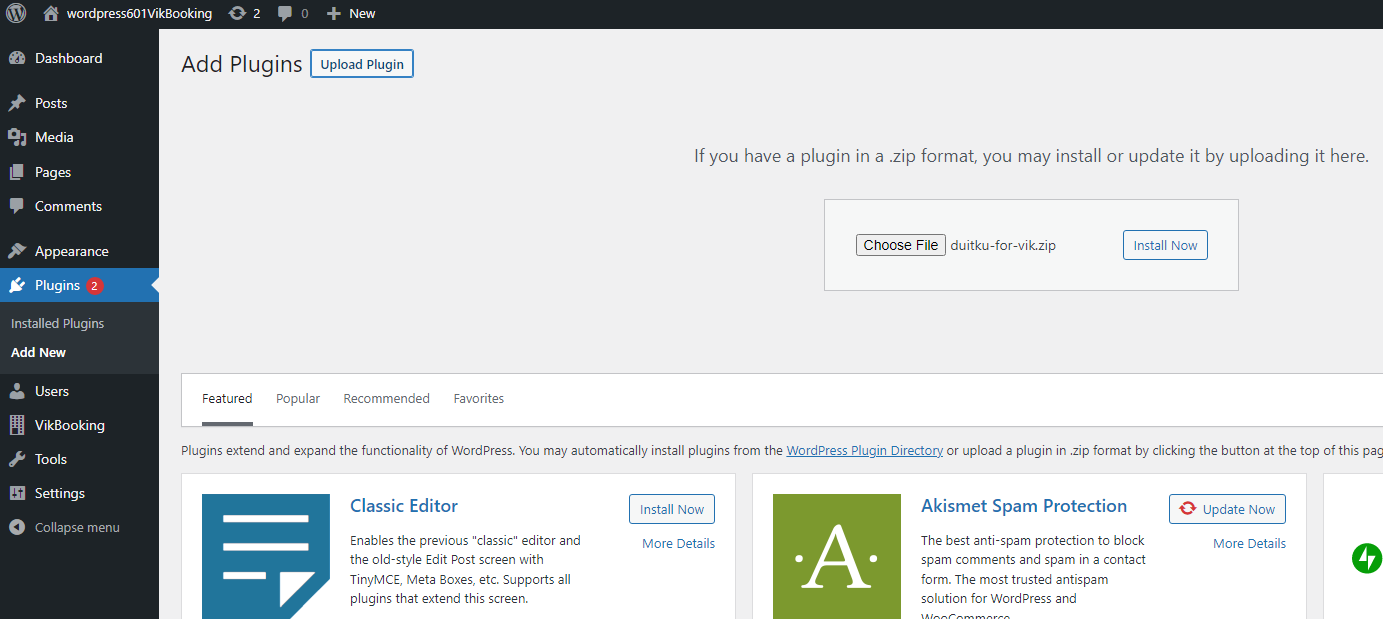
Installation

Plugin View

Payment Methods Menu

Create Payment Methods

Duitku Payment Settings

Duitku Payment Confirmation
Ìgbéwọlẹ̀
Guide to installing the Duitku plugin for VikBooking
Download the Duitku plugin for VikBooking here.
Open your WordPress Admin menu (generally in / wp-admin).
Open the Plugins menu -> Add New Page.
Upload the Duitku plugin file (Make sure VikBooking is installed before adding the Duitku plugin).
After the plugin is installed, Duitku will appear in the list of installed plugins. Open the Plugin -> Installled Plugins page, then activate the Duitku plugin.
Open VikBooking on Admin -> Global -> Payment Methods click New button to create new payment methods.
On new payment method you may set Payment Name for user UI. Then, select duitku on File Class. (The Parameters will show Duitku settings).
Enter your Merchant Code and API Key. If you havenÌtumọ̀ Yorùbá: ’t had it you might register on Duitku first then create project to get it.
After the Duitku Payment setting is complete, click save button.
The settings is complete. You might see your Duitku payment method on confimation reservation page.
FAQ
-
What is Duitku?
-
Duitku is a Payment Solution service with the best MDR (Merchant Discount Rate) fees from many Payment Channels in Indonesia. As your payment service provider, Duitku can serve payments via credit cards, bank transfers and internet banking directly to your online shop.
-
How do I integrate Duitku with my website?
-
Integrating online payments with Duitku is very easy, web integration using our API. (API doc: http://docs.duitku.com/docs-api.html) or using plugins for e-commerce.
Àwọn àgbéyẹ̀wò
Kò sí àwọn àgbéyẹ̀wò fún plugin yìí.
Àwọn Olùkópa & Olùgbéejáde
“Duitku for VikBooking WordPress” jẹ́ ètò ìṣàmúlò orísun ṣíṣí sílẹ̀. Àwọn ènìyàn wọ̀nyí ti ṣe ìkópa sí plugin yìí.
Àwọn Olùkópa

Túmọ̀ “Duitku for VikBooking WordPress” sí èdè rẹ.
Ṣe o nífẹ̀ẹ́ sí ìdàgbàsókè?
Ṣàwárí koodu, ṣàyẹ̀wò ibi ìpamọ́ SVN, tàbí ṣe àgbékalẹ̀ sí àkọsílẹ̀ ìdàgbàsókè nípasẹ̀ RSS.
Àkọsílẹ̀ àwọn àyípadà
1.0.1
- Fix Redirection payment.
1.0
- Initial release.