

Àpèjúwe
Transform your WordPress content into professional PDF documents
Generate stunning, brand-consistent PDF files from your WordPress posts, pages, custom post types, and WooCommerce products with just one click. Perfect for content creators, businesses, and developers who need reliable PDF generation.
Homepage | View Demo | Documentation | YouTube
Powerful features that deliver results
- Multi-Content Generation: Create PDFs from posts, pages, custom post types, taxonomies, WooCommerce products, shop and categories
- Selective Content Display: Choose exactly what appears in your PDFs Ìtumọ̀ Yorùbá: – featured images, post dates, authors, categories, and more
- Custom Fields Support: Add custom fields including Advanced Custom Fields, see documentation
- Custom Font Manager: Upload and manage custom .ttf fonts to match your brand typography in generated PDFs: see documentation
- Multi-Language Support: Core fonts management for Arabic, Hebrew, Indic, and CJK languages ensuring proper character rendering
- Button Visibility by User Role: Control which WordPress user roles can see and generate PDFs, see documentation
- WooCommerce Integration: Include product details like prices, SKUs, categories, and more
- Header & Footer Control: Add logo, custom text, and branding elements to headers and footers
- Custom CSS Support: Apply your own styling to match your brand perfectly
- Smart Content Control: Use powerful shortcodes to hide sections, create column layouts, and add page breaks exactly where you need them
- Template Overrides: Create custom templates in your theme for complete design and content control
- WordPress Hooks: Extensive filter and action hooks for advanced customization
Perfect for every use case
- Content Creators & Bloggers: Transform your best blog posts into downloadable PDFs for lead magnets or offline reading.
- E-commerce Sites: Create product catalogs and detailed product sheets from your WooCommerce products.
- Developers: Build custom PDF solutions for clients using template overrides and WordPress hooks.
- Educational Sites: Convert course materials, lessons, and resources into portable PDF formats.
DK PDF Custom Services
Need custom functionality for the DK PDF Plugin? I provide professional customization services to extend and enhance your PDF generation capabilities.
Àwọn àwòrán ìbòjú

Front-end PDF Button 
PDF Button settings 
PDF Setup settings 
PDF Header & Footer settings 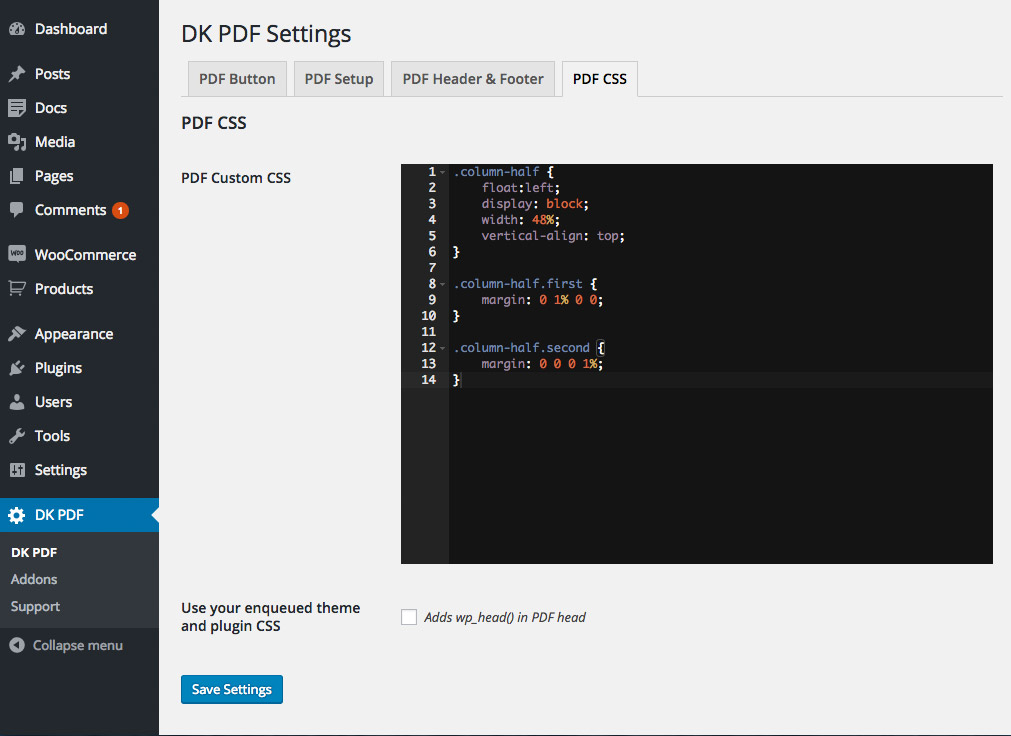
PDF Custom CSS 
PDF Templates 
Single post PDF 
Category PDF 
WooCommerce Product PDF 
WooCommerce Shop PDF 
Disable PDF Button Metabox 
Custom Fields support
Ìgbéwọlẹ̀
Installing “DK PDF” can be done either by searching for “DK PDF” via the “Plugins > Add New” screen in your WordPress dashboard, or by using the following steps:
- Download the plugin via WordPress.org
- Upload the ZIP file through the ‘Plugins > Add New > Upload’ screen in your WordPress dashboard
- Activate the plugin through the ‘Plugins’ menu in WordPress
Àwọn àgbéyẹ̀wò


Àwọn Olùkópa & Olùgbéejáde
“DK PDF Ìtumọ̀ Yorùbá: – WordPress PDF Generator” jẹ́ ètò ìṣàmúlò orísun ṣíṣí sílẹ̀. Àwọn ènìyàn wọ̀nyí ti ṣe ìkópa sí plugin yìí.
Àwọn Olùkópa

Túmọ̀ “DK PDF Ìtumọ̀ Yorùbá: – WordPress PDF Generator” sí èdè rẹ.
Ṣe o nífẹ̀ẹ́ sí ìdàgbàsókè?
Ṣàwárí koodu, ṣàyẹ̀wò ibi ìpamọ́ SVN, tàbí ṣe àgbékalẹ̀ sí àkọsílẹ̀ ìdàgbàsókè nípasẹ̀ RSS.
Àkọsílẹ̀ àwọn àyípadà
2.3.1
- Fix Ìtumọ̀ Yorùbá: – Server-Side Request Forgery by sanitizing external URLs from content, and configuring mPDF to restrict external resource fetching.
2.3.0
- Enhancement Ìtumọ̀ Yorùbá: – Add custom font manager for uploading and managing custom .ttf fonts in PDF generation.
- Enhancement Ìtumọ̀ Yorùbá: – Add core fonts management, recommended for Arabic, Hebrew, Indic and CJK languages support.
2.2.1
- Enhancement Ìtumọ̀ Yorùbá: – Display custom fields in WooCommerce product PDF.
- Fix Ìtumọ̀ Yorùbá: – Fatal error when generating PDFs for posts with non-publish status.
- Fix Ìtumọ̀ Yorùbá: – Respect ‘shortcode only’ position setting on WooCommerce and WordPress archive pages.
2.2.0
- Enhancement Ìtumọ̀ Yorùbá: – Add button visibility by role.
- Enhancement Ìtumọ̀ Yorùbá: – Add max. number of items to display in the PDF.
- Fix Ìtumọ̀ Yorùbá: – Fatal error with composer package versions.
- Fix Ìtumọ̀ Yorùbá: – Wrong header and footer title for categories and shop.
2.1.0
- Enhancement Ìtumọ̀ Yorùbá: – Add custom fields support.
- Fix Ìtumọ̀ Yorùbá: – Display pdf button in wc taxonomies to apply.
2.0.2
- Fix Ìtumọ̀ Yorùbá: – Wrong post content in single templates.
2.0.1
- Fix Ìtumọ̀ Yorùbá: – Broken shortcodes after 2.0.0 upgrade.
2.0.0
- Enhancement Ìtumọ̀ Yorùbá: – New template system and content display including archive and single templates.
- Enhancement Ìtumọ̀ Yorùbá: – Support for WooCommerce products including single, shop and archive pages.
1.9.10
- Enhancement Ìtumọ̀ Yorùbá: – Add new template sets system.
- Enhancement Ìtumọ̀ Yorùbá: – Add new
dkpdf_content_templatefilter to select template conditionally. - Enhancement Ìtumọ̀ Yorùbá: – Add output PDF html for debugging purposes.
- Enhancement Ìtumọ̀ Yorùbá: – Increase init settings action priority to allow more custom post types to apply.
1.9.9
- Fix Ìtumọ̀ Yorùbá: – Plugin templates not displaying CSS correctly.
1.9.8
- Fix Ìtumọ̀ Yorùbá: – Add custom namespace to avoid issues with third party composer packages.
- Fix Ìtumọ̀ Yorùbá: – Disable deprecated dynamic property message.
1.9.7
- Enhancement Ìtumọ̀ Yorùbá: – Update plugin requirements and mpdf library to PHP 8+
- Fix Ìtumọ̀ Yorùbá: – Reflected Cross-Site Scripting security issue
1.9.6
- Update mPDF library to latest version.
- New filters
dkpdf_mpdf_font_dir,dkpdf_mpdf_font_data,dkpdf_mpdf_temp_dir. Thanks to joostvanbockel.
1.9.3
- Reverting to 1.9.1, something went wrong in 1.9.2
1.9.2
- PHP7: Remove some warnings, see issue #38, issue #48.
- HTTPS: Fix images not working after move to https, see issue #51.
1.9.1
- Added PDF Protection in PDF Setup Settings
- New Columns Shortcodes: [dkpdf-columns] and [dkpdf-columnbreak]
- New Filter: dkpdf_pdf_filename
- Fixed Admin scripts enqueued on all pages (thanks to Aristeides Stathopoulos @aristath)
1.9
- Added shortcode tag attribute to dkpdf-remove shortcode
- FontAwesome icons support
- Added post title as PDF filename when downloaded from browser
1.8
- New filter dkpdf_pdf_format
- New filter dkpdf_header_title
- Option for remove default PDF button when adding PDF button manually (thanks to Renato Alves)
1.7
- New filters (see documentation filters)
- Fixed github issues #21 #23 #24
1.6
- 4.4.2 Tested
- Added DK PDF Generator compatibility (css + shortcodes)
1.5
- Added PDF Custom CSS setting
- Sanitized settings fields
1.4
- Added [dkpdf-pagebreak] shortcode for adding page breaks
- Added filters dkpdf_header_pagination and dkpdf_footer_pagination
- Added addons page to admin menu
1.3
- New DK PDF admin menu for better usability
- Added a PDF Setup tab for adjusting page orientation, font size and margins of the PDF
- Added [dkpdf-remove] shortcode for removing pieces of content in the generated PDF
1.2
- Settings link in plugins list page
- Adjusts header template for better logo display
1.1
- Removes dkpdf-button shortcode in the generated PDF
1.0
- Initial release