

Àpèjúwe
Creates a meta-box with meta-data information of a post for all post types. Information with meta key, meta value and its var_dump
Install and activate the plugin and youÌtumọ̀ Yorùbá: ’ll have the meta box for all post types (even the custom post types).
License & Conduct
- MIT © Ahmad Awais
- Code of Conduct
Àwọn àwòrán ìbòjú
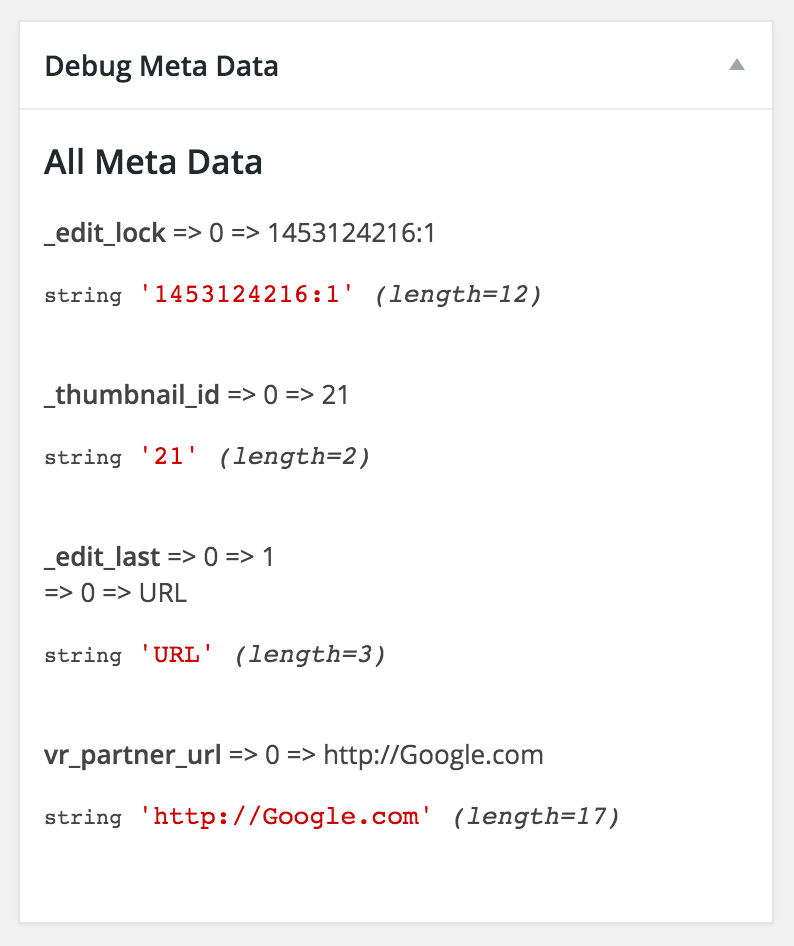
An example of the custom debug meta box with all the meta data that will display for all the post types.
Ìgbéwọlẹ̀
Install and activate the plugin and youÌtumọ̀ Yorùbá: ’ll have the meta box for all post types (even the custom post types).
Details:
- Upload `debug-meta-data.zip` to the `/wp-content/plugins/` directory
- Activate the plugin through the ‘Plugins’ menu in WordPress
- You can find the “Debug Meta Data” meta-box on all post types
FAQ
- Is there anything else needed?
-
No, not really.
Àwọn àgbéyẹ̀wò

Ọwẹ́wẹ̀ 3, 2016
ItÌtumọ̀ Yorùbá: ’s just useful to have that debug info right there on the post-type page. Thanks!
Àwọn Olùkópa & Olùgbéejáde
“Debug Meta Data” jẹ́ ètò ìṣàmúlò orísun ṣíṣí sílẹ̀. Àwọn ènìyàn wọ̀nyí ti ṣe ìkópa sí plugin yìí.
Àwọn Olùkópa


Túmọ̀ “Debug Meta Data” sí èdè rẹ.
Ṣe o nífẹ̀ẹ́ sí ìdàgbàsókè?
Ṣàwárí koodu, ṣàyẹ̀wò ibi ìpamọ́ SVN, tàbí ṣe àgbékalẹ̀ sí àkọsílẹ̀ ìdàgbàsókè nípasẹ̀ RSS.
Àkọsílẹ̀ àwọn àyípadà
KEY: 📦 NEW, 👌 IMPROVE, 🐛 FIX, 📖 DOC, 🚀 RELEASE, and ✅ TEST
I use Emoji-log, you should try it and simplify your git commits.