

Àpèjúwe
Just another code syntaxhighligher for the theme and plugin editor with CodeMirror. This plugin can highlight sourcecodes in the theme/plugin editor and provide a useful toolbar.
Features
- Highlight sourcecodes in theme and plugin editor on the dashboard.
- Based on Marijn HaverbekeÌtumọ̀ Yorùbá: ’s “CodeMirror” JavaScript library.
- Built-in 10 themes.
- Useful toolbar which includes search/replace features.
- Full-screen editing.
- Auto-complete.
- Easy to configure features through the setting panel.
- Localization: English(Default), 日本語(Japanese, UTF-8).
Support languages
- PHP
- CSS
- Javascript
- (X)HTML
Recommended plugin
- “WP SyntaxHighlighter” can highlight sourcecodes on your front-end(posts, pages, comments).
Àwọn àwòrán ìbòjú
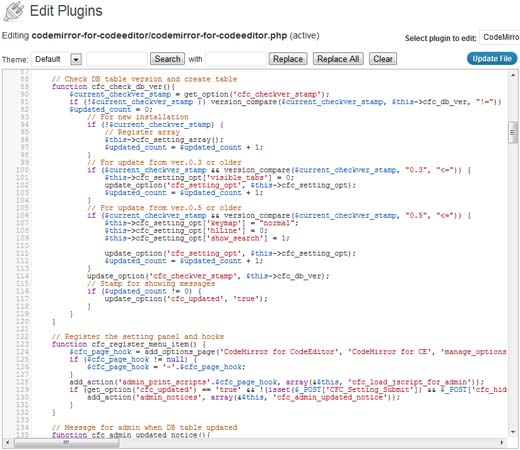
This is a highlighted code in the plugin editor. 
This is AJAX search dialog. 
This is Auto-omplete Demo. 
This is setting panel.
Ìgbéwọlẹ̀
Installation
- Upload plugin folder to the
/wp-content/plugins/directory. - Activate the plugin through the “Plugins” menu in WordPress.
- If you need, go to “Settings” -> “CodeMirror for CE” to configure.
Usage
- You can select a theme, run search and replace on the toolbar.
- Place the cursor in the textarea and press “Esc” or “F11” key to chage to the “fullscreen mode”.
- Press “Ctrl” Ìtumọ̀ Yorùbá: – “Space” to activate Auto-omplete.
- Press “Ctrl” Ìtumọ̀ Yorùbá: – “Z” to undo the previous change.
- Press “Ctrl” Ìtumọ̀ Yorùbá: – “Y” to redo.
- Press “Shift” Ìtumọ̀ Yorùbá: – “Tab” to reset line indentation to default.
- Press “Ctrl/Cmd” Ìtumọ̀ Yorùbá: – “[” to reduce line indentation.
- Press “Ctrl/Cmd” Ìtumọ̀ Yorùbá: – “]” to increase line indentation.
You can also use following shortcuts to search and replace.
- Search: Press Ctrl-F / Cmd-F
- Find next: Press Ctrl-G / Cmd-G
- Find previous: Press Shift-Ctrl-G / Cmd-Option-G
- Replace: Shift-Ctrl-F / Cmd-Option-F (Run this after searching.)
- Replace all: Shift-Ctrl-R / Shift-Cmd-Option-F (Run this after searching.)
Note: “Search & replace” by shortcut and “Auto-omplete” canÌtumọ̀ Yorùbá: ’t work in the “fullscreen mode”.
Àwọn àgbéyẹ̀wò
Kò sí àwọn àgbéyẹ̀wò fún plugin yìí.
Àwọn Olùkópa & Olùgbéejáde
“CodeMirror for CodeEditor” jẹ́ ètò ìṣàmúlò orísun ṣíṣí sílẹ̀. Àwọn ènìyàn wọ̀nyí ti ṣe ìkópa sí plugin yìí.
Àwọn Olùkópa
Túmọ̀ “CodeMirror for CodeEditor” sí èdè rẹ.
Ṣe o nífẹ̀ẹ́ sí ìdàgbàsókè?
Ṣàwárí koodu, ṣàyẹ̀wò ibi ìpamọ́ SVN, tàbí ṣe àgbékalẹ̀ sí àkọsílẹ̀ ìdàgbàsókè nípasẹ̀ RSS.
Àkọsílẹ̀ àwọn àyípadà
0.5.6.1
- Updated CodeMirror to ver. 2.23.
- Add new themes(Lesser-Dark, XQ-Dark).
0.5.6
- Updated CodeMirror to ver. 2.22.
- Add “Highlight matched strings” option.
0.5.5
- Updated CodeMirror to ver. 2.21.
- Add “Smart indent” option.
- Discontinue “Tab mode” and “Indentation for a new line” options.
- Fix a bug: Selected elements by dragging the mouse isnÌtumọ̀ Yorùbá: ’t displayed inverted correctly.
0.5.3
- Updated CodeMirror to ver. 2.2-55.
- Supports “Emacs keybindings”.
- Supports “Vim keybindings”.
- Supports “Highlighting the current line”.
- Re-added “Serach and Replace” box into the toolbar.
- Added new setting option to show/hide serach and replace box.
0.5
- Updated CodeMirror to ver. 2.2-39.
- Supports “visible tab”.
- New “Search” and “Replace” functions.
- Fix a bug: Using bloginfo() in the wrong way.
0.4.5
- Added new theme “monokai” and “rubyblue”.
- Added “Update File” button into the toolbar.
- Renewed “Auto-complete” function.
- Modified the processing of “Search”.
- Updated CodeMirror to ver. 2.18.
0.4
- Updated CodeMirror to ver. 2.16-22(including important bug fixes for IE users).
- Added new variable that has version info of CodeMirror.
0.3.6
- Added setting link into “Plugins” section.
- Fix a bug: a missing arrow operator.
0.3.5
- Rewrote the code using class.
- Fix a bug: PHP with HTML, Javascript or CSS canÌtumọ̀ Yorùbá: ’t be highlighted correctly.
- Fix a bug: HTML with Javascript or CSS canÌtumọ̀ Yorùbá: ’t be highlighted correctly.
0.3
- Added setting panel.
- Modified stylesheet.
0.2
- Added Search and Replace functions.
- Added Auto-complete.
- The themes become user-selectable in the “fullscreen mode”.
0.1
- This is the initial release.