

Àpèjúwe
AudioTyped UX provides clean, accessible, and structured transcript layouts for interviews, podcasts, co-host formats, research conversations, and other spoken-word content published on WordPress. The plugin improves readability through a chat-style layout with distinct speaker sections and optional avatars, helping readers follow conversations smoothly.
Video AudioTyped UX demo:
Traditional transcripts often appear as dense text blocks or hidden behind toggles. AudioTyped UX places transcripts front and center with a clear layout that supports accessibility and makes long-form conversations easier to navigate — including for deaf and hard-of-hearing users.
All layouts are created using pure HTML, ensuring full SEO crawlability and compatibility with assistive technologies.
Why AudioTyped UX?
- Improves readability of long conversations
- Supports accessibility for deaf and hard-of-hearing users
- Distinct speaker bubbles for clear separation
- Works for interviews, podcasts, journalistic content, research, NGOs, and education
- Fully HTML-based for optimal SEO
- Lightweight and easy to style
Who Is It For?
- Podcasters
- Journalists publishing interviews
- Researchers working with qualitative data
- NGOs sharing spoken-word content
- Educators and academic projects
- Corporate teams publishing internal or external transcripts
- Bloggers and content creators
Key Features
- Clean chat-style bubble layout
- Optional speaker avatars
- Clear speaker identification
- Accessible HTML structure
- SEO-friendly markup
- Works with any theme
- No external libraries required
Accessibility & SEO
- Full search engine indexing
- Screen-reader compatibility
- Consistent structure for long transcripts
- Stable, lightweight performance
Requirements
Transcripts must follow a consistent speaker structure:
Host:
Guest:
Àwọn àwòrán ìbòjú
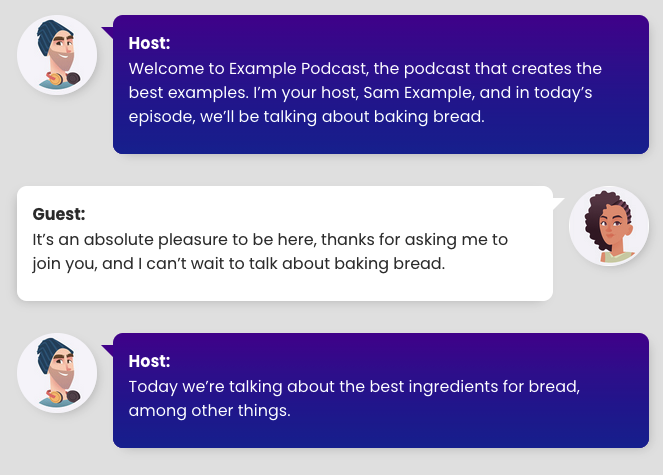
Example interview transcript design for desktop and tablet view 
Example interview transcript design for smartphone mobile view 
How to fill in the form fields to generate the HTML for the transcript view 
Buttons for generate html and copy HTML 
Paste generated HTML code into WordPress post or page custom html block 
Settings for individual design of your podcast interview transcript
Ìgbéwọlẹ̀
Local installation
- Upload the
/audiotyped-ux/folder and its contents to your wordpress plugin directory /wp-content/plugins/ - Login to your WordPress installation and activate the plugin on the wordpress plugin page
FAQ
-
For which podcast transcripts I can make the settings?
-
The settings are for interview transcripts with 2 speakers
-
Nothing happens, when I make settings, whatÌtumọ̀ Yorùbá: ’s wrong?
-
Probably the transcript is not coded in the UX Interview Layout.
Your interview transcript has to be coded in a specific HTML for the UX Interview Layout.
Soon there will be a documentation with examples. -
Is the UX layout still good for SEO?
-
Yes, because itÌtumọ̀ Yorùbá: ’s pure HTML Code, the content is crawlable for Google, Bing or other search engines
Àwọn àgbéyẹ̀wò
Kò sí àwọn àgbéyẹ̀wò fún plugin yìí.
Àwọn Olùkópa & Olùgbéejáde
“AudioTyped UX – Chat-Style Transcripts for Podcasts” jẹ́ ètò ìṣàmúlò orísun ṣíṣí sílẹ̀. Àwọn ènìyàn wọ̀nyí ti ṣe ìkópa sí plugin yìí.
Àwọn Olùkópa
Túmọ̀ “AudioTyped UX – Chat-Style Transcripts for Podcasts” sí èdè rẹ.
Ṣe o nífẹ̀ẹ́ sí ìdàgbàsókè?
Ṣàwárí koodu, ṣàyẹ̀wò ibi ìpamọ́ SVN, tàbí ṣe àgbékalẹ̀ sí àkọsílẹ̀ ìdàgbàsókè nípasẹ̀ RSS.
Àkọsílẹ̀ àwọn àyípadà
1.0.1 Ìtumọ̀ Yorùbá: – 16th February 2019
- Add font size settings for mobile and desktop
1.0.2 Ìtumọ̀ Yorùbá: – 17th February 2019
- Add bubble box shadow blur settings
1.0.3 Ìtumọ̀ Yorùbá: – 24th February 2019
- Optimizing for better mobile layout
1.0.4 Ìtumọ̀ Yorùbá: – 24th February 2019
- Correction color with update for better mobile layout
1.0.5 Ìtumọ̀ Yorùbá: – 24th February 2019
- Update font size in bubbles
1.0.6 Ìtumọ̀ Yorùbá: – 25th February 2019
- Avatar size and gap between bubble and avatar for desktop
1.0.7 Ìtumọ̀ Yorùbá: – 25th February 2019
- Avatar default size for desktop
1.0.8 Ìtumọ̀ Yorùbá: – 14th March 2019
- New feature of mobile avatar image sizing
1.0.9 Ìtumọ̀ Yorùbá: – 16th March 2019
- Setting important default values
1.0.10 Ìtumọ̀ Yorùbá: – 26th March 2019
- Padding for speech bubbles, gap avatar and speech bubble for mobile
1.0.11 Ìtumọ̀ Yorùbá: – 29th April 2019
- Less margin between speaker name and spoken text
1.0.12 Ìtumọ̀ Yorùbá: – 19th July 2020
- Host and Guest speaker underlined
1.0.13 Ìtumọ̀ Yorùbá: – 19th July 2020
- only the version number
1.0.14 Ìtumọ̀ Yorùbá: – 20th July 2020
- correct transcript height
1.0.15 Ìtumọ̀ Yorùbá: – 20th July 2020
- transcript background color and padding
1.0.16 Ìtumọ̀ Yorùbá: – 20th July 2020
- transcript background color update
1.0.17 Ìtumọ̀ Yorùbá: – 20th July 2020
- only the version number
1.0.18 Ìtumọ̀ Yorùbá: – 20th July 2020
- transcript background color
1.0.19 Ìtumọ̀ Yorùbá: – 20th July 2020
- transcript layout corrections
1.0.20 Ìtumọ̀ Yorùbá: – 26th July 2020
- transcript and speaker layout
1.0.21 Ìtumọ̀ Yorùbá: – 4th August 2020
- break long words
1.1.0 Ìtumọ̀ Yorùbá: – 30th March 2025
- New preview tab to see how the transcript design is changing because of settings, New icon for each setting
1.1.5 Ìtumọ̀ Yorùbá: – 14th April 2025
- New plugin icons, help tab udpate
1.2.0 Ìtumọ̀ Yorùbá: – 1st December 2025
- New tab to generate HTML from interview text (2 speaker)
1.3.0 Ìtumọ̀ Yorùbá: – 2nd December 2025
- Now also creates HTML for podcast interview transcripts with 3 speakers