The Darkprogramer's Blog

My Blog of all things that interest me

  • Ever felt like Razor Pages dev is a little… stiff?
    Ever wanted that magical Angular/Vite instant-reload dev loop but without switching ecosystems or bloating your stack?

    Well, curiosity got the better of me — and now I’m never going back. This is how I turned Visual Studio’s Razor Pages workflow into a lean, fast, hot-reloading machine using nothing but dotnet watch, a single config tweak, and some stubborn experimentation.

    🎯 Why Bother?

    Let’s be real:

    • Waiting for Visual Studio to compile, launch IIS Express, open the browser, then hit your endpoint…
    • Only to repeat that every time you touch a .cshtml file or toggle a CSS class?

    That’s slow. Clunky. Painful.

    Hot reload exists, but the default tooling isn’t exactly smooth for Razor Pages.

    So here’s what we wanted:

    • ✅ No more clicking Run and waiting forever
    • ✅ Just code, save, and see changes instantly
    • ✅ Get true hot reload output in the terminal (you know the one: colored, clean, with Ctrl+R to restart)
    • ✅ And most importantly, a single click in Visual Studio to launch all of it

    🔥 The Final Result

    Here’s the launch profile we ended up with:

    "profiles": {
      "https(hot reload)": {
        "commandName": "Executable",
        "executablePath": "C:\\Program Files\\dotnet\\dotnet.exe",
        "workingDirectory": "$(ProjectDir)",
        "commandLineArgs": "watch run --project \"$(ProjectPath)\" --urls https://localhost:7050",
        "launchBrowser": false
      }
    }

    📌 What This Does:

    Launches dotnet watch run directly — no wrappers, no PowerShell, no zombie processes

    Targets the current .csproj dynamically with $(ProjectPath)

    Forces it to run on a consistent port (7050) so you can open your browser to it and even hit it from other devices

    Stops cleanly when you hit the Stop button in Visual Studio

    🛠 How to Set It Up

    1. Open your project’s Properties/launchSettings.json
    2. Add the following profile under profiles:
      "https(hot reload)": { "commandName": "Executable", "executablePath": "C:\\Program Files\\dotnet\\dotnet.exe", "workingDirectory": "$(ProjectDir)", "commandLineArgs": "watch run --project \"$(ProjectPath)\" --urls https://localhost:7050", "launchBrowser": false }
    3. Make sure the port 7050 matches whatever you want — update it in both this line and your browser.
    4. In Visual Studio, click the green dropdown next to the ▶️ button and choose https(hot reload)
    5. Hit ▶️ and marvel.

    🧠 Why This Works

    Visual Studio doesn’t natively support dotnet watch as a launch target. But by leveraging the Executable profile type and pointing directly to the dotnet CLI, we trick it into launching watch mode as if it were built-in.

    Then, by using:

    • $(ProjectPath) — to dynamically get the active .csproj
    • --urls — to force it to use a predictable port

    We’ve created a smooth, hot-reloading experience with just one click, no extra terminals, and full control.

    🧪 Pro Tips

    Add a delay-based browser launch if you want to auto-open the page (or do it manually — no big deal).

    Match the port (7050) to your needs. Want 5001? Change it. Just make sure it’s not already in use.

    Works best with .NET 6+ (we’re using .NET 8)

    😎 Why I Did It

    Honestly? Curiosity.
    I just wanted Razor Pages to feel modern. I didn’t want to switch to Blazor, Angular, or React for something that should be fast by default. And once I saw how good dotnet watch’s hot reload output was, I had to find a way to wire it into my workflow.

    Now I’m spending less time waiting, more time building, and I can’t imagine going back.

    ✅ TL;DR

    Add "https(hot reload)" profile to your launchSettings.json

    Use dotnet.exe directly with watch run

    Enjoy Angular-level speed in your Razor Pages world

    Thank your future self for having one of the slickest setups around

  • Introduction

    In 2024, Steam Browser-in-the-Browser (BitB) phishing attacks became frighteningly sophisticated.
    Attackers began deploying ultra-realistic fake Steam login windows using clever HTML, CSS, and JavaScript tricks.
    These attacks bypassed most anti-phishing tools and fooled even experienced users.

    I decided to change that.
    This post documents how I reverse engineered the latest Steam BitB scam kits
    and built a personal Chrome extension to detect and stop them instantly.

    👉 The result: My extension detects tapszone.com, jahreedition.com, and any current or future clones.
    The attack surface is closed.

    What is Steam Browser-in-the-Browser (BitB) Phishing?

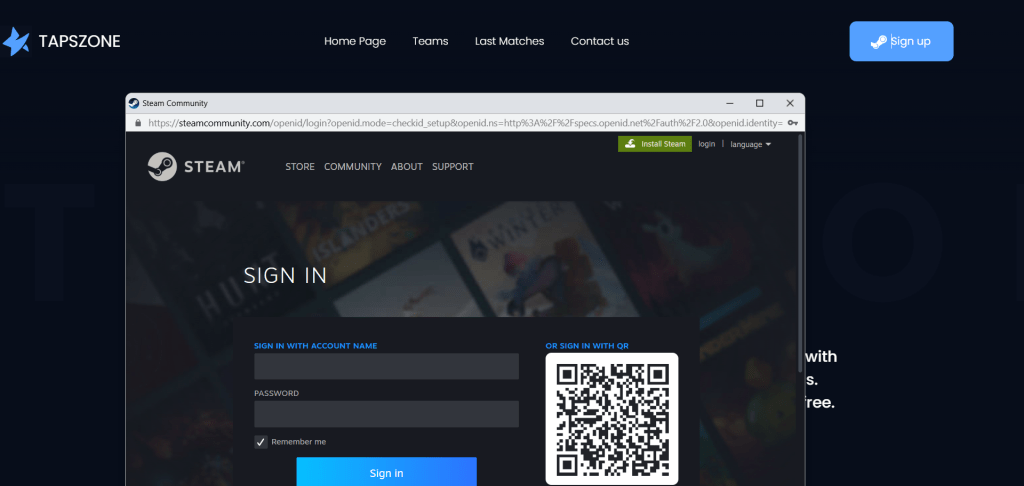
    BitB phishing displays a fake browser window inside your real browser tab,
    mimicking an OAuth login popup.
    It fakes:

    • the Steam address bar (https://steamcommunity.com/openid/login?...)
    • the padlock icon
    • the window frame
    • and a perfect copy of Steam’s login form.

    You think you’re logging into Steam.
    You’re not.
    You’re giving your credentials to an attacker inside their fake in-page popup.

    Why Existing Detectors Failed

    Traditional anti-phishing extensions focus on:

    • URLs
    • SSL certificates
    • iframe origin mismatches

    These new BitB kits bypass them completely by:

    • using fixed-position floating divs (not real windows)
    • faking Steam’s URL bar using contenteditable divs
    • hijacking history.pushState() to rewrite the browser URL
    • showing cloned Steam forms inside an iframe

    👉 Result: 99% of security tools failed.

    My Reverse Engineering Approach

    I deeply analyzed tapszone.com and jahreedition.com scam kits.

    Key attacker behaviors:

    TrickMethod
    Scam iframe<iframe src="https://jahreedition.com/...">
    Fake URL bar<div contenteditable="true"> steamcommunity.com </div>
    Fake modal popup.modal-window-content-fix_border { z-index: 9999999 }
    URL hijackhistory.pushState()
    Block interactionsFullscreen z-index + pointer-events

    👉 None of these are legitimate behaviors on any normal website.
    👉 This was the blueprint for detection.

    My Solution: detectNextGenBitB()

    I built an aggressive, lightweight content script:

    function detectNextGenBitB() {
    // Scam iframe check
    // High z-index modal check
    // Fake URL bar div check
    // tapszone class check
    // URL rewrite check
    }

    It detects the entire attack chain instantly.
    It works inside any Chromium-based browser.
    It never triggers on real Steam domains.

    I also kept it compatible with my existing Steam API scam and classic iframe detection.

    👉 It finally stops tapszone.com, jahreedition.com, and all clones.

    Results

    My Chrome extension blocked:

    • tapszone.com ✅
    • jahreedition.com ✅
    • Steam BitB clones ✅
    • classic iframe scams ✅

    ✅ No false positives on real steamcommunity.com
    ✅ No false positives on any normal website

    Why This Matters

    To my knowledge, this is the first personal Chrome extension
    to fully detect next-generation Steam BitB phishing with zero user input required.

    Steam users and CS2 players are heavily targeted.
    My tool gives them silent protection.
    If you try to scam me (or my friends), you’re going to fail.

    Next Steps

    I’m continuing to improve my personal tool:

    • Detecting Google, Facebook, Apple BitB scams too
    • Adding visual fingerprinting for even harder attacks
    • Exploring Firefox + Edge versions

    This was a private security project, but I’m open to share ideas
    or help others protect their communities too.

    Try It Yourself

    If you want to test this protection on your own browser, I’ve published a simple personal demo version of my extension.

    This is not a commercial product, it’s a personal research project for the community.
    You can download and load it manually as an unpacked Chrome extension.

    👉 🛡️ Download Steam BitB Scam Detector (GitHub)

    Instructions:

    1. Download the repository ZIP or clone the repo
    2. Open chrome://extensions/ in Chrome
    3. Enable Developer Mode
    4. Click Load Unpacked
    5. Select the folder with the extension files
    6. Visit tapszone.com or any known Steam BitB kit to test
    7. The extension will block the scam window and alert you instantly

    ✅ It runs quietly in the background
    ✅ It does not modify pages or track data
    ✅ It works on any Chromium-based browser (Chrome, Brave, Edge, etc.)

    Warning:
    This tool is for educational purposes.
    I accept no liability if attackers change their techniques after this publication.
    Always use multiple layers of security and avoid logging into Steam via third-party websites.

    Conclusion

    Browser-in-the-Browser phishing is dangerous, but not unstoppable.
    With careful analysis and the right detection logic,
    I’ve proven you can shut it down at the extension level.

    The Steam community deserves better defense.
    This is my contribution.

    👉 The scammers adapted.
    👉 So did I.

  • Review Bombing: The Good, The Bad, and the Totally Illegal

    In today’s digital age, the reputation of businesses is increasingly vulnerable to the whims of online reviews. A phenomenon known as “review bombing” has emerged, where masses of people leave negative reviews, not as genuine feedback, but as a method to damage a company’s reputation often in response to some action or statement by the company that they disagree with. While many view this as part of “cancel culture,” it poses a significant threat to businesses, big and small.

    What is Review Bombing?

    Review bombing occurs when a group of people coordinate to post negative reviews about a business or product, attempting to manipulate its ratings. This can be triggered by actual grievances, or as an attempt to punish a company for perceived social, political, or cultural missteps. The consequences can be devastating, leading to loss of customers, revenue, and even affecting stock prices.

    The Double-Edged Sword

    On one hand, review bombing can be seen as an expression of consumer power, holding companies accountable. On the other hand, it can be weaponized to unfairly target and damage businesses. This raises questions about the legitimacy and fairness of such tactics.

    The Legal and Ethical Dilemma

    While not strictly illegal in most jurisdictions, review bombing treads a fine line between free expression and malicious intent. It can be considered defamatory, misleading, and harmful. Laws are still catching up to these digital tactics, and what’s legal today might not be tomorrow.

    Fighting Back: A Controversial Method

    For educational purposes, let’s explore a method some might consider to counteract review bombing. This involves creating fictitious user accounts to balance out unfairly negative reviews. Note: This practice is ethically and legally dubious, and we discuss it here purely for informational purposes.

    Tools Required:

    1. Temporary Email System: Services like Temp-Mail provide temporary email addresses to register on review platforms without revealing personal information.
    2. Creating a Persona: Tools like ChatGPT can help generate a believable back story and user profile, aiding in the creation of a realistic user persona.
    3. Phone Number Generator: Some sites require phone verification. Tools like AKTO can generate non-working phone numbers for account verification purposes.

    Implementing the Strategy

    1. Set Up Email: Use a temporary email service to create a new email address.
    2. Generate User Profile: Employ AI to create a detailed and believable persona, complete with background information that aligns with the typical user demographic of the review site.
    3. Sign Up: Register on the review platform using the generated email and phone number.
    4. Post Reviews: Write balanced reviews to counteract unjust negative feedback. Ensure these reviews are thoughtful and contribute genuinely to the conversation.

    Ethical Considerations

    It’s crucial to highlight the ethical implications of using such tactics. Creating fake reviews, even if well-intentioned, can contribute to misinformation and further degrade trust in online review ecosystems.

    Conclusion

    While review bombing is a significant challenge in the digital age, the methods to combat it should be considered carefully. Businesses should focus on building resilience through excellent customer service and transparency rather than resorting to ethically questionable tactics. As we navigate these murky waters, it’s important for legislation and platform policies to evolve to protect both businesses and consumers from digital manipulation.

  • Orbis-Pub-prx.dll

    Here we will have a look at orbis-pub-prx.dll

    As suggested by Z80 we will be using DnSpy for this which is also made by 0xd4d

    This tool has a really nice feel similar to visual studios and will also give you a great understanding of how IL works a good read for anyone interested on this is the following Getting Started With .Net IL

    Getting Familiar with DnSpy

    The Assembly Viewer

    From here you can add .net dll’s exe’s to the dissembler.

    it also allows you to view classes similar to ILSpy but with one addition you can also see the PE configuration for each build which is really cool !

     Main Window

    This window will show all currently active code for the current class

    Similar view as we have in VS which is really cool. From here we can add breakpoints and even change code on the fly and recompile the exe as we need it as well as the best part (we can debug the exe as we go)

    Main View Of Class e which has already been modified


    Digging in

    As you can see from my previous topic Reverse Engineering PS4 Pub Tools Part 1 the class which is called from here is called e which is what we will be targeting today.

    For this you can see and add the orbis-pub-prx.dll to the assembly view either the open menu option or just dragging and dropping it inside. Once loaded expand the item until you get to class e and the tool will disassemble it for us.


    From here we add a break point on this.ᜀ();

    And Start the debugger it will ask you for a debug engine which will be .net and it will also ask you for an assembly


    Siimply select orbis-pub-chk.exe from our last topic and you can use either the orginal or the cleaned version both will work the same

    Click OK and wait for the magic.


    After a few seconds your debug point should be reached on lass e

    our target right now will be to enable some hidden buttons as we can see here.

    we can also de-obfuscate this class to get a bit more of an idea what each button is the same way we did it in the last post

    And here we have a better name for each of these items we definitely want to see the debug button ! so lets see if we can get it to show.

    to do this we will be using the IL replace method inside DnSpy

    From here we will simply change the buttons visibility by changing idc.i4.0 to idc.i4.1 and this should also apply for enabling a button as well


    Click OK and away we go

    We can see the values have changed as we wanted them now all we have to do is save the module and we should see buttons now

    and there you have it xD the debug button is now enabled for all to see and use

    only one problem the click event is blank it seems Sony cleans this out either before a release or they just don’t use it anymore

    i had a member inside the scene send me some of the oldest pub tools he has and can confirm it seems to only be available since v1.84 and was not there in V0.85

    we should hypercritically be able to reverse the code and call the correct method within the button click

    for this more research is needed on my end since if we try and edit the class via DnSpy we do get a lot of errors about not being able to recompile because of obfuscation issues ext ext.


  • So recently I noticed that SpecterDev and  Mathieulh  had started working on the  PS4 Homebrew Toolchain  and i tough id join in myself and help out where i can .

    I started off by Checking what can be easily dissembled with ILSpy from the SDK and found one program to start with “PS4 Error Viewer” it didn’t take to long to see how they did it as they included a .CSV file with the app to read error codes.After having a look at how they worked with it . I grabbed ILSpy and went thought the code and simply enough just made my own open source reader which can be found below.

    PS4 Error Code Viewer Source Code

    After this i tough to myself how hard would it be to reverse the PUB Tools and see what goodies are inside.

    Again i grabbed ILSpy and got to work.


    Our Target

    i decided to end up using orbis-pub-chk.exe as my target and seeing what goes on inside

    sityuyl

    After adding them and expanding i could see the famous dotfusctor attribute class was present which is awesome news as I had some experience in working with this tool at my job recently but now its time to work against it (or try at least 😉 )

    My next step would be to get a cleaned (de-obfuscated) version of the applications so we can reverse engineer them.

    To do this little task I did some research and found a very handy little tool called d4dot which can be found here Github

    After simply running the application’s command line we see it actually knows which build of dotfuscator was used when creating this app from sony

    9rxl4pu

    Which is awesome cause it produced a clean file for us to work with and then reverse into a project.

    gvsg8x2

    as you can see we now have a fully de-obfuscated project which we can decompile and build ourselves

    Enter Visual Studios

    After getting the source we will run into an issue when loading the solution as there is no STAThread for Visual Studios to start with

    So lets make a new class and call it Program and set it up correctly


    p9d5xcz


    now we can finally run the project and see what it spits out


    ptu4nzh


    well that didn’t last long at all xD

    lets see what happens when we add the “ext” folder to our solution this should fix this issue and show us the checker tool.

    and it worked now we have the checker tool and know its either within one of the following classes either in our dll orbis-pub-prx.dll or in the sc.exe file it complained about earlier.


    How to know which one is our next target ?

    Well lets use this approach if we use any type of UI automation tool we should be able to see what it was designed in in this case i ended up using spyxx just for fun

    From this and personal experience i can tell you its a WinForms application written in c#

    this means we need to dig into that little dll as soon as possible.


  • So i know i haven’t worked on much tools as of late as i got really busy at work and so on but i’m making a few new tools for the open source community for PS3 tools open source
    Added as of yesterday is build one of PS3 RIP and I’m still working on most of it also i will be doing the PS3 Games Database

    as always my tools are available on xDPx Github


  • Well i know not everyone is still interested in the ps3 scene and so on


    but i had a look and ive been using @eminem451 @slimshady451 ‘s psnstuff which he took over since it was made open source

    i have however had a few issues with it like when it downloads a newer version of the application it makes a new folder every time and it gets annoying to move them to the main folder every time

    so i have created my version of psnstuff from v3.0.0.0 by @Lozers


    and have created a Download Helper which will replace the new exe with the old one this is purely for developers and the source code is as always available on my github


    so here is the link to the source on my github


    PW4uVNZ.png


    https://github.com/xXxTheDarkprogramerxXx/psnstuff


    a bit more of what ive added


    ive added a settings window just to allow the user to select where to save the downloads


    by default it will save them in MyDocuments\PSNStuff\Downloads\

    else the user can select where to save it


    the download helper will be in the same folder as the executable


    this is purely some code to help out @eminem451 @slimshady451 with future development on psnstuff


    also something i have added is to copy the data from downloads directly to a usb for easy access to the users (kind of like noob proofing)

  • so this was gonna be the IDPS generator for ps3 to use with pexploit but o well


    as you can see we would have used the region

    model type

    cech model and serial to give you a valid idps bur the risks were to high for ofw users


  • IDPS Breakdown

    As you can see from the ps3 dev wiki the IPDS is pretty straight forward until the last 6 bytes these need an algo as far as i can tell and the chassis check is a bit of a tricky one

    Structure

      
                                  Chassis Check
                                      ⇓  ⇓                    
    00000000  00 00 00 01 00 89 00 0B 14 00 EF DD CA 25 52 66  .....‰....ïÝÊ%Rf
                             ⇑     ⇑
                     Target ID     PS3 Model type
        (Internal:Product Code)   (Internal: Product Sub Code)

    so lets break it down


    Static(Magic)

    the IDPS for the ps3 will always start with

    00 00 00 01 00

    after this we get the target id which is usually your region

    Target ID

    this is well documented on the dev wiki

    Known Target ID’s

    Value Console Type Shortcode Region Code
    0x80 TEST AVTest / DECHS TEST TEST
    0x81 SD System Debugger / DECR Reference Tool / DECR TOOL TOOL
    0x82 DEX Debug / DECH DEX DEX
    0x83 CEX Retail or Shop Kiosk – Japan CEX J1
    0x84 CEX Retail or Shop Kiosk – USA CEX UC2
    0x85 CEX Retail or Shop Kiosk – Europe CEX CEL
    0x86 CEX Retail or Shop Kiosk – Korea CEX KR2
    0x87 CEX Retail or Shop Kiosk – United Kingdom CEX CEK
    0x88 CEX Retail or Shop Kiosk – Mexico CEX MX2
    0x89 CEX Retail or Shop Kiosk – Australia/New Zealand CEX AU3
    0x8A CEX Retail or Shop Kiosk – South Asia CEX E12
    0x8B CEX Retail or Shop Kiosk – Taiwan CEX TW1
    0x8C CEX Retail or Shop Kiosk – Russia CEX RU3
    0x8D CEX Retail or Shop Kiosk – China (Never released) CEX CN9
    0x8E CEX Retail or Shop Kiosk – Hong Kong CEX HK5
    0x8F CEX Retail or Shop Kiosk – Brazil CEX BR2
    0xA0 ARC Arcade ARC ARCADE

    Not in this table: PRO Prototype (mostly SD or DECR themselves)

    the target id is always followed by the 00

    Model Type

    Fat Models

    CECHAxx 0x01
    CECHAxx 0x01
    CECHBxx 0x02
    CECHBxx 0x02
    CECHCxx 0x03
    CECHCxx 0x03
    CECHDxx SKU never released
    CECHExx 0x04
    CECHFxx SKU never released
    CECHGxx 0x05
    CECHHxx 0x06
    CECHIxx SKU never released
    CECHJxx 0x07
    CECHKxx 0x07
    CECHLxx 0x08
    CECHMxx 0x08
    CECHNxx SKU never released
    CECHOxx SKU never released
    CECHPxx 0x08
    CECHQxx 0x08

    2000 Models

    CECH-20xxA 0x09
    CECH-20xxB 0x09
    CECH-21xxA 0x0A
    CECH-21xxB 0x0A
    CECH-25xxA 0x0B
    CECH-25xxB 0x0B
    CECH-25xxA 0x0B
    CECH-25xxB 0x0B
    CECH-25xxA 0x0B
    CECH-25xxB 0x0B
    CECH-25xxA 0x0B
    CECH-25xxB 0x0B
    CECH-25xxA 0x0B
    CECH-25xxB 0x0B
    CECH-25xxA 0x0B
    CECH-25xxB 0x0B

    3000 Series

    CECH-30xxA 0x0C
    CECH-30xxB 0x0C

    4000 series

    CECH-40xxA 0x0D
    CECH-40xxB 0x0D
    CECH-40xxC 0x0D
    CECH-42xxA  ?0x0E?
    CECH-42xxB  ?0x0E?
    CECH-42xxC  ?0x0E?
    CECH-42xxA  ?0x0E?
    CECH-42xxB  ?0x0E?
    CECH-42xxC  ?0x0E?
    CECH-43xxA  ?0x0F?
    CECH-43xxB  ?0x0F?
    CECH-43xxC 0x13

    Chassis Check

    the chassis check can be done via the following


    (0x1400 >> 0xA) = 5d or 0x1400h thus 1010000000000b then shift the pointer left by 0xDh resulting in 101b or 0x5h

    chassis check. F4 0X <- passed through CS (customer service)
    any other value than that <- did not pass through CS and you only need to calculate it as you would normally.

    Last 6 bytes


    now the last six bytes are not actually know this is where the algo would need to be created or found . My research on this subject stopped here after realizing some of the users will start stealing other peoples idps’s

Design a site like this with WordPress.com
Get started