


Feeling overwhelmed by all the web design software options? Picking the right tool for your website can feel like navigating a maze, especially when every solution claims to be the best.
I understand this frustration. When I started in the early days of web design, building a site was a manual process that required specialized tools like Adobe Dreamweaver. The tools were powerful, but using them required coding skills and lots of effort.
Luckily, things have changed. I set out to find the best web design software for different needs and skill levels. I looked for features like drag-and-drop editors, responsive design capabilities, pre-made templates, and AI-powered tools. I carefully considered ease-of-use and pricing.
In this article, I’ll share our top picks for web design software across different categories. Whether you’re a beginner creating your first website or online store, or a designer needing professional tools, we’ll help you find the right solution for your needs.

Best Web Design Software: Our Top Picks
No time to read? Here are our top picks for the best web design software:
| Category | Winner | Best For | Starting Price |
|---|---|---|---|
| WordPress Design | SeedProd | Creating professional websites with AI | Free (paid plans from $39.50/year) |
| Hosted Website Builders | Wix | Complete website creation with no technical skills needed | Free (paid plans from $17/month) |
| Graphic Design | Adobe Photoshop | Professional image editing and graphic creation | $22.99/month |
| UI/UX Design | Figma | Collaborative website design and prototyping | Free (paid plans from $12/month) |
| eCommerce | WooCommerce | Building flexible online stores with WordPress | Free (paid extensions vary) |
| Marketing | Beacon | Converting website content into downloadable resources | Free (paid plans from $19/month) |
If you want to learn more about all of these tools, then please keep reading this article.
How We Tested and Reviewed the Best Web Design Software
We know that choosing the right web design software can make or break your project. That’s why we spent weeks testing and reviewing the best design tools so you can make an informed decision based on your specific needs.
Firstly, we kept in mind that not all website owners are designers or developers. Some are small business owners, bloggers, or marketing professionals who need simple yet effective tools.
That’s why we decided to test and include user-friendly options like the SeedProd page builder and Wix alongside professional tools like Adobe Creative Suite.
We also tested how well each tool handles essential design tasks to build the perfect website. Can you create mobile-friendly layouts easily? How much creative freedom do you have?
We looked for features like drag-and-drop editing, pre-made templates, and customization options that don’t require coding knowledge.
Performance was another important factor in our testing. We tested each tool on different computers and browsers to see how well they ran. We found that powerful tools like Photoshop and Illustrator are certainly feature-rich, but they can also be slow on less powerful computers.
Of course, we also had to evaluate the cost versus value. We believe that not all free tools are basic. For instance, we tested if free alternatives like GIMP could effectively replace expensive options like Photoshop for basic web design needs.
Given the rising importance of AI in web design, we also evaluated each tool’s AI capabilities where available. Can they generate designs, write content, or optimize layouts?
Tools like Canva and Adobe Express impressed us with their AI-powered features that can speed up the design process significantly.
Why Trust WPBeginner?
At WPBeginner, we don’t just teach web design – we live it. Our team has created and optimized dozens of successful websites across our partner companies. This has given us hands-on experience with virtually every web design tool on the market.
We’re led by Syed Balkhi, a WordPress expert who has built multiple successful software companies focused on helping users create better-looking, higher-converting websites. Plus, our tools and design solutions are used by millions of websites worldwide.
With over 16 years of experience in website creation and optimization, we’ve tested and used every type of design software imaginable.
Want to learn more? Just read our editorial process.
What Kinds of Web Design Software Are There?
Before we dive into our top picks, let’s quickly break down the main types of tools in this guide. Each category serves a different purpose, and knowing the difference is key to picking the right solution for you! 🤠
- For WordPress Websites: These are plugins that add powerful drag-and-drop design capabilities directly into an existing WordPress site.
- Hosted Website Builders: These are all-in-one platforms that include design tools, web hosting, and support in one simple package. They’re great for beginners but offer less flexibility than WordPress.
- For Graphic Design: These are tools used to create visual assets for your site, such as logos, featured images, custom icons, and photo edits.
- For Planning UI/UX: This software helps you plan your website’s layout and user flow with wireframes and prototypes before you start the final design and build process.
- For Online Stores: These are platforms and plugins built specifically for eCommerce, with essential features like shopping carts, product pages, and payment processing.
- For Marketing: This category includes tools designed to help you promote your site and convert visitors, such as creating lead magnets or social media graphics.
Best Web Design Software for WordPress Websites
WordPress powers more than 43% of all websites on the internet, and it’s the platform we use to build all our own websites. Since WordPress is the most popular content management system, we want to show you the best web design tools that work perfectly with it.
Let’s look at our top picks for WordPress web design software that we’ve personally tested and recommend:
1. SeedProd

SeedProd is the best web design software for WordPress, and we use it to create custom pages across our partner websites.
In fact, our friends at OptinMonster achieved impressive results using SeedProd, seeing a 340% increase in conversion rates during their marketing campaign. We’ve covered all the features in detail in our comprehensive SeedProd review, but we’ll share the highlights here.
What makes SeedProd special is its combination of simplicity and functionality. With over 300+ templates, numerous design blocks, and pre-built section templates, you can create professional pages quickly.
The smart AI website builder takes this even further, allowing you to create a complete website in under a minute just by describing what you want.

Pros of SeedProd:
- Intuitive drag-and-drop page builder with a layer management feature to manage your design elements
- 300+ professionally designed templates for various purposes like sales pages, coming soon pages, maintenance mode pages, and custom login pages
- When we tried the AI website builder, it was able to create an entire website with custom fonts and images in under a minute
- AI tools for generating website copy, creating high-quality images, and translating content into 50+ languages
- Dynamic content features for personalizing your website content
- Built-in optin form block with email subscriber management capabilities
- Dozens of integrations with popular tools like Google Analytics, Drip, Constant Contact, and more
Cons of SeedProd:
- The free version is limited to landing pages and doesn’t support full website creation
Pricing: SeedProd offers a free version for basic landing pages and coming soon pages. Premium plans range from $39.50 to $239.50 per year. You can also use our SeedProd coupon code to get up to 60% off of your first purchase.
Why we recommend SeedProd: This WordPress web design software is the perfect balance of user-friendliness and professional features. This makes it an excellent choice for both beginners and experienced WordPress users who want to create stunning websites quickly.
2. Thrive Theme Builder

Thrive Theme Builder is a powerful drag-and-drop WordPress theme builder designed for creating conversion-optimized websites, landing pages, and online stores.
It comes packed with hundreds of WordPress design elements and templates. These include essential components like hero sections, testimonials, and lead generation forms. We’ve thoroughly tested this tool and shared our detailed findings in our Thrive Themes review.
When we compared this tool to SeedProd, Thrive Theme Builder offers a more sophisticated design experience. It provides deeper control over element behavior. For example, you can add scrollbars to individual page elements if they take up too much space on a page.

Pros of Thrive Theme Builder:
- 350+ professionally designed themes and landing page templates for various niches, including online stores, personal branding, and online courses
- Conversion-focused design elements, including countdown timers, lead generation forms, number count animations, and pricing tables
- Flexible layout options with customizable sidebar positioning and the ability to change designs in a few clicks
- We particularly enjoyed the advanced design settings, like parallax scrolling, sticky behavior, conditional content display, and mobile-specific visibility
- Seamless integration with other Thrive plugins like Thrive Comments for engagement and Thrive Ovation for social proof
- Full WooCommerce compatibility and integration with major CRMs and email marketing platforms like HubSpot and Kit
Cons of Thrive Theme Builder:
- More complex learning curve compared to SeedProd
- No free version is available
Pricing: You can get the standalone Thrive Theme Builder for $99 per year. For more features, you can get it bundled with Thrive Architect at $199 per year, or get the complete Thrive Suite at $299 per year.
Feel free to use our Thrive Themes coupon to get up to 50% discount on your purchase.
Why we recommend Thrive Theme Builder: This web design platform is the perfect choice for WordPress users who want advanced design control and conversion-focused features.
Other Web Design Software for WordPress Websites
While SeedProd and Thrive Theme Builder are our top recommendations for their power and ease of use, the WordPress ecosystem is filled with excellent tools. The builders below are also incredibly popular and powerful, and might be a better fit if you’re looking for a different design experience or already use them on other projects.
3. Beaver Builder: A Reliable & Stable WordPress Builder

Beaver Builder is a well-respected WordPress page builder known for its stability and clean code. It provides a reliable and intuitive front-end editing experience, making it easy to see your changes in real-time.
This tool is an excellent choice for users and developers who prioritize performance and a solid, bloat-free foundation over a massive library of pre-made templates. It’s a builder you can trust for long-term projects.
4. Divi: A Visual Builder with All-in-One Design Tools

Divi by Elegant Themes is both a WordPress theme and a visual page builder, offering a complete design framework in one package. Its visual editor gives you control over every element on your page.
With its huge library of layout packs and a massive user community, Divi is particularly popular among freelancers and agencies who build a wide variety of websites for different clients.
Hosted Website Builders With the Best Web Design Features
Not everyone wants to manage a WordPress blog or site with hosting and plugins. Sometimes, you might prefer a simpler solution where everything is included in one package. That’s where all-in-one website builders come in handy.
We’ve tested many website builders over the years and found several excellent options that offer powerful design features.
5. Wix

Wix is a top WordPress alternative that makes website design simple and enjoyable. We’ve spent a lot of hours testing this platform, and its combination of user-friendly tools and professional templates impressed us.
For people curious about how it compares to WordPress, we’ve created a detailed Wix vs. WordPress comparison guide to help you decide which platform fits your needs better.
The drag-and-drop editor strikes an excellent balance between simplicity and control. You can place elements anywhere on the page, while the smart grid system helps keep everything aligned and professional-looking.

Pros of Wix:
- All-inclusive platform with hosting and SSL certificate included
- 800+ professionally designed templates for every type of website
- Intuitive drag-and-drop editor with helpful grid alignment
- Powerful AI tools for creating websites, generating content, and designing images
- App marketplace for adding features like online booking, eCommerce, and live chat
Cons of Wix:
- We find that the editor can feel sluggish at times, especially when making multiple changes
- Switching to a different theme isn’t possible after site creation, so choose carefully
Pricing: Start with a free plan to test the platform. Premium plans cost between $17 and $159 per month.
Why we recommend Wix: It offers everything you need to create a professional website in one place. This makes it perfect for beginners who want a complete website-building and optimization experience.
6. Hostinger Website Builder

Hostinger Website Builder makes creating websites quick and easy with its AI-powered tools. Perfect for beginners, this platform helps you build custom landing pages, online stores, and portfolios without any technical knowledge.
The platform runs on Hostinger’s powerful servers, ensuring your website loads quickly for visitors. You can learn more about the hosting performance in our detailed Hostinger review.
What impressed us most was how the AI website generator created complete, personalized websites in just minutes. The platform also includes helpful AI tools for analyzing visitor behavior with a heatmap, creating images, writing content, and improving your site’s SEO.
Pros of Hostinger Website Builder:
- Simple drag-and-drop desktop and mobile editors
- 150+ ready-to-use website templates for different industries
- Comprehensive AI toolkit for website creation and optimization
- Built-in eCommerce features without transaction fees
- Easy content export option to WordPress if you want to switch later
Cons of Hostinger Website Builder:
- Limited selection of basic design elements compared to other builders
Pricing: Plans start from $2.69 to $3.41 per month, with a special 78% discount available through our Hostinger coupon code.
Why we recommend Hostinger Website Builder: It’s one of the most affordable ways to create an AI-powered website that loads fast and looks professional.
Other Hosted Website Builders With Web Design Features
Beyond our top picks, there are other well-known tools that offer powerful web design features. This next option is a classic in the web design world, though it works very differently from an all-in-one hosted builder.
7. Adobe Dreamweaver: The Classic Code-First Web Design Software

Unlike the other tools in this section, Adobe Dreamweaver is a professional desktop application. This means you will need to purchase your own web hosting separately to publish your website.
It’s a powerful tool for designers and developers who want to build sites by writing code (like HTML and CSS) while seeing a live visual preview. It offers precise control but is best suited for those with technical skills.
Best Web Design Software for Graphic Design
Creating a great website isn’t just about code and layout. You also need eye-catching visuals. Whether it’s a logo that stands out, beautiful backgrounds, or engaging featured images, good graphics make your website more professional.
Besides the tools I recommend below, you might also like to see my guide on how to use AI to generate images in WordPress.
Let’s look at some tools that can help you create these visuals, even if you’re just starting with graphic design.
8. Adobe Photoshop

Adobe Photoshop is the industry leader in photo editing and graphic design software. It is available for Mac and Windows operating systems, so you can use it even when you’re offline.
With new AI features, Photoshop is now easier to use than ever before. You can remove unwanted objects from photos with one click, fill empty spaces with AI-generated content, and even expand your images beyond their original boundaries.
We find these AI tools particularly helpful for tweaking website graphics. For example, you can quickly remove backgrounds from product images or extend custom header images to fit different screen sizes without losing quality.
Pros of Adobe Photoshop:
- Powerful editing tools for creating professional-looking graphics
- Works for many types of designs, from logos to full website layouts
- Smart layer system that helps organize your design elements
- Lots of free tutorials online to help you learn
- New AI tools that make complex editing tasks simple
Cons of Adobe Photoshop:
- Based on our experience, it needs a powerful computer to run smoothly
- The monthly subscription cost can be expensive if you don’t use it often
Pricing: You can get Photoshop alone for $22.99 per month. Or choose the complete Adobe Creative Cloud package for $69.99 per month, which includes other useful web design tools. A 7-day free trial is available to test it out.
Why we recommend Adobe Photoshop: It’s the most versatile graphic design tool available. With its new AI features, even beginners can create professional-looking website graphics quickly.
9. Affinity Designer

Affinity Designer offers professional-level graphic design tools at a one-time cost, making it a popular Adobe Illustrator alternative. In fact, many of our team members use it to edit their graphics because it’s easier to learn than other professional tools.
What makes Affinity Designer special is you can switch between Vector mode for creating scalable graphics like logos, and Pixel mode for editing regular images. This means you get two types of design tools in one program, which is really helpful when creating website graphics.
The software runs smoothly even on basic computers because it’s built with modern, efficient code. You can work on large, detailed graphics without your computer slowing down, and there are no file size limits to worry about.
Pros of Affinity Designer:
- Easy-to-understand interface that’s great for beginners
- Built-in shapes and brushes to help you create designs quickly
- Works well for both vector and pixel-based graphics
- Exports files in all common web formats like PNG and JPG
Cons of Affinity Designer:
- Files don’t always work perfectly with Adobe software, which is important if you work with people who use its programs
- Lacks some web-specific features like CSS integration
Pricing: One-time payment of $69.99 for Windows or Mac or $18.49 for iPad. No monthly subscriptions are required.
Why we recommend Affinity Designer: It offers professional-level design tools without an ongoing subscription. It’s also great for creating both vector and pixel-based graphics in one tool.
Other Web Design Software for Graphic Design
Photoshop and Affinity Designer cover the needs of most website owners, but designers often use a wider range of specialized tools. The following software options are industry standards for creating everything from animated ads to full website prototypes.
10. Google Web Designer: For Creating Interactive HTML5 Ads & Animations

Google Web Designer is a free tool for creating interactive and animated HTML5-based designs. While its name suggests general web design, its primary purpose is building engaging banner ads and web components.
This is the perfect tool for marketers and designers who need to create animated ads for the Google Display Network. It is not intended for building complete, functional websites.
11. Adobe Illustrator: The Industry Standard for Vector Graphics

Adobe Illustrator is the world’s leading software for creating vector graphics. Unlike pixel-based images (like photos), vector graphics can be scaled to any size without losing quality, making them perfect for logos and icons.
It’s an essential tool for professional graphic designers who need to create crisp, high-quality logos, illustrations, and icons for their websites that will look perfect on any device or screen resolution.
12. Sketch: The Go-To UI Design Tool for Mac Users

Sketch is a vector design application built specifically for digital design, but it is only available for Mac users. It became an industry standard for its focus on user interface (UI) and user experience (UX) design.
It remains a favorite among many designers on macOS for creating high-fidelity website mockups, app interfaces, and prototypes before the coding and development process begins.
13. GIMP: A Powerful & Free Photoshop Alternative

GIMP (GNU Image Manipulation Program) is a completely free and open-source image editor. It offers a surprisingly complete set of features for photo retouching, image composition, and graphic design.
It’s the perfect choice for bloggers and website owners on a tight budget who need to perform essential image editing tasks like cropping, resizing, or color correction without paying for premium software like Adobe Photoshop.
Best Web Design Tools for Planning UI/UX
Smart designers know that great websites start with proper planning. Here are the best tools for mapping out your website’s structure and user experience.
14. Figma

Figma is like Google Docs for web design, as it allows multiple people to work on the same design at once. We’ve found this real-time collaboration feature incredibly useful for working with clients and team members who need to give instant feedback.
The platform shines when it comes to creating website designs that work on all devices. With features like Auto Layout and the new AI-powered prototyping tools, you can quickly test how your website will look and work on mobile, desktop, and tablet sizes without writing any code.
One of the best things about Figma is its version control system. Just like in Google Docs, you can see who made what changes and go back to earlier versions if needed. This is especially helpful when multiple people are working on the same project.
Pros of Figma:
- Real-time collaboration where everyone can work together
- Saves your design history so you can go back to previous versions
- Creates designs that automatically adjust to different screen sizes with Auto Layout
- Lots of Figma plugins are available to add extra features, including ones for converting Figma to WordPress
- Dev Mode that helps developers turn designs into code
Cons of Figma:
- Needs an internet connection to work properly
Pricing: Figma offers a powerful free plan that’s perfect for individuals. Paid plans start with the Professional plan at $12 per editor per month (when billed annually).
Why we recommend Figma: It is the industry-standard tool for teams that need to design, prototype, and collaborate on website layouts in real-time before a single line of code is written.
15. Moqups

Moqups helps you plan your website’s layout before writing any code. Think of it as sketching your website on paper but digitally. This makes it easier to spot design problems early and get feedback from your team.
Unlike regular design tools, Moqups focuses on wireframes: simple outlines that show where everything goes on your website. During our testing, we found this approach helps you focus on how your website will work rather than getting caught up in small design details too early.
The tool comes with everything you need to map out your website: icons, templates, and shapes for different types of pages. You can even create flowcharts to show how users will move through your site. Since it’s cloud-based, your team can work together on designs in real time.
Pros of Moqups:
- 150+ ready-to-use website layout templates
- Simple tools for creating visual sitemaps
- Team collaboration features built-in
- Converts rough sketches into interactive prototypes
Cons of Moqups:
- Needs an internet connection to work
- The free plan limits file export options
Pricing: Free plan available for basic use. Paid plans range from $8 to $67 per month.
Why we recommend Moqups: It helps you nail down your website’s structure and flow before investing time in detailed design work.
Best Web Design Software for Online Stores
While the WordPress page builders or website builders we mentioned earlier can help you create an online store, dedicated eCommerce platforms offer special features that make selling online much easier.
16. WooCommerce

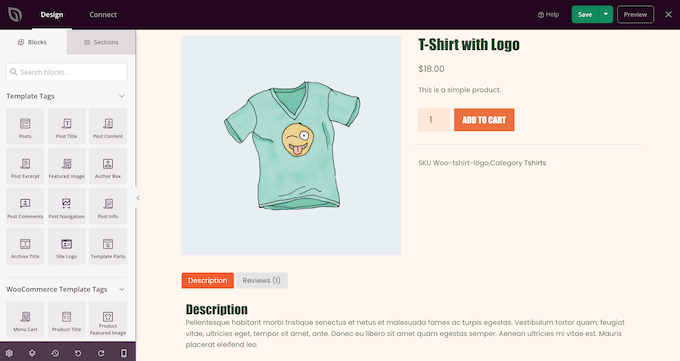
WooCommerce powers over 5.8 million online stores worldwide, making it the most popular eCommerce solution for WordPress. We have tested it extensively ourselves to create tutorials and help our readers who use it.
If you want to learn more about our hands-on experience, check out our detailed WooCommerce review.
The best part about WooCommerce is that it’s free to start. You get everything you need for a basic online store: product pages, a shopping cart, a checkout process, and popular payment options like PayPal and Stripe. Setting up takes just a few minutes with the helpful setup wizard.
Making your store look good is easy, too. You can choose from thousands of store themes, ranging from free options in the WordPress directory to premium designs from various marketplaces. You can take a look at our list of the best WordPress themes for WooCommerce.
To make your store unique, you can use tools like SeedProd (which we discussed earlier) or WordPress’ built-in customization options. Plus, there are countless plugins available to add features like product comparisons, customer reviews, and abandoned cart recovery.
Pros of WooCommerce:
- Free to set up and use with basic features
- Works with physical and digital products out of the box
- Easy inventory management system
- Built-in marketing tools like discount codes
- Supports multiple currencies and languages
- Lots of WooCommerce extensions available for added features
- Large community with helpful resources
Cons of WooCommerce:
- You have to install some extensions to optimize your online store, which can affect the performance of your website and your overall business expense
Pricing: The plugin is free. Paid themes and extensions range from $1 to hundreds of dollars. For hosting, we recommend SiteGround (from $4.99 per month) or Bluehost (from $13.99 per month).
Why we recommend WooCommerce: It’s the most flexible and cost-effective way to create an online store, especially if you’re already using WordPress.
17. FunnelKit

FunnelKit is a WooCommerce funnel builder plugin that can help you optimize your store for conversions. This powerful plugin helps you create sales funnels that guide visitors toward making a purchase.
We’ve talked more about this sales funnel plugin in our full FunnelKit Funnel Builder review.
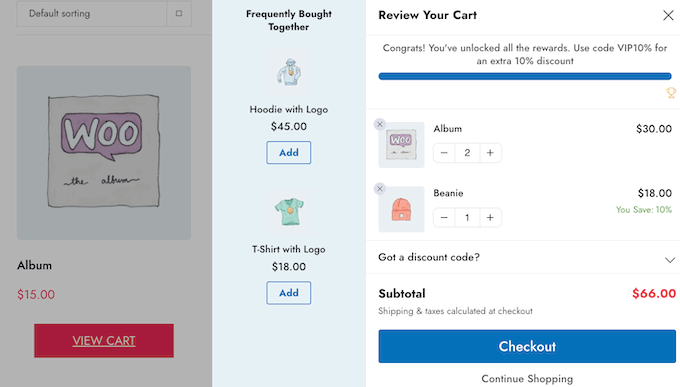
What we love about FunnelKit is how it improves the shopping experience. You can add features like slide-in carts, one-click upsells, and smart checkout forms that auto-complete addresses. During our research, we found these small touches make a big difference in getting more sales.
The plugin works with major WordPress editing tools. Whether you use Gutenberg, Elementor, or Divi, you can design your funnels using your favorite page builder. Plus, all templates are mobile-friendly, so your funnels look great on phones and tablets.
Pros of FunnelKit:
- Ready-to-use checkout, slide-in cart, upsell, order bump templates, and more for quick setup
- Our tests showed that the designs were mobile-friendly
- Built-in A/B testing to find what works best
- Smart features like address auto-complete
- Detailed reports to track your results
Cons of FunnelKit:
- Some advanced features are only available in higher plans
Pricing: Plans range from $99.50 to $399.50 per year. Free plugin version available with basic features.
Why we recommend FunnelKit: It adds proven sales-boosting features to your WooCommerce store that can help turn more browsers into buyers.
Other Web Design Software for Online Stores
WooCommerce and FunnelKit provide a complete toolkit for selling on WordPress. However, there are other powerful platforms that are popular for their simplicity or ability to handle very large stores. Here are a couple of excellent alternatives to consider.
18. BigCommerce: A Scalable ‘Headless’ eCommerce Platform

BigCommerce is a powerful, dedicated eCommerce platform designed for serious online stores. It can function as a standalone store or integrate with WordPress, a method known as ‘headless commerce’.
This approach is great for large or fast-growing businesses that want to use WordPress for its content management strengths while offloading the technical demands of eCommerce (like security and payment processing) to a specialized platform.
19. Shopify: The All-in-One Hosted eCommerce Solution

Shopify is an extremely popular all-in-one eCommerce platform that includes everything you need to start, run, and grow an online store. It handles web hosting, security, and payment processing for you in one simple package.
It’s suitable for beginners who want the easiest and quickest way to start selling online without having to worry about any of the technical details of managing a website.
Best Web Design Software for Marketing
Your website’s success depends on both its design and its marketing effectiveness. Here are some tools that excel at both.
20. Beacon

Beacon helps you turn your website content into lead magnets that visitors actually want. Whether you need PDF guides, checklists, or workbooks to grow your email list, this tool makes creating them surprisingly easy.
Check out our Beacon review for a more detailed look into this lead magnet platform.
During our testing, we found Beacon particularly useful for turning blog posts into downloadable content. Instead of starting from scratch, you can import your existing articles and transform them into an eBook in minutes.
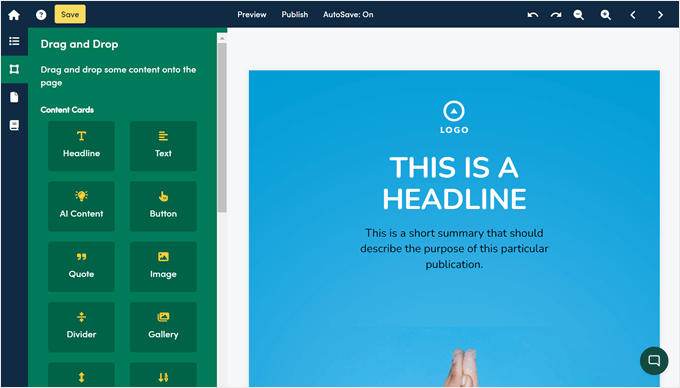
The platform comes with templates for different industries and occasions. While the designs might not win any awards, they’re clean and functional. Plus, you can add these downloads to your website as popup offers, content upgrades, embedded forms, and more.
Pros of Beacon:
- Turns blog posts into downloadable content quickly
- Comes with industry-specific templates
- Works with major email marketing tools
- Lets you create unlimited lead magnets
Cons of Beacon:
- Designs aren’t as fancy as some alternatives
- You may face some issues with deleting pre-existing elements in the templates
Pricing: Free plan available. Premium plans cost between $19 and $99 per month.
Why we recommend Beacon: It’s the fastest way to create valuable downloadable content that helps grow your email list.
21. Canva
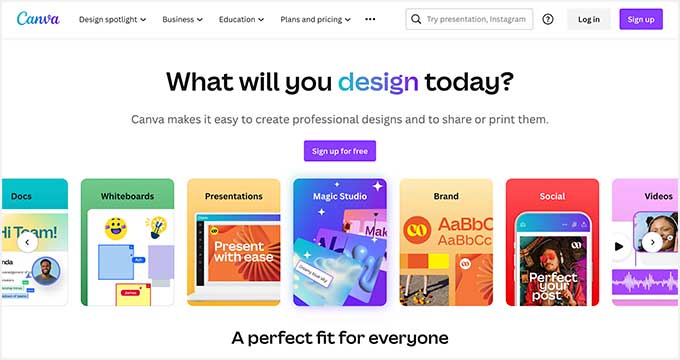
Canva makes professional graphic design as easy as writing an email. We’ve used it ourselves for our own marketing needs, and you can even take advantage of it to create and sell digital products.
This web-based tool requires no software installation. Just open your browser and start creating. With millions of templates and stock photos, you can design almost anything your website needs: headers, logos, infographics, and even website mockups.
We especially like Canva’s new AI features. During our testing, we found it could generate design mockups quickly just by describing what we wanted. Plus, its drag-and-drop editor and pre-made color palettes make it easy to match your brand’s style.
Pros of Canva:
- Super easy to use, even for beginners
- Huge library of templates and stock photos
- AI tools to help generate design ideas
- Team collaboration features built-in
- Works for both images and videos
Cons of Canva:
- Can run slowly with complex designs
- Some advanced features need a paid plan
Pricing: Paid plans cost between $100 and $120 per person per year. Try premium features free for 30 days and use the free plan.
Why we recommend Canva: With its massive template library and simple tools, Canva can turn anyone into a capable designer.
Want to explore other options? Check out our guide to the best Canva alternatives.
Other Web Design Software for Marketing
Beacon and Canva are fantastic for creating marketing assets quickly. If you’re already in the Adobe ecosystem or looking for an alternative with a similar feel to Canva, this tool is another excellent choice.
22. Adobe Express: AI-Powered Design for Everyone

Adobe Express is Adobe’s user-friendly, all-in-one design app that competes directly with tools like Canva. It brings the power of Adobe’s professional creative tools, like AI-powered photo editing, into a simple interface for creating graphics, short videos, and web pages.
This tool is perfect for bloggers and business owners who want to quickly create stunning, professional-quality social media posts, featured images, and marketing materials without the steep learning curve of advanced Adobe software.
What Is the Best Web Design Software?
Based on our extensive testing and real-world experience, here are the best web design tools for different needs:
- SeedProd – Best overall for WordPress websites because it combines powerful design features with AI-powered simplicity, letting you create professional sites in minutes without coding.
- Wix – Best hosted website builder for beginners because it includes everything you need in one package, from hosting to professional templates, with an intuitive drag-and-drop editor.
- Adobe Photoshop – Best for graphic design because it offers professional-grade photo editing and design tools, now made easier with AI features.
- Figma – Best for UI/UX design because it enables real-time team collaboration and creates responsive designs that work across all devices.
- WooCommerce – Best for online stores because it offers the most flexible and cost-effective way to create an eCommerce site, especially with WordPress.
- Beacon – Best for lead magnets because it quickly turns your existing content into professional downloadable resources that help grow your email list.
Your choice will ultimately depend on your specific needs, technical skills, and budget. For most users, we recommend starting with SeedProd if you’re using WordPress or Wix if you want an all-in-one solution.
Best Web Design Software: Frequently Asked Questions
Now that we have gone over the best web design software on the market, let’s answer some frequently asked questions:
What is the easiest program for creating a website?
Based on our experience, using WordPress with a page builder like SeedProd is the easiest way to create a website. The combination gives you both simplicity and power: SeedProd’s drag-and-drop interface and AI tools make it incredibly easy to design pages, while WordPress provides all the features you need to manage your content.
If you prefer an all-in-one solution, Wix is a good alternative. It handles hosting and technical details for you, though you’ll have less flexibility than WordPress in the long run.
Is WordPress better than Wix?
In our opinion, yes. While Wix is easier to start with, WordPress offers more control and flexibility as your website grows. With WordPress, you:
- Own your content and move it anywhere
- Have access to thousands more plugins and themes
- Pay less in the long run
- Can scale your website without limitations
- Have more options for customization
That said, Wix might be better if you want everything handled for you and don’t mind paying more for convenience.
What do web designers use to create websites?
Professional web designers traditionally use tools like Adobe Dreamweaver for coding, Figma for layout planning, and Adobe Illustrator for graphics. However, we’ve noticed a shift in recent years.
Many designers now prefer WordPress-based tools like SeedProd or Thrive Theme Builder because they speed up the design process significantly, require less manual coding, and make it easier to hand off sites to clients.
Video Tutorial
We also have a video review of the best web design software if you’d prefer to watch instead of read:
We hope this article helped you find the best web design software for your design toolkit. You may also want to see our list of the best website builders and the essential WordPress design elements for your website.
If you liked this article, then please subscribe to our YouTube Channel for WordPress video tutorials. You can also find us on Twitter and Facebook.


Dennis Muthomi
Love this breakdown of web design tools
I REALLY appreciated the section about different types of software. It totally confirms what I’ve learned – there’s no single perfect tool that does it all. Building your own toolkit is definitely the way to go!
Moinuddin Waheed
Thanks for the comprehensive list of tools that can be utilised for designing a website.
I am curious about canva in the list, if it can be utilised to make a full fledged website design to showcase to the clients before making it to the development part.
also, can it be used to make pdf brochures for course outlines?
I am trying to find one that can be utilised to make beautiful pdf copies.
any guidance regarding this would be much appreciated.
WPBeginner Support
Canva does have a tool to create PDFs.
Admin
Jiří Vaněk
Alternatively, you might want to try out Figma. You can create website designs as well as entire templates, which you can then use for building your own site or even sell as graphic assets. It’s a really interesting tool that you might find appealing. I use it occasionally and I’m absolutely satisfied with it.
MOINUDDIN WAHEED
Thanks for your valuable recommendation.
As of now I am learning coreldraw the graphic desiging software.
It has plenty of options to make graphic designs from scrathc of any kind.
I think learning the tools in the corel draw will also help in using figma and
other similar softwares in future given the similar tools used.
Moinuddin Waheed
I was thinking to learn figma for the designing part of the websites but since I have been using seedprod, I left the idea to invest my time and energy there.
Using seedprod is as though as I am doing two tasks at one time i e design and development part simultaneously.
Thanks for its powerful features .
Rupinder
Thanks for sharing, this article is extremely great and helpful it is very useful for developers. Thanks and keep Sharing.
WPBeginner Support
You’re welcome, glad our guide could be helpful
Admin
Nissi
thanks for sharing list of web design software its really used for me
WPBeginner Support
You’re welcome, glad you liked our article
Admin
Alex
Nice list guys, however including Adobe AI an PS, which are for vector and raster graphic design, and not including Adobe XD, which is specifically for Web and Mobile design is quite strange…
Editorial Staff
Adobe XD is a great software as well, and if you have the whole suite, then definitely worth using XD.
Majority of our team now uses Affinity suite because its far more affordable and gives you the best of both world.
Admin
Caleb Weeks
Hi guys – thanks for another great post!
If the editors might still have the energy, Adobe XD is a really good (FREE!) option and has many of the features of Sketch but is available for both Windows and Mac users. Perhaps it would qualify as official website design software?
Also, with Beaver Builder & Divi listed for WordPress, it felt like something was missing without Elementor. That said, perhaps all that is needed is a link to WPBeginner’s other post “6 Best Drag and Drop WordPress Page Builders Compared” to let those in your audience who are truly new to this know that there are some other great (Grade: A) WordPress options. We, personally, love using Elementor and easily recommend it to others designing with WordPress.
No worries if both are still left out! You can only include so many. Congratulations on WPBeginner’s steady contributions to the WordPress/Website/Design world!
Editorial Staff
Hi Caleb, we do have a link to the best page builder article in the description for Beaver Builder. Unfortunately we couldn’t list every single design software or builder, so we picked the two that our team uses the most.
This doesn’t discredit other software that exist in the market though
Admin