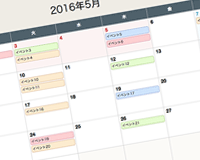
ソースファイルはGitHubに置いてあります。
Vue.MiniCalendar
html
Vue.jsの他にAxiosも使用しているので読み込んでください。
index.xml
<!DOCTYPE html>
<html lang="ja">
	<head>
		<link rel="stylesheet" href="mini-calendar.css">
	</head>
	<body>
		<div id="app">
			<div class="container">
				<mini-calendar />
			</div>
		</div>
		<script src="https://cdn.jsdelivr.net/npm/vue@2/dist/vue.js"></script>
		<script src="https://cdn.jsdelivr.net/npm/[email protected]/dist/axios.min.js"></script>
		<script src="mini-calendar.js"></script>
		<script>
		var app = new Vue({
			el: '#app'
		});
		</script>
	</body>
</html>
イベントの表示
デフォルト設定ではhtmlと同階層に「data」というディレクトリを作成、その下に「年」のディレクトリを作り「月.json」というファイル名で作成します。
例えば2021年7月のデータなら「/data/2021/7.json」のようになります。
data/2021/7.json
{
	"events": [
		{
			"day": 2,
			"title": "イベント",
			"type": "blue"

		},{
			"day": 6,
			"title": "イベント2",
			"type": "red"
		},{
			"day": 23,
			"title": "イベント3",
			"type": "green"
		}
	],
	"holidays": [19]
}
Props
設定はPropsで変更することができます。
| Props | 説明 | 値 |
|---|---|---|
| data-path | イベントデータのパス | ‘./data/’ |
| current-date | 表示するカレンダーの月 | ‘2021/6’ |
| week-type | 曜日のラベル | [“日”, “月”, “火”, “水”, “木”, “金”, “土”] |