
Running an eCommerce store on WordPress opens the door to endless growth opportunities, but success often depends on choosing the right tools. With the right mix of plugins, you can streamline your workflow, improve customer experience, and create a store that feels polished and professional.
Whether you’re just starting or already scaling, having a well-curated toolkit makes all the difference. In this guide, we’ve gathered a list of must-have WordPress plugins that support essential store functions while helping you build a smoother, smarter shopping experience. These plugins are widely used, beginner-friendly, and trusted by online businesses around the world.
Let’s jump right in and explore what they bring to the table.
1. WebToffee WooCommerce Marketing Automation App

This WooCommerce Marketing Automation App is designed to help store owners automate repetitive tasks and create smarter customer journeys without complexity. It focuses on improving engagement through targeted workflows that run on autopilot, making it easier to stay connected with customers at the right moment.
By setting triggers and actions, you can personalize how your store interacts with buyers based on their behavior, past purchases, or browsing patterns. You can create automated email marketing workflows for welcome emails, cart abandonment emails, post-purchase thank you emails, and more.
Other key features of this Marketing automation app include dynamic popups, free shipping bar, sign-up forms, and spin-wheel campaigns. You can integrate upsell and cross-sell campaigns into your email marketing campaigns.
Also read: 20+ Email Marketing Statistics to Know in 2026
2. YITH WooCommerce Wishlist

YITH WooCommerce Wishlist offers a simple and effective way to enhance the shopping experience by letting customers save products for later. This creates an experience similar to popular eCommerce giants, where users can revisit items they’re interested in without the pressure to buy immediately.
Allowing shoppers to maintain wishlists also encourages them to return to your store more often and complete pending purchases. The plugin integrates naturally with WooCommerce and blends with most themes, making setup quick and beginner-friendly.
Store owners also gain helpful insights into what customers are saving, which can influence promotional decisions, product planning, or email campaigns. With easy sharing options, customers can share their wishlists with friends and family, increasing exposure for your products. It’s a small feature that adds a surprisingly meaningful boost to user engagement.
3. WooCommerce Gift Cards

WooCommerce Gift Cards is a handy solution for store owners wanting to offer professional, customizable gift cards directly through their WooCommerce store. With this plugin, you can allow your customers to purchase digital gift cards, send them to others, and use them just like regular store credit.
The personalization options, such as adding messages, choosing templates, or scheduling delivery, make the gift-giving experience feel more thoughtful and smooth. Store owners benefit from gaining new buyers through gift card recipients, creating a natural path for customer acquisition.
This gift cards plugin supports multiple designs, flexible denominations, and user-friendly management tools in the backend. Since the entire system is native to WooCommerce, you don’t have to rely on external platforms. It’s a practical addition for stores that want to expand their offerings and give customers more convenient ways to shop or share products with loved ones.
4. Jetpack

Jetpack is a versatile toolkit that delivers a wide range of enhancements for your eCommerce store, from performance improvements to site monitoring. Many online stores use it because it reduces the need for multiple separate plugins, helping keep your site faster and more stable.
It provides helpful features like downtime alerts, automated backups when paired with its services, and performance optimization tools that enhance loading speed. Jetpack also includes design tools, security features, and traffic insights, making it a convenient all-in-one solution for store owners who want simplicity.
Because it’s developed by Automattic, the company behind WordPress.com, compatibility and reliability are strong selling points. Whether you’re looking to improve user experience or strengthen site stability, Jetpack adds a layer of convenience and peace of mind to your day-to-day store operations.
5. Smart Coupons for WooCommerce Coupons

The WooCommerce Smart Coupons plugin gives store owners a flexible and powerful way to manage promotions that go beyond basic discount codes. With this plugin, you can create advanced coupons, store credit, offer giveaways, set advanced restrictions, or run creative deals that influence customer behavior.
It’s especially useful for stores that rely heavily on promotional strategies, as the plugin provides more control over how and when coupons can be used. The interface makes it easy to configure everything from percentage discounts to buy-one-get-one deals, helping you tailor offers for different types of customers.
If you’re aiming to increase conversions or boost average order value, the level of flexibility this coupon plugin brings can make your promotions much more effective.
6. MonsterInsights

MonsterInsights helps store owners understand how people use their website without needing to dig through complicated analytics dashboards. It connects Google Analytics to WordPress in a user-friendly way, bringing essential data directly into your admin area.
With its enhanced eCommerce tracking features, you can easily view how customers move through your store, which products attract the most attention, and where drop-offs occur. This makes decision-making simpler, especially when optimizing product pages or marketing campaigns.
The reports are designed to be beginner-friendly, so you don’t need an analytics background to understand what’s working. By giving clear visibility into traffic sources, user behavior, and top-performing content, MonsterInsights becomes a helpful companion for improving your store’s overall performance. It’s ideal for anyone wanting to make data-backed improvements without technical hassle.
7. Product Feed for WooCommerce

The WooCommerce Product Feed plugin provides a straightforward way to sync your WooCommerce products with major marketing and shopping platforms. Instead of manually updating product details across multiple channels, this plugin automates the process by generating accurate, up-to-date product feeds.
It supports platforms like Google Shopping, Facebook, Instagram, Pinterest Shops, and more, helping store owners expand their reach effortlessly. The plugin gives you control over which products get included, how attributes are mapped, and how often feeds are refreshed.
This is particularly helpful for stores with larger inventories or frequent updates. Its easy-to-use interface ensures even beginners can generate feeds without confusion. When your products are consistently updated across channels, you create a smoother path for customers to discover and purchase your items.
8. Dokan

Dokan is a popular plugin for creating multi-vendor marketplaces on WordPress, giving store owners the tools to host multiple sellers under one platform. With this plugin, vendors can manage their own products, orders, and profiles through dedicated dashboards, making marketplace management more decentralized and efficient.
Dokan includes features like vendor commissions, storefront customization, and product publishing controls, allowing you to structure your marketplace according to your business model. For store owners, it reduces the burden of managing every listing manually, and for vendors, it creates a clean, intuitive space to operate.
The layout is simple enough for beginners but scalable enough for stores expecting more advanced vendor needs. Whether you’re building a niche marketplace or a broad multi-seller platform, Dokan provides a solid foundation that balances flexibility with ease of use.
9. WebToffee WooCommerce Product Recommendations

The WooCommerce Product Recommendations plugin helps WooCommerce stores showcase tailored product suggestions that guide customers toward items they’re likely to buy. With this plugin, you can place recommendations throughout your store, including on product pages, cart pages, and the checkout page.
The tool supports multiple recommendation templates, such as related products, best sellers, frequently bought together, new arrivals, and more. It helps you recommend relevant products to your customers at the right time.
By delivering more relevant shopping paths, the plugin adds a smooth and natural layer of personalization. Shoppers feel supported in their decisions, and store owners benefit from higher conversion rates and higher average order values.
10. Variation Swatches for WooCommerce

Variation Swatches for WooCommerce enhances the look and feel of your product variation options by replacing dropdowns with visual swatches. Instead of expecting customers to interpret long text labels, this plugin allows you to display colors, images, and labels that make selection more intuitive.
The visual approach creates a more polished shopping experience and helps remove friction when customers choose product variations like color or size. Installation is quick, and the plugin works smoothly with most WooCommerce themes.
Store owners can customize swatch shapes, tooltips, and styles to match their branding. By making the selection process more appealing and interactive, the plugin adds clarity and helps customers confidently choose the variation they want.
11. Checkout Field Editor for WooCommerce

Checkout Field Editor for WooCommerce allows store owners to tailor the WooCommerce checkout form to match their business requirements. With this plugin, you can add, edit, or rearrange fields to make the checkout experience simpler and more relevant for your audience.
The interface is easy to use, so even non-technical users can customize fields without touching code. Whether you need extra customer details, want to streamline unnecessary fields, or hope to experiment with new layouts, the plugin provides full control.
It also supports field types like text boxes, dropdowns, and checkboxes, making it flexible for many store needs. A cleaner and more personalized checkout form often results in fewer abandoned carts and more satisfied customers who appreciate a smooth buying process. This plugin helps ensure that every checkout step feels purposeful and aligned with your store’s goals.
12. WooCommerce PDF Invoices, Packing Slips and Credit Notes Plugin

The PDF Invoices & Packing Slips for WooCommerce plugin offers a complete solution for automatically generating and managing store documents. It creates professional PDF invoices, packing slips, and credit notes that can be customized to reflect your branding.
This invoice plugin supports UBL or XML invoices and offers multiple templates for invoices and other documents. It offers multiple add-ons for generating shipping labels, address labels, and more.
You can bulk print or download invoices, packing slips, and credit notes from the order edit page. Overall, this is a must-have plugin for those store owners who want to upgrade their default WooCommerce invoices.
13. GDPR Cookie Consent

The GDPR Cookie Consent plugin helps website owners meet privacy requirements by providing clear, customizable cookie consent notices. The plugin provides visitors with transparent information about cookie usage and gives them the option to provide or revoke consent.
It provides layouts, colors, and styles you can adjust to match your site’s branding while ensuring compliance with GDPR guidelines. You can categorize cookies, manage scripts based on consent, and maintain logs for added transparency.
The plugin integrates cleanly with most WordPress themes and caching setups, ensuring the banner doesn’t disrupt the website’s performance. It’s a practical tool for maintaining user trust and staying aligned with evolving privacy expectations. This cookie consent plugin is a Google-certified CMP partner and supports integration with Google Consent Mode v2 and Clarity Consent v2.
14. HubSpot

HubSpot brings CRM and marketing tools directly into your WordPress dashboard, giving store owners a streamlined way to track leads, manage contacts, and build meaningful customer relationships.
The plugin automatically syncs visitor interactions, form submissions, and conversations, so you can understand customer journeys without extra tools. Its built-in forms, live chat, and email features make it easier to engage visitors in real time, while the CRM ensures every interaction is logged for future follow-ups.
Integration with WooCommerce lets you track purchases and use that information to segment contacts or plan marketing campaigns. For growing online stores, HubSpot offers a convenient way to unify communication and customer management in one place.
15. Advanced Shipment Tracking for WooCommerce
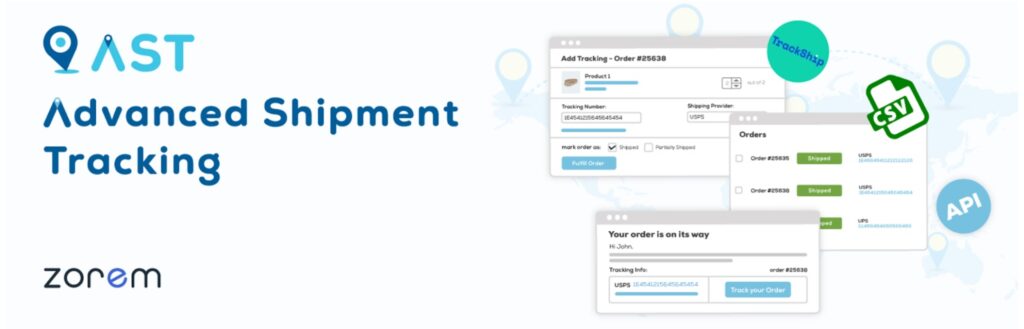
Advanced Shipment Tracking for WooCommerce brings clarity and convenience to the post-purchase experience by letting store owners add tracking information directly to orders. With this plugin, customers can easily follow their packages through links sent in order emails or shown in their account dashboard.
Store owners can choose from a large list of supported carriers or add custom carriers as needed. The plugin helps streamline order fulfillment by making shipment communication more organized and transparent.
When customers know exactly where their order is, it reduces the number of support requests and leaves a better impression. Whether you’re shipping locally or internationally, the added visibility helps deliver a more confidence-boosting experience for your buyers.
Conclusion
Choosing the right plugins can completely reshape how efficiently your store operates and how confidently shoppers interact with your brand. In the eCommerce niche, thoughtful additions to your toolkit, managing your online business becomes smoother, more organized, and more enjoyable.
The right setup also frees up more time for you to focus on growth instead of juggling routine tasks. As your store evolves, revisiting and refining your plugin stack keeps you aligned with what your customers expect from a modern shopping experience.