Python Strings
A String in Python is a sequence of characters. For example, "welcome" is a string consisting of a sequence of characters such as 'w', 'e', 'l', 'c', 'o', 'm', 'e'. Anything, including letters, numbers, symbols, and even whitespaces, within the quotation marks is treated as a string in Python. Python does not have a character data type; therefore, a single character is considered as a string of length 1.
Let us see an example of strings in Python.
Example
Execute NowOutput:
String: tpointtech
Data Type: <class 'str'>
Explanation:
In this example, the sample_str holds the value "tpointtech" and is defined as a string.
Characteristics of Python Strings
Here are some characteristics of strings in Python:
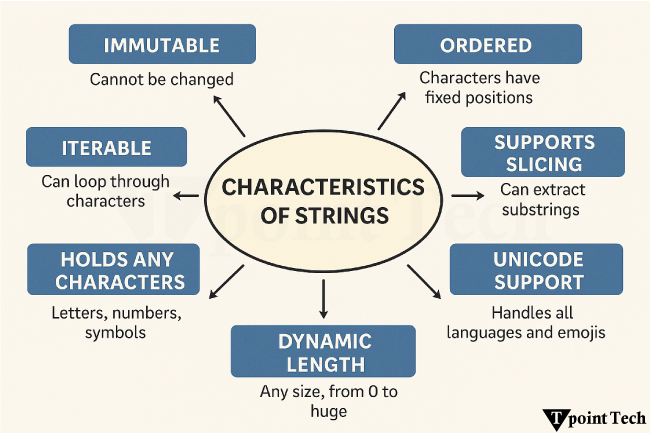
- Immutable: Once a string is created, we cannot change it. Any operation in terms of modifying a string will actually make a new string.
- Ordered: Strings are ordered collections of characters where each character has a fixed index (starting from 0). We can access the characters using their position.
- Iterable: We can iterate through each character of a string using Python loops, like for and while.
- Support Slicing: We can slice a string to extract substrings with the help of [start : end] syntax.
- Unicode Support: By default, strings in Python 3 are stored as Unicode. This allows us to handle international languages and emojis efficiently.
- Dynamic Length: We can initialize a string of any length, from an empty string to a string consisting of millions of characters.
- Can contain any characters: A string can include letters (A-Z, a-z), digits (0-9), special characters like @, #, $, %, etc., spaces, tabs, and even newlines.
Creating a String
We can create strings using either single quotation marks ('…') or double quotation marks ("…").
Let us see an example showing both ways of creating strings in Python.
Example
Execute NowOutput:
String 1: Welcome to Tpoint Tech
String 2: Welcome to Tpoint Tech
Explanation:
In the above example, we have created strings using single and double quotation marks. These quotation marks can be interchangeably utilized while initializing a string.
Multiline Strings
In case we want a string to span multiple lines, then we can make use of triple quotation marks ('''…''' or """…""").
The following is a simple example of how to create a multiline string in Python.
Example
Execute NowOutput:
Multiline String 1:
Learning Python
is fun with
Tpoint Tech

Multiline String 2:
Tpoint Tech is
the best place to learn
Python Programming
Explanation:
In the above example, we have created multiline strings using triple quotation marks.
Accessing Characters in a String
In Python, strings are sequences of characters that can be accessed individually with the help of indexing. Strings are indexed 0 from the start and -1 from the end. This indexing helps us retrieve particular characters from the string effortlessly.
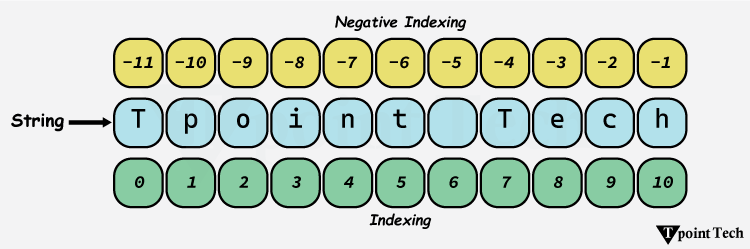
Here is an example to access a specific character in a given string:
Example
Execute NowOutput:
Given String: Tpoint Tech
s[0] = T
s[9] = c
Explanation:
In the above example, we have used indexing to access the different characters in the given string.
Note: Accessing an index out of range will result in an IndexError exception. Moreover, only integers are allowed as indices, and using other types like float, string, or Boolean will result in a TypeError exception.
Accessing String with Negative Indexing
In Python, we are allowed to use negative address references in order to access the characters from the back of the string. For example, -1 refers to the last character, -2 refers to the second last, and so on.
Let us take a look at an example showing how to access characters in a string using negative indexing.
Example
Execute NowOutput:
Given String: Tpoint Tech
s[-1] = h
s[-6] = t
Explanation:
In the above example, we have used negative indexing to access the characters from the back of the given strings.
String Slicing
Slicing is a way in Python that allows us to extract a portion of a string by specifying the start and end indexes. The format for slicing a string is string_name[start : end], where the start is the index where slicing begins, and the end is the index where it ends.
The following is an example showing the implementation of string slicing in Python.
Example
Execute NowOutput:
Given String: Tpoint Tech
s[1:5] = poin
s[:4] = Tpoi
s[4:] = nt Tech
s[::-1] = hceT tniopT
Explanation:
In this example, we have accessed the range of characters in the given string using slicing.
String Immutability
String in Python is an immutable data type that cannot be changed after creation. However, we can manipulate strings using various methods like slicing, concatenation, or formatting in order to create new strings on the basis of the original one.
Let us take a look at an example showing how to manipulate a string in Python.
Example
Execute NowOutput:
Given String: tpointtech
New String: Tpoint Tech
Explanation:
In the above example, we can observe that we cannot directly modify the character in the given string due to string immutability. However, we have created a new string by manipulating the given string by performing formatting, concatenation, and slicing.
Deleting a String
Since Python strings are immutable, we can't delete individual characters from a string. However, Python provides accessibility to delete an entire string variable using the del keyword, as shown in the following example:
Example
Execute NowOutput:
NameError: name 'msg' is not defined
Explanation:
In the above example, we have used the del keyword to delete the given string variable. As we can observe, the program is raising a NameError exception when we try calling it after deletion.
Updating a String
A string is an immutable data type which cannot be modified. However, we can update a part of a string by creating a new string itself.
Let us see an example to understand how to update a string in Python.
Example
Execute NowOutput:
Given String: welcome learners
New String 1: Welcome learners
New String 2: welcome to Tpoint Tech
Explanation:
In the first case, we have sliced the original string given_str from index 1 to end and concatenate it with "W" in order to create a new update string new_str_1.
For the second case, we have created a new string as new_str_2 and used the replace() method to replace "learners" with "to Tpoint Tech".
Common String Methods
Python offers many built-in methods for string manipulation. These methods allow us to determine the length of a string, change its cases, validate it, split and join it, search and find substrings, and a lot more. Below are some of the most useful methods:
len()
The len() function is used to determine the length of a string. This function returns the total number of characters in a given string.
The following example shows the usage of the Python len() function:
Example
Execute NowOutput:
Given String: tpointtech
Number of Characters: 10
Explanation:
In this example, we have used the len() function and determined the number of characters in the given string.
upper() and lower()
In Python, the upper() method is used to convert all the characters of the string to uppercase. Whereas, the lower() method allows us to convert all the characters of the string to lowercase.
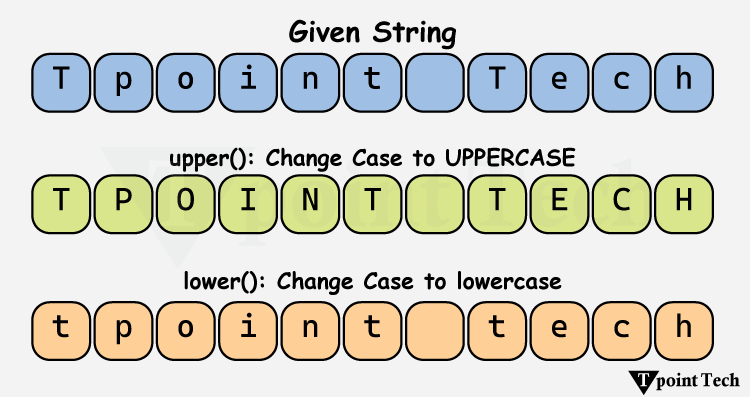
The following example displays the use of the String upper() and lower() methods in Python:
Example
Execute NowOutput:
Given String: Tpoint Tech
Uppercase String: TPOINT TECH
Lowercase String: tpoint tech
Explanation:
In this example, we have used the upper() method to change the case of the given string to uppercase. We have also used the lower() method to change the case to lowercase.
Note: Strings are immutable; therefore, all of these methods will return a new string, keeping the original one unchanged.
strip() and replace()
The strip() method allows us to remove the leading and trailing whitespaces from the string. The replace() method is used to replace all occurrences of a particular substring with another.
Let us take a look at an example to understand the implementation of the strip() and replace() methods in Python.
Example
Execute NowOutput:
String 1:       TpointTech
After removing spaces from both ends:
TpointTech
String 2: Learning Python with TpointTech is fun!
After replacing 'fun' with 'amazing':
Learning Python with TpointTech is amazing!
Explanation:
In the first case, we have used the strip() method to remove the leading and trailing spaces from the given string.
In the second case, we have used the replace() method to replace 'fun' with 'amazing' in the given string.
To learn more about string methods, refer to Python String Methods.
String Concatenation and Repetition
Python allows us to concatenate and repeat strings using different operators. We can concatenate strings with the help of the '+' operator and repeat them using the '*' operator.
The following example shows the use of these two operations:
Example
Execute NowOutput:
Concatenated String: Tpoint Tech
Repeated String: TpointTpointTpointTpoint
Explanation:
In the above example, we have used the + operator to concatenate the strings to create a new string. We have also used the * operator to repeat the specified string multiple times.
Formatting Strings
There are several ways in Python that allow us to include variables inside strings. Some of these methods are discussed below:
Using f-strings
The convenient and most desirable method to format strings in Python is by using f-strings. Let us take a look at the following example:
Example
Execute NowOutput:
John is a 19 years old boy living in New York.
Explanation:
In the above example, we have included the given variables to a string using the f-string.
Using format()
The format() method is another way to format strings in Python. Let us take a look at a simple example showing the use of the format() method in Python.
Example
Execute NowOutput:
Sachin is a Software Developer at Apple Inc.
Explanation:
In the above example, we have used the format() method to include the specified variables in a string.
String Membership Test
We can test whether a substring exists within a string or not using the 'in' and 'not in' keywords.
The example of these keywords is shown below:
Example
Execute NowOutput:
Does 'p' exist in 'Tpoint Tech'? True
Does 'a' exist in 'Tpoint Tech'? False
Does 'e' not exist in 'Tpoint Tech'? False
Does 'g' not exist in 'Tpoint Tech'? True
Explanation:
In the above example, we have checked if the specified substrings is a part or member of the given string using the 'in' and 'not in' keywords.
Conclusion
String is an immutable, ordered sequence in Python used to store and manipulate text. With powerful built-in methods, slicing, and Unicode support, strings are ideal for performing various activities like formatting, searching, and data handling. Master string operations are essential for any Python developer aiming to write efficient and readable code.
Subscribe to Tpoint Tech
We request you to subscribe our newsletter for upcoming updates.

We deliver comprehensive tutorials, interview question-answers, MCQs, study materials on leading programming languages and web technologies like Data Science, MEAN/MERN full stack development, Python, Java, C++, C, HTML, React, Angular, PHP and much more to support your learning and career growth.
Contact info
G-13, 2nd Floor, Sec-3, Noida, UP, 201301, India
Follow us


