Python Lists
In Python, a list is a built-in data structure that allows us to store multiple items in a single variable. Lists are one of the most used data structures in Python because they are mutable, ordered, and can hold different types of elements. Lists provide a flexible way to handle collections of data and come with many useful built-in methods.
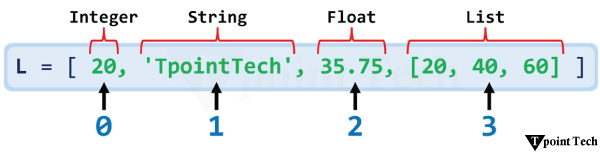
Let us take a look at a simple example of a list.
Example
Compile and RunOutput:
[20, 'TpointTech', 35.75, [20, 40, 60]]
Explanation:
In the above example, we have created a simple list consisting of four elements of different data types. Each element in this list is indexed, meaning it can be accessed using its position in the list, as shown below:
- L[0] = 20 (Integer)
- L[1] = 'TpointTech' (String)
- L[2] = 35.75 (Float)
- L[3] = [20, 40, 60] (Nested List)
Characteristics of Python Lists
List in Python is a data structure, which is:
- Ordered: The data elements of list maintain their order of insertion. If an element is inserted at a specific index, it remains there unless it is explicitly changed.
- Changeable (Mutable): Lists in Python allow modification of their elements after creation.
Let us look at the following example showing that Lists are changeable.
Example
Compile and RunOutput:
[25, 'welcome', 'TpointTech', [20, 40, 60], 300000000.0]
In this example, we have initialized a list and used the indexing to change its element.
- Heterogeneous (Different Data Types): A single list can store multiple data types like integers, strings, floats, and even another list.
Let us take a look at the following example showing that List is a heterogeneous data structure.
Example
Compile and RunOutput:
[10, 'Hello', 5.23, [7, 12]]
In this example, we have initialized a list consisting of multiple data types, such as integer, string, float, and a list.
- Contains Duplicates: List is a data structure that can store duplicate values.
Let us take an example showing that List allows duplicates.
Example
Compile and RunOutput:
[12, 51, 12, 5, 3, 5, 77, 42, 2, 12, 12, 6, 6]
In this example, we have initialized a list consisting of duplicate values.
Operations on List in Python
There are many operations that we can perform on Python list. Some of them are listed below:
- Creating a List
- Accessing List Elements
- Adding Elements to List
- Updating Elements into List
- Removing Elements from the List
- Iterating Over Lists
Let us now see the implementation of these list operations with examples.
Creating a List
Lists in Python can be created by enclosing elements within square brackets [], separated by commas.
Let us see an example showing the way of creating a list.
Example
Compile and RunOutput:
[]
[11, 4, 23, 71, 58]
[1, 'Hello', 6.74, True]
Explanation:
In the above example, we have created three types of lists – empty list, list consisting of only integer values, and list consisting of elements of different data types. We have then printed them for reference.
Accessing List Elements
Elements in a list can be accessed using indexing. Python uses zero-based indexing, meaning the first element has an index of 0. We can use the index number enclosed with the square brackets '[]' to access the element present at the given position.
Here is an example showing the method of accessing the element in a given list.
Example
Compile and RunOutput:
15
94
Explanation:
In the above example, we have created three types of lists – empty list, list consisting of only integer values, and list consisting of elements of different data types. We have then printed them for reference.
Adding Elements to the List
Python offers accessibility to add elements to a list. This can be achieved using the various options available for us:
- append(): Adds a single element to the end of the list.
- insert(): Inserts an element at a specific index.
- extend(): Adds multiple elements to the end of the list.
Here is an example showing different methods to add elements to a list.
Example
Compile and RunOutput:
[7, 3, 4, 6]
[7, 13, 3, 4, 6]
[7, 13, 3, 4, 6, 14, 43, 37]
Explanation:
In the above example, we have created a list and used three different methods – append(), insert() and extend(), in order to insert items in the list. As a result, the append() method has added an item at the end of the list. The insert() method has added an item at the second place in the list. The extend() method has added multiple elements altogether at the end of the list.
Updating Elements into a List
Elements in a list can be updated using indexing. The following is an example showing the way of updating items in a list.
Example
Compile and RunOutput:
[17, 52, 35]
Explanation:
In the above example, we have created a list. We then used the indexing to update the second element of the list.
Removing Elements from the List
Python provides several methods to remove elements from a list:
- remove(value): Removes the first occurrence of the value.
- pop(index): Removes the element at a specific index (or the last element by default).
- del statement: Deletes an element or the entire list.
Let us take a look at the following example showing several ways to remove an item from the list.
Example
Compile and RunOutput:
[14, 25, 2, 33]
[14, 25, 2]
[25, 2]
Explanation:
In the above example, we have created a list and used three different approaches – remove(), pop() and del keyword, in order to remove items from the list. As a result, remove() method has removed the specified item from the list. The pop() method has removed the element at the specified index from the list. The del keyword has deleted the element from the list at the specified index.
Iterating Over Lists
In Python, we can iterate over lists using the loops. Let us take an example showing the use of 'for' loop and 'while' loop to iterate over the elements of a given list.
Example
Compile and RunOutput:
Iterating List using 'for' loop:
12
23
9
17
41

Iterating List using 'while' loop:
12
23
9
17
41
Explanation:
In this example, we have created a list. We have then used the for loop to iterate over the list. We then used the while loop where we set the initial index value, i as 0; and incremented it while printing the element of the current index from the list.
Nested Lists in Python
Nested List is a list in Python that consists of multiple sub-lists separated by commas. The elements in each sub-list can be of different data types. The inner lists (or sub-list) can again consist of other lists, giving rise to the multiple levels of nesting.
In Python, we can use nested lists to create hierarchical data structures, matrices or simply, a list of lists. Python provides various tools to handle nested lists efficiently and effectively, allowing users to perform standard functions on them.
Let us see an example showing the different operations on nested list in Python.
Example
Compile and RunOutput:
Nested List: [[14, 6, 8], [13, 18, 25], [72, 48, 69]]

Accessing Elements of Nested List:
nested_lst[0]: [14, 6, 8]
nested_lst[0][1]: 6

Iterating through Nested list using 'for' loop:
14
6
8
13
18
25
72
48
69

Adding element to Nested list:
New Nested List: [[14, 6, 8, 10], [13, 18, 25], [72, 48, 69]]
Explanation:
In the above example, we have created a nested list. We then used the indexing to access the elements of the list. In first case, we have accessed the element of the outer list using nested_lst[0], which returns the inner list as an output, i.e., [14, 6, 8]. In second case, we have accessed the element of the inner list using nested_lst[0][1], which returns the element of the inner list, i.e., 6. We then perform iteration on the nested list using the nested for loop. At last, we have added an element to the nested list using the append() method.
Finding the Length of a List
Python provides a built-in function called len() in order to determine the number of elements in a list.
Syntax:
Let us take an example showing the use of the len() function on lists.
Example
Compile and RunOutput:
Given List: [15, 61, 23, 6, 87, 5, 93]
Number of Elements in the given list: 7
Explanation:
In the above example, we have created a list of some integers. We have then used the len() function to find the size of the list and store it in a variable. We then printed the list and the variable value as a result.
Sorting a List
Python provides a method called sort() that allows users to sort the elements of a list in place. Let us look at an example showing the working of sort() method.
Example
Compile and RunOutput:
Given List: [15, 61, 23, 6, 87, 5, 93]
Sorted List: [5, 6, 15, 23, 61, 87, 93]
Explanation:
In the above example, we have created a list and used the sort() method to sort it into ascending order.
Python Sorted List Example
Python also offers a function called sorted() which works similar to the sort() method; however, it returns a new list.
Let us take a look at the following example showing the use of sorted() function.
Example
Compile and RunOutput:
Given List: [15, 61, 23, 6, 87, 5, 93]
Sorted List: [5, 6, 15, 23, 61, 87, 93]
Explanation:
In the example, we have created a list and used the sorted() function to sort the list.
Reversing a List
Python List provides a method called reverse() that allows users to reverse the order of the elements in the list.
Let us see the following example showing the use of reverse() method.
Example
Compile and RunOutput:
Given List: [15, 61, 23, 6, 87, 5, 93]
Reversed List: [93, 5, 87, 6, 23, 61, 15]
Explanation:
In the above example, we have created a list and used the reverse() method to reverse the order of the elements in the given list.
Finding the Largest and Smallest Number in a List
To find the largest and smallest number in a list, we can make use of max() and min() functions as shown in the following example:
Example
Compile and RunOutput:
Given List: [15, 61, 23, 6, 87, 5, 93]
Largest Number: 93
Smallest Number: 5
Explanation:
In the above example, we have created a list. We then used the max() function to determine the largest number in the given list. We also used the min() function to find the smallest number.
Calculating Sum of Elements in a List
In order to calculate the sum of elements in a list, we can use Python's built-in sum() function as shown in the following example:
Example
Compile and RunOutput:
Given List: [15, 61, 23, 6, 87, 5, 93]
Sum of the Elements in the list: 290
Explanation:
In the above example, we have created a list. We then used the sum() function to calculate the sum of the elements in the given list.
Conclusion
Python lists provide a versatile way to handle multiple data items. With functionalities like appending, inserting, updating, and iterating, lists form the backbone of many Python programs. Mastering lists is essential for efficient programming in Python.
Subscribe to Tpoint Tech
We request you to subscribe our newsletter for upcoming updates.

We deliver comprehensive tutorials, interview question-answers, MCQs, study materials on leading programming languages and web technologies like Data Science, MEAN/MERN full stack development, Python, Java, C++, C, HTML, React, Angular, PHP and much more to support your learning and career growth.
Contact info
G-13, 2nd Floor, Sec-3, Noida, UP, 201301, India
Follow us


