Python for Loop
The 'for' loop in Python allows us to iterate over iterable objects, such as tuples, lists, dictionaries, and strings, until it reaches the termination of the sequence or the condition is fulfilled. The 'for' loop proceeds to the next step after each iteration is completed.

Syntax of the Python for Loop
It has the following syntax:
Parameter(s):
- var_name: A name of a variable assigned to each element in the given sequence.
- sequence: Sequence refers to iterable elements such as lists, tuples, dictionaries and strings.
Simple Python for Loop Example
Let us see through a simple example to understand how the For Loop works in Python.
Example
Compile and RunOutput:
1
2
3
4
5
6
Explanation:
In the above example, we used a for loop with the range() function to print numbers ranging from 1 to 6.
Flowchart of the for Loop in Python
The following flowchart represents the working of a 'for' loop:
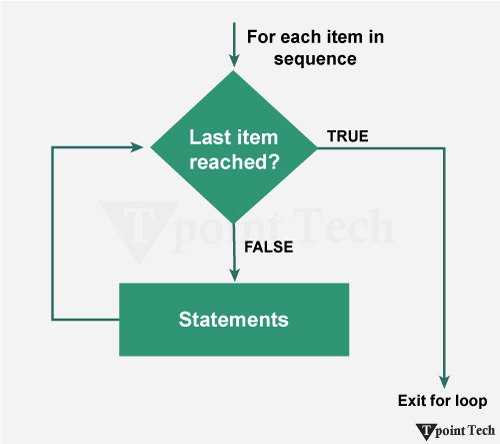
Step 1: The 'for' loop iterates over each item in the sequence.
Step 2: It will check whether the last item in the sequence has been reached; if not, the loop will return to the statement.
Step 3: If the final item in the sequence is reached, the loop will exit.
Examples of Python for Loop
We will now look at some basic examples of Python for loop:
Printing Elements from a List or Tuple
Lists and Tuples are the data structures used in Python to store multiple items in a single variable. We can use the 'for' loop to iterate through each element of these sequential data structures.
Let us take a look at the following example:
Example
Compile and RunOutput:
Tata
Honda
Mahindra
Suzuki
BMW
Explanation:
In this example, we are given a list. We used the 'for' loop to iterate through element of the list and printed them.
Python Program to Print Factorial of a Number
We will now take a look at an example to print the factorial of a number. For this Python program, we will use the 'for' loop to iterate through each number from 1 to that number and add them to return the factorial of the number.
Example
Compile and RunOutput:
Enter a Number: 5
5! = 120
Explanation:
In this example, we have used the 'for' loop to iterate through the range from 2 to that number and multiply the value from the current iteration with the initialized factorial value. As a result, we calculated the factorial of the number.
Nested for Loop
In Python, a nested 'for' loop refers to a 'for' loop placed inside the body of another 'for' loop. We generally use this structure while iterating over multi-dimensional data structures, generating patterns, or performing operations that requires multiple levels of iteration.
Syntax:
Nested for loop has the following syntax:
Let us now take a look at some examples to understand the working of nested for loop.
Printing the Elements of the Matrix
We will now see an example to print the elements of a 3x3 Matrix using the nested for loop.
Example
Compile and RunOutput:
Given Matrix:
13 4 27
22 16 8
5 11 19
Explanation:
In the above example, we are given a 3x3 matrix. We used the nested for loop to iterate through the rows and columns in the given matrix and print the elements.
Pyramid Pattern using Nested for Loop
We will now take a look at the following program to create a Pyramid using the Nested for Loop.
Example
Compile and RunOutput:
Enter number of rows: 5
         *
      * * *
    * * * * *
  * * * * * * *
* * * * * * * * *
Explanation:
In this example, we are have created a star pyramid using the nested for loop.
Loop Control Statements with Python for Loop
We will now look at various loop control statements used in Python's for loop.
1) break Statement
The 'break' statement in the 'for' loop permanently stops the current iteration.
Example
Compile and RunOutput:
Tata
Honda
Explanation:
In the above example, we used the break statement in the 'for' loop to stop the iterations when the current iteration value is "Mahindra".
2) continue Statement
The 'continue' statement in the 'for' loop skip the current iteration and move to the next.
Example
Compile and RunOutput:
Tata
Honda
BMW
Explanation:
In this example, we used the continue statement to skip the current iteration of the 'for' loop.
3) pass Statement
In 'for' loop, the 'pass' statement in Python is used as a placeholder. It means that we can use it when we need to write something in our code but don't want it to do anything or want to leave space to write something in the future.
Example
Compile and RunOutput:
1
2
4
5
7
8
10
Explanation:
In this pass statement in for loop example, the pass statement is a placeholder indicating that a piece of code can be added in the if-block in the future.
4) else with for loop
The 'else' statement in the 'for' loop is used to provide an output when the previous condition is not met or cannot be achieved.
Example
Compile and RunOutput:
1
2
3
4
5
6
7
8
9
Loop Finished
Explanation:
In this example, the else statement is execute after the completion of the 'for' loop.
Conclusion
The 'for' Loop in Python is a very crucial construct in the programming world, which helps in various aspects such as iteration and looping. Control statements like continue, break, pass and else make the functioning of the program more controlled and efficient.
Subscribe to Tpoint Tech
We request you to subscribe our newsletter for upcoming updates.

We deliver comprehensive tutorials, interview question-answers, MCQs, study materials on leading programming languages and web technologies like Data Science, MEAN/MERN full stack development, Python, Java, C++, C, HTML, React, Angular, PHP and much more to support your learning and career growth.
Contact info
G-13, 2nd Floor, Sec-3, Noida, UP, 201301, India
Follow us


