Python Date and Time
Python provides the datetime module to work with real dates and times. Python enables us to schedule our Python script to run at a particular time. The date is not a data type, but we can work with the date objects by importing the modules named datetime, time, and calendar.
In this section of the tutorial, we will discuss how to work with the date and time objects in Python.
The datetime classes are classified into six main classes.
- Date - It is a simple date. It consists of the year, month, and day as attributes.
- Time - It is a perfect time, assuming every day has precisely 24*60*60 seconds. It has hour, minute, second, microsecond, and tzinfo as attributes.
- datetime - It is a grouping of date and time, along with the attributes year, month, day, hour, minute, second, microsecond, and tzinfo.
- timedelta - It represents the difference between two dates, times, or datetime instances to microsecond resolution.
- tzinfo - It provides time zone information objects.
- Timezone - It is included in the new version of Python. It is the class that implements the tzinfo abstract base class.
Tick
In Python, the time instants are counted since 12 AM, 1st January 1970. The function time() of the module time returns the total number of ticks spent since 12 AM, 1st January 1970. A tick can be seen as the smallest unit to measure time.
Python Tick Example
Let us take an example to demonstrate the tick in Python.
Output:
1585928913.6519969
How to get the current time?
The localtime() functions of the time module are used to get the current time tuple. Consider the following example to get the current time using the localtime() function.
Output:
time.struct-time(tm-year=2020, tm-mon=4, tm-mday=3, tm-hour=21, tm-min=21, tm-sec=40, tm-wday=4, tm-yday=94, tm-isdst=0)
Time tuple
The time is treated as the tuple of 9 numbers. Let's look at the members of the time tuple.
| Index | Attribute | Values |
|---|---|---|
| 0 | Year | 4 digit (for example 2018) |
| 1 | Month | 1 to 12 |
| 2 | Day | 1 to 31 |
| 3 | Hour | 0 to 23 |
| 4 | Minute | 0 to 59 |
| 5 | Second | 0 to 60 |
| 6 | Day of weak | 0 to 6 |
| 7 | Day of year | 1 to 366 |
| 8 | Daylight savings | -1, 0, 1 , or -1 |
Getting formatted time
The time can be formatted by using the asctime() function of the time module. It returns the formatted time for the time tuple being passed.
Python Example to Getting Formatted Time
Let us take an example to demonstrate how to get formatted time in Python.
Output:
Wed Sep 10 13:52:19 2025
Python sleep time
The sleep() method of the time module is used to stop the execution of the script for a given amount of time. The output will be delayed for the number of seconds provided as a float.
Python sleep() time Method Example
Let us take an example to demonstrate the sleep() time method in Python.
Output:
0
1
2
3
4
The datetime Module
The datetime module enables us to create custom date objects and perform various operations on dates, such as comparison. In order to work with dates as date objects, we have to import the datetime module into the Python source code.
Python datetime Module Example
Consider the following example to get the datetime object representation for the current time.
Output:
2025-09-10 13:54:25.140259
Creating date objects
We can create the date objects by passing the desired date in the datetime constructor for which the date objects are to be created.
Python Example to Create Date Objects
Here, we are going to take an example that demonstrate gow to create date objects in Python.
Output:
2025-09-10 00:00:00
Python datetime Module Example with Custom Date and Time
We can also specify the time along with the date to create the datetime object. Consider the following example.
Output:
2025-09-10 01:58:20
Explanation:
In the above code, we have passed in the datetime() function year, month, day, hour, minute, and millisecond attributes in a sequential manner.
Comparison of two dates
We can compare two dates by using the comparison operators like >, >=, <, and <=.
Python Example for Comparing Two Dates
Let us take an example to demonstrate how to compare two dates in Python.
Output:
Working hours....
Calendar module
Python provides a calendar object that contains various methods to work with calendars.
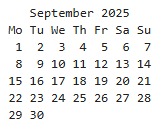
Calender Module Example in Python
Consider the following example to print the calendar for the last month of 2018.
Output:
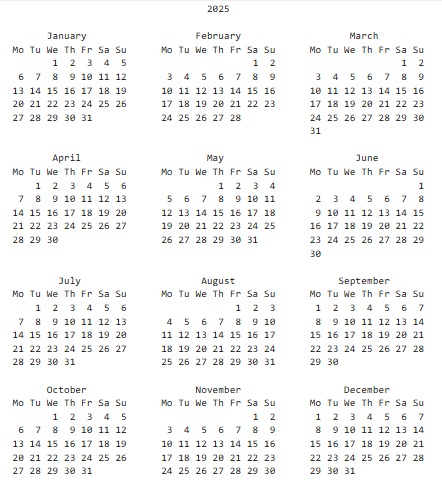
Printing the calendar for the whole year
The prcal() method of the calendar module is used to print the calendar of the entire year. The year for which the calendar is to be printed must be passed into this method.
Output:
Subscribe to Tpoint Tech
We request you to subscribe our newsletter for upcoming updates.

We deliver comprehensive tutorials, interview question-answers, MCQs, study materials on leading programming languages and web technologies like Data Science, MEAN/MERN full stack development, Python, Java, C++, C, HTML, React, Angular, PHP and much more to support your learning and career growth.
Contact info
G-13, 2nd Floor, Sec-3, Noida, UP, 201301, India
Follow us


