MySQL COT() Function
The cot() is a Math function of MySQL. This function is used to get the cotangent of the given number. If the given number is 0, an error or NULL will be returned. In a right triangle, the cotangent of an angle is the length of the adjacent side divided by the length of the opposite side.
In MySQL, we can also find the cotangent of an angle by dividing its sine value by its cosine value. In this article, we will explore the concept of the MySQL COT() function in detail, along with several working examples.
Syntax
Parameters:
Num: It is the number to get cotangent value.
Returns
This function returns the cotangent of the given number.
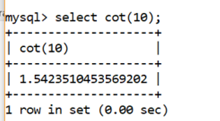
Example 1
Explanation: On the execution of above query, the cot() function returns the cotangent value of given angles.
Output: The output of this example is given below.
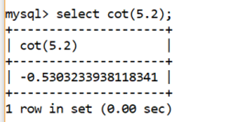
Example 2
Explanation: On the execution of above query, the cot() function returns the cotangent value of given angles.
Output: The output of this example is given below.
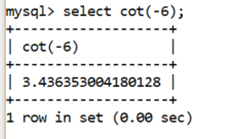
Example 3
Explanation: On the execution of above query, the cot() function returns the cotangent value of given negative values.
Output: The output of this example is given below.
Example 3:
Explanation: On the execution of above query, in the COT() function we can pass the PI() function as an argument which returns the cotangent value.
Output: The output of this example is given below.
| RESULT |
| -8.165619676597685e15 |
Using the MySQL COT() function in a Table
The MySQL COT function is used to find the cotangent value of given column value.
Follow the steps given below to perform the MySQL COT() functionality in a table column.
Step 1: First, create a table named Math_Figure using the CREATE TABLE statement.
Step 2: After that INSERT data into a table using the INSERT TABLE statement.
Step 3: To check the information with the use of SELECT statement, whether the data is inserted or not.
| ID | Diagram | Angle | Sin_Value | Cosine_Value |
|---|---|---|---|---|
| 1 | ABC | 0.5 | 0.5 | 0.866025 |
| 2 | PQR | 1 | 0.707107 | 0.707107 |
| 3 | RST | 5 | 0.965927 | 0.258816 |
| 4 | DEF | 10 | 1 | -000036199 |
| 5 | XYZ | 50 | 0.5 | 0.866025 |
Example:
Explanation: On execution of the above statement, the Cot function is used to return the cotangent value of the Angle column in a table.
Output: The output of this example is given below.
| ID | Diagram | Angle | Sin_Value | Cosine_Value | Cot_Value |
|---|---|---|---|---|---|
| 1 | ABC | 0.5 | 0.5 | 0.866025 | 1.830487721712452 |
| 2 | PQR | 1 | 0.707107 | 0.707107 | 0.6420926159343306 |
| 3 | RST | 5 | 0.965927 | 0.258816 | 0.2958129155327455 |
| 4 | DEF | 10 | 1 | -000036199 | 1.5423510453569202 |
| 5 | XYZ | 50 | 0.5 | 0.866025 | 1.830487721712452 |
Using the MySQL COT() function in a Table with Sin Value and Cosine Value
In MySQL, we can find the cotangent of an angle by dividing the sine value of an angle with the cosine value of an angle.
Take a following example of "Math_Figure" table which contains the following information.
| ID | Diagram | Angle | Sin_Value | Cosine_Value |
|---|---|---|---|---|
| 1 | ABC | 0.5 | 0.5 | 0.866025 |
| 2 | PQR | 1 | 0.707107 | 0.707107 |
| 3 | RST | 5 | 0.965927 | 0.258816 |
| 4 | DEF | 10 | 1 | -000036199 |
| 5 | XYZ | 50 | 0.5 | 0.866025 |
Example:
Explanation: On execution of the above statement, by dividing the sine value of an angle with the cosine value of an angle to return the cotangent value.
Output: The output of this example is given below.
| ID | Diagram | Angle | Sin_Value | Cosine_Value | Cot_Value |
|---|---|---|---|---|---|
| 1 | ABC | 0.5 | 0.5 | 0.866025 | 1.830487721712452 |
| 2 | PQR | 1 | 0.707107 | 0.707107 | 0.6420926159343306 |
| 3 | RST | 5 | 0.965927 | 0.258816 | 0.2958129155327455 |
| 4 | DEF | 10 | 1 | -000036199 | 1.5423510453569202 |
| 5 | XYZ | 50 | 0.5 | 0.866025 | 1.830487721712452 |
Using the MySQL COT() function in a Table column with a WHERE clause
The MySQL COT function is used to find the cotangent value of a given column value with restricted data using the WHERE clause.
Sample Table: Math_Figure
| ID | Diagram | Angle | Sin_Value | Cosine_Value |
|---|---|---|---|---|
| 1 | ABC | 0.5 | 0.5 | 0.866025 |
| 2 | PQR | 1 | 0.707107 | 0.707107 |
| 3 | RST | 5 | 0.965927 | 0.258816 |
| 4 | DEF | 10 | 1 | -000036199 |
| 5 | XYZ | 50 | 0.5 | 0.866025 |
Example:
Explanation: On execution of the above statement, the COT function is used to return the cotangent value from the Angle column in a Math_Figure table where the value of the ID column is greater than 1.
Output: The output of this example is given below.
| ID | Diagram | Angle | Sin_Value | Cosine_Value | Cot_Value |
|---|---|---|---|---|---|
| 2 | PQR | 1 | 0.707107 | 0.707107 | 0.6420926159343306 |
| 3 | RST | 5 | 0.965927 | 0.258816 | 0.2958129155327455 |
| 4 | DEF | 10 | 1 | -000036199 | 1.5423510453569202 |
| 5 | XYZ | 50 | 0.5 | 0.866025 | 1.830487721712452 |
MySQL COT function with UPDATE Statement
In MySQL, the COT() function does not change the data in the table. With the use of the UPDATE statement we can update the data.
Take an example of the Math_Figure table, which contains the following information.
| ID | Diagram | Angle | Sin_Value | Cosine_Value |
|---|---|---|---|---|
| 1 | ABC | 0.5 | 0.5 | 0.866025 |
| 2 | PQR | 1 | 0.707107 | 0.707107 |
| 3 | RST | 5 | 0.965927 | 0.258816 |
| 4 | DEF | 10 | 1 | -000036199 |
| 5 | XYZ | 50 | 0.5 | 0.866025 |
Syntax:
Example: Write a MySQL query to calculate the Cot value from the Angle column.
Step1: First, add a new column i.e. Cot_Value to the existing table using the ALTER statement.
Step2: After that use an UPDATE statement to set the value of the Cot_Value column.
Explanation: On execution of the above statement, the COT function is used to return the cotangent value from the Angle column in a Math_Figure table and the UPDATE statement is used to update the required changes in the table.
If you want to check whether the content is updated in the table or not, then use the following statement.
Output: After running this query, the output of the table is given below.
| ID | Diagram | Angle | Sin_Value | Cosine_Value | Cot_Value |
|---|---|---|---|---|---|
| 1 | ABC | 0.5 | 0.5 | 0.866025 | 1.830487721712452 |
| 2 | PQR | 1 | 0.707107 | 0.707107 | 0.6420926159343306 |
| 3 | RST | 5 | 0.965927 | 0.258816 | 0.2958129155327455 |
| 4 | DEF | 10 | 1 | -000036199 | 1.5423510453569202 |
| 5 | XYZ | 50 | 0.5 | 0.866025 | 1.830487721712452 |
Subscribe to Tpoint Tech
We request you to subscribe our newsletter for upcoming updates.

We deliver comprehensive tutorials, interview question-answers, MCQs, study materials on leading programming languages and web technologies like Data Science, MEAN/MERN full stack development, Python, Java, C++, C, HTML, React, Angular, PHP and much more to support your learning and career growth.
Contact info
G-13, 2nd Floor, Sec-3, Noida, UP, 201301, India
Follow us


