JDBC in Java | Java Database Connectivity
JDBC stands for Java Database Connectivity. JDBC is a Java API to connect and execute the query with the database, and processing the results. It is a part of JavaSE (Java Standard Edition). JDBC API uses JDBC drivers to connect with the database. There are four types of JDBC drivers:
- JDBC-ODBC Bridge Driver
- Native Driver
- Network Protocol Driver
- Thin Driver
We have discussed the above four drivers in the next chapter.
We can use JDBC API to access tabular data stored in any relational database. By the help of JDBC API, we can save, update, delete and fetch data from the database. It is like Open Database Connectivity (ODBC) provided by Microsoft.
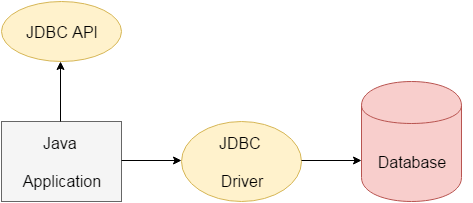
The current version of JDBC is 4.3. It is the stable release since 21st September, 2017. It is based on the X/Open SQL Call Level Interface. The java.sql package contains classes and interfaces for JDBC API. A list of popular interfaces of JDBC API are given below:
- Driver interface
- Connection interface
- Statement interface
- PreparedStatement interface
- CallableStatement interface
- ResultSet interface
- ResultSetMetaData interface
- DatabaseMetaData interface
- RowSet interface
A list of popular classes of JDBC API are given below:
- DriverManager class
- Blob class
- Clob class
- Types class
Why Should We Use JDBC?
Before JDBC, ODBC API was the database API to connect and execute the query with the database. But ODBC API uses ODBC driver that is written in C language (i.e. platform dependent and unsecured). That is why Java has defined its own API (JDBC API) that uses JDBC drivers (written in Java language).
We can use JDBC API to handle database using Java program and can perform the following activities:
- Connect to the database
- Execute queries and update statements to the database
- Retrieve the result received from the database.
What is API?
JDBC also provides support for handling database metadata that allows us to retrieve information about the database, such as its tables, columns, and indexes. We can use the DatabaseMetaData interface to obtain this information that can be useful for dynamically generating SQL queries or for database schema introspection.
Another important feature of JDBC is its support for batch processing that allows us to group multiple SQL statements into a batch and execute them together. It can improve performance by reducing the number of round trips between the application and the database.
Topics in Java JDBC Tutorial
2) JDBC DriversIn this JDBC tutorial, we will learn four types of JDBC drivers, their advantages and disadvantages.
3) 5 Steps to connect to the Database
In this JDBC tutorial, we will see the five steps to connect to the database in Java using JDBC.
4) Connectivity with Oracle using JDBC
In this JDBC tutorial, we will connect a simple Java program with the Oracle database.
5) Connectivity with MySQL using JDBC
In this JDBC tutorial, we will connect a simple Java program with the MySQL database.
6) Connectivity with Access without DSN
Let's connect java application with access database with and without DSN.
7) DriverManager class
In this JDBC tutorial, we will learn what does the DriverManager class and what are its methods.
8) Connection interface
In this JDBC tutorial, we will learn what is Connection interface and what are its methods.
9) Statement interface
In this JDBC tutorial, we will learn what is Statement interface and what are its methods.
10) ResultSet interface
In this JDBC tutorial, we will learn what is ResultSet interface and what are its methods. Moreover, we will learn how we can make the ResultSet scrollable.
11) PreparedStatement Interface
In this JDBC tutorial, we will learn what is benefit of PreparedStatement over Statement interface. We will see examples to insert, update or delete records using the PreparedStatement interface.
12) ResultSetMetaData interface
In this JDBC tutorial, we will learn how we can get the metadata of a table.
13) DatabaseMetaData interface
In this JDBC tutorial, we will learn how we can get the metadata of a database.
14) Storing image in Oracle
Let's learn how to store image in the Oracle database using JDBC.
15) Retrieving image from Oracle
Let's see the simple example to retrieve image from the Oracle database using JDBC.
16) Storing file in Oracle
Let's see the simple example to store file in the Oracle database using JDBC.
17) Retrieving file from Oracle
Let's see the simple example to retrieve file from the Oracle database using JDBC.
18) CallableStatement
Let's see the code to call stored procedures and functions using CallableStatement.
19) Transaction Management using JDBC
Let's see the simple example to use transaction management using JDBC.
20) Batch Statement using JDBC
Let's see the code to execute batch of queries.
21) JDBC RowSet
Let's see the working of new JDBC RowSet interface.
Subscribe to Tpoint Tech
We request you to subscribe our newsletter for upcoming updates.

We deliver comprehensive tutorials, interview question-answers, MCQs, study materials on leading programming languages and web technologies like Data Science, MEAN/MERN full stack development, Python, Java, C++, C, HTML, React, Angular, PHP and much more to support your learning and career growth.
Contact info
G-13, 2nd Floor, Sec-3, Noida, UP, 201301, India
Follow us


