SQL OperatorLast Updated : 10 Feb 2026 IntroductionAn operator is a symbol which is used to fulfill operations on values. This includes mathematical calculations, data comparisons, and logical manipulations, etc. Advantages of SQL Operators- It allows us to manipulate and retrieve data efficiently.
- It is used for performing complex data manipulations such as calculations and filtering operations in queries.
There are various types of SQL operator: 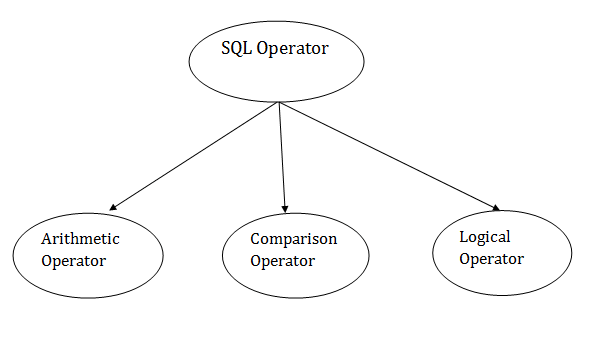 SQL Arithmetic OperatorsLet's assume 'variable a' and 'variable b'. Here, 'a' contains 20 and 'b' contains 10. | Operator | Description | Example |
|---|
| + | It adds the value of both operands. | a+b will give 30 | | - | It is used to subtract the right-hand operand from the left-hand operand. | a-b will give 10 | | * | It is used to multiply the value of both operands. | a*b will give 200 | | / | It is used to divide the left-hand operand by the right-hand operand. | a/b will give 2 | | % | It is used to divide the left-hand operand by the right-hand operand and returns reminder. | a%b will give 0 |
Let’s take an example of “Emp_Sal” table for performing arithmetic operators.| EID | EName | ESalary |
|---|
| E1 | Rakesh | 25000 | | E2 | John | 30000 | | E3 | Smith | 15000 | | E4 | Jordan | 40000 |
Example 1: Take a SQL query to perform addition operator.Resulted Output:| EID | EName | NSalary |
|---|
| E1 | Rakesh | 35000 | | E2 | John | 40000 | | E3 | Smith | 25000 | | E4 | Jordan | 50000 |
Example 2: Take a SQL query to perform subtraction operator.Resulted Output:| EID | EName | NSalary |
|---|
| E1 | Rakesh | 15000 | | E2 | John | 20000 | | E3 | Smith | 5000 | | E4 | Jordan | 30000 |
Example 3: Take a SQL query to perform multiplication operator.Resulted Output:| EID | EName | NSalary |
|---|
| E1 | Rakesh | 50000 | | E2 | John | 60000 | | E3 | Smith | 30000 | | E4 | Jordan | 80000 |
Example 4: Take a SQL query to perform division operator.Resulted Output:| EID | EName | NSalary |
|---|
| E1 | Rakesh | 12500 | | E2 | John | 15000 | | E3 | Smith | 7500 | | E4 | Jordan | 20000 |
SQL Comparison Operators:Let's assume 'variable a' and 'variable b'. Here, 'a' contains 20 and 'b' contains 10. | Operator | Description | Example |
|---|
| = | It checks if two operands values are equal or not, if the values are equal then condition becomes true. | (a=b) is not true | | != | It checks if two operands values are equal or not, if values are not equal, then condition becomes true. | (a!=b) is true | | <> | It checks if two operands values are equal or not, if values are not equal then condition becomes true. | (a<>b) is true | | > | It checks if the left operand value is greater than right operand value, if yes then condition becomes true. | (a>b) is not true | | < | It checks if the left operand value is less than right operand value, if yes then condition becomes true. | (a<b) is true | | >= | It checks if the left operand value is greater than or equal to the right operand value, if yes then condition becomes true. | (a>=b) is not true | | <= | It checks if the left operand value is not less than the right operand value, if yes then condition becomes true. | (a<=b) is true | | !< | It checks if the left operand value is not less than the right operand value, if yes then condition becomes true. | (a!=b) is not true | | !> | It checks if the left operand value is not greater than the right operand value, if yes then condition becomes true. | (a!>b) is true |
Let’s take an example of “Emp_Sal” table for performing comparison operators.| EID | EName | ESalary |
|---|
| E1 | Rakesh | 25000 | | E2 | John | 30000 | | E3 | Smith | 15000 | | E4 | Jordan | 40000 |
Example 1: Take a SQL query to perform Equal to ( = ) operator.Resulted Output:| EID | EName | NSalary |
|---|
| E2 | John | 30000 |
Example 2: Take a SQL query to perform Not Equal to ( != ) operator.Resulted Output:| EID | EName | NSalary |
|---|
| E1 | Rakesh | 25000 | | E2 | John | 30000 | | E3 | Smith | 15000 | | E4 | Jordan | 40000 |
Example 3: Take a SQL query to perform greater than (> ) operator.Resulted Output:| EID | EName | NSalary |
|---|
| E1 | Rakesh | 25000 | | E2 | John | 30000 | | E3 | Smith | 15000 |
Example 4: Take a SQL query to perform less than (<) operator.Resulted Output:| EID | EName | NSalary |
|---|
| E1 | Rakesh | 25000 | | E2 | John | 30000 | | E3 | Smith | 15000 |
Example 5: Take a SQL query to perform greater than equal to (>= ) operator.Resulted Output:| EID | EName | NSalary |
|---|
| E1 | Rakesh | 25000 | | E2 | John | 30000 | | E3 | Smith | 15000 | | E4 | Jordan | 40000 |
Example 6: Take a SQL query to perform less than equal to (<= ) operator.Resulted Output:| EID | EName | NSalary |
|---|
| E1 | Rakesh | 25000 | | E2 | John | 30000 | | E3 | Smith | 15000 | | E4 | Jordan | 40000 |
Example 7: Take a SQL query to perform less than not equal to ( !< ) operator.Resulted Output:| EID | EName | NSalary |
|---|
| E1 | Rakesh | 25000 | | E2 | John | 30000 | | E4 | Jordan | 40000 |
Example 8: Take a SQL query to perform greater than not equal to ( !> ) operator.Resulted Output:| EID | EName | NSalary |
|---|
| E1 | Rakesh | 25000 | | E2 | John | 30000 | | E4 | Jordan | 40000 |
SQL Logical OperatorsThere is the list of logical operator used in SQL: | Operator | Description |
|---|
| ALL | It compares a value to all values in another value set. | | AND | It allows the existence of multiple conditions in an SQL statement. | | ANY | It compares the values in the list according to the condition. | | BETWEEN | It is used to search for values that are within a set of values. | | IN | It compares a value to that specified list value. | | NOT | It reverses the meaning of any logical operator. | | OR | It combines multiple conditions in SQL statements. | | EXISTS | It is used to search for the presence of a row in a specified table. | | LIKE | It compares a value to similar values using wildcard operator. |
Let’s take an example of “Emp_Sal” table for performing Logical operators.| EID | EName | ESalary |
|---|
| E1 | Rakesh | 25000 | | E2 | John | 30000 | | E3 | Smith | 15000 | | E4 | Jordan | 40000 |
Example 1: Take a SQL query to perform AND operator.Resulted Output:| EID | EName | NSalary |
|---|
| E1 | Rakesh | 25000 |
Example 2: Take a SQL query to perform OR operator.Resulted Output:| EID | EName | NSalary |
|---|
| E1 | Rakesh | 25000 | | E2 | John | 30000 | | E3 | Smith | 15000 |
Example 3: Take a SQL query to perform NOT operator.| EID | EName | NSalary |
|---|
| E2 | John | 30000 | | E3 | Smith | 15000 | | E4 | Jordan | 40000 |
Example 4: Take a SQL query to perform BETWEEN operators.Resulted Output:| EID | EName | NSalary |
|---|
| E1 | Rakesh | 25000 | | E2 | John | 30000 | | E3 | Smith | 15000 | | E4 | Jordan | 40000 |
Example 5: Take a SQL query to perform LIKE (%) operator.Resulted Output:| EID | EName | ESalary |
|---|
| E2 | John | 30000 | | E4 | Jordan | 40000 |
Example 6: Take a SQL query to perform LIKE (_) operator.Resulted Output:| EID | EName | ESalary |
|---|
| E2 | John | 30000 |
Example 7: Take a SQL query to perform IN operator.Resulted Output:| EID | EName | NSalary |
|---|
| E1 | Rakesh | 25000 | | E2 | John | 30000 | | E3 | Smith | 15000 |
| 


