Summary: in this tutorial, you’ll learn how to use the SQL RTRIM function to return a new with specified characters removed from the end of a string.
Introduction to SQL RTRIM function #
The RTRIM function takes a string and returns a new string with specified characters removed from the end of the input string.
The following shows the syntax of the RTRIM function:
RTRIM(string, [trim_characters])Code language: SQL (Structured Query Language) (sql)The RTRIM function accepts two parameters:
string: The input string from which you want to remove the trailing characters.trim_characters: (Optional) a string of characters you want to trim from the input string. If you omit thetrim_characters, theRTRIMfunction will remove spaces by default.
The RTRIM function returns a new string with all trim_characters removed from the end of the input string. However, it does not modify the input string.
In practice, you’ll find the RTRIM function helpful in cleaning strings.
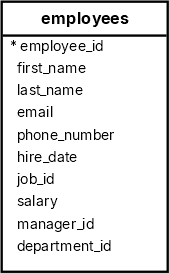
We’ll use the employees table from the HR sample database to demonstrate the RTRIM function:
Removing trailing spaces #
First, insert a new row into the employees table with the first name and last name have a trailing space:
INSERT INTO
  employees (
    employee_id,
    first_name,
    last_name,
    email,
    phone_number,
    hire_date,
    job_id,
    salary,
    manager_id,
    department_id
  )
VALUES
  (
    406,
    'Jane ',
    'Doe ',
    '[email protected]',
    '515.123.8191#',
    '1994-06-07',
    1,
    9000.00,
    205,
    11
);Code language: SQL (Structured Query Language) (sql)Second, select the employee whose first_name end with a space:
SELECT
  first_name,
  RTRIM(first_name) AS trimmed_name
FROM
  employees
WHERE
first_name LIKE '% ';Code language: SQL (Structured Query Language) (sql)Output:
 first_name | trimmed_name
------------+--------------
 Jane       | JaneCode language: SQL (Structured Query Language) (sql)
In this query:
- The
WHEREclause uses theLIKEoperator to match thefirst_namethat ends with a space. - The
RTRIMfunction removes the trailing space from thefirst_namecolumn.
Third, remove the trailing space from the first_name column:
UPDATE employees
SET
  first_name = RTRIM(first_name)
WHERE
first_name LIKE '% ';Code language: SQL (Structured Query Language) (sql)Removing Specific Characters #
The following query returns the first name and phone number of the employee id 406 with the trailing character # removed from the phone_number:
SELECT
  first_name,
  phone_number,
  RTRIM(phone_number, '#') AS plain_phone_number
FROM
  employees
WHERE
employee_id = 406;Code language: SQL (Structured Query Language) (sql)Output:
 first_name | phone_number  | plain_phone_number
------------+---------------+--------------------
 Jane       | 515.123.8191# | 515.123.8191Code language: SQL (Structured Query Language) (sql)
In this example, we use the RTRIM function to trim the character # from the end of the phone number.
You can remove the character # from the phone number using the RTRIM function in an UPDATE statement:
UPDATE employees
SET
  phone_number = RTRIM(phone_number, '#')
WHERE
employee_id = 406;Code language: SQL (Structured Query Language) (sql)Using RTRIM function in Conditional Logic #
The following query uses the RTRIM function to flag employees whose last names contain trailing spaces:
SELECT
  employee_id,
  last_name,
  CASE
    WHEN last_name != RTRIM(last_name) THEN 'Has trailing spaces'
    ELSE 'No trailing spaces'
  END AS status
FROM
  employees
ORDER BY
last_name;Code language: SQL (Structured Query Language) (sql)Summary #
- Use the
RTRIMfunction to return a new string with specified characters removed from the end of an input string. - If you omit the
trim_characters, theRTRIMfunction defaults to remove the trailing spaces.
Databases #
- PostgreSQL RTRIM Function
- MySQL RTRIM Function
- SQLite RTRIM Function
- Db2 RTRIM Function
- Oracle RTRIM Function
- SQL Server RTRIM Function

