Summary: in this tutorial, you’ll learn how to use the SQL RIGHT JOIN clause to merge rows from two tables.
Introduction to the SQL RIGHT JOIN clause #
The RIGHT JOIN is an optional clause of the SELECT statement. The RIGHT JOIN clause allows you to merge rows from two tables.
Here’s the syntax of the RIGHT JOIN clause:
SELECT
  column1,
  column2
FROM
  left_table
  RIGHT JOIN right_table ON condition;Code language: PostgreSQL SQL dialect and PL/pgSQL (pgsql)
In this syntax:
- First, specify the first table (
left_table) in theFROMclause. - Second, provide the second table (
right_table) in theRIGHT JOINclause. - Third, specify a condition for matching rows between the first and second tables after the
ONkeyword.
For each row in the right_table, the RIGHT JOIN checks the condition with each row in the left_table. If the condition is true, the RIGHT JOIN merges two rows from both tables into a single row.
If the condition is false, the RIGHT JOIN clause combines the row from the right table with a row from the left table filled with NULLs into a single row. In other words, the RIGHT JOIN clause always includes rows from the right table.
Typically, you’ll use an equal operator (=) for comparing rows between two columns of the left and right tables:
SELECT
  column1,
  column2
FROM
  left_table
  RIGHT JOIN right_table ON right_table.column1 = left_table_column2;Code language: PostgreSQL SQL dialect and PL/pgSQL (pgsql)
The RIGHT JOIN and RIGHT OUTER JOIN are the same because the OUTER keyword is optional.
Understanding SQL right join #
Suppose you have two tables:
- The
Xtable has two columnsid(key) andx. - The
Ytable has also has two columnsid(key) andy.


The right join matches the rows between the tables X and Y using the values in the id columns of both tables.
The right join includes all rows from the right table (Y) and matching rows from the left table (X); if there are no matching rows, it uses null for columns of the left table (X):

The following Venn diagram is another way to illustrate a right join:

Basic SQL RIGHT JOIN clause example #
Suppose we have two tables employees and departments.
The employees table:
| employee_id | name | department_id |
|---|---|---|
| 1 | Jane | 1 |
| 2 | Bob | 2 |
| 3 | Maria | NULL |
The departments table:
| department_id | department_name |
|---|---|
| 1 | Sales |
| 2 | Marketing |
The following query uses the RIGHT JOIN clause to retrieve the employee ID, name, and department name from the employees and departments table:
SELECT
  employee_id,
  name,
  department_name
FROM
  departments
  RIGHT JOIN employees ON employees.department_id = departments.department_id;Code language: PostgreSQL SQL dialect and PL/pgSQL (pgsql)
Output:
 employee_id | name  | department_name
-------------+-------+-----------------
           1 | Jane  | Sales
           2 | Bob   | Marketing
           3 | Maria | NULLCode language: PostgreSQL SQL dialect and PL/pgSQL (pgsql)
How the query works:
Step 1. The RIGHT JOIN clause examines every row in the employees table.
The row #1 (department_id 1) matches with the row #1 (department_id 1) in the departments table. The RIGHT JOIN clause merges rows from two tables into a single row:
| employee_id | name | department_id | department_id | department_name |
|---|---|---|---|---|
| 1 | Jane | 1 | 1 | Sales |
The row #2 (department_id 2) matches with the row #2 (department_id 2) in the departments table. The RIGHT JOIN clause combines the rows into a new row:
| employee_id | name | department_id | department_id | department_name |
|---|---|---|---|---|
| 2 | Bob | 2 | 2 | Marketing |
The row #3 (department_id NULL) does not match any rows in the departments table. The RIGHT JOIN includes the row from the employees table and fills NULL for columns of the row from the departments table:
| employee_id | name | department_id | department_id | department_name |
|---|---|---|---|---|
| 3 | Maria | NULL | NULL | NULL |
The RIGHT JOIN comes up with the following intermediate result set:
| employee_id | name | department_id | department_id | department_name |
|---|---|---|---|---|
| 1 | Jane | 1 | 1 | Sales |
| 2 | Bob | 2 | 2 | Marketing |
| 3 | Maria | NULL | NULL | NULL |
Step 2. The SELECT clause retrieves the employee_id, name, and department_id from the intermediate result set and returns the following final result set:
| employee_id | name | department_id |
|---|---|---|
| 1 | Jane | 1 |
| 2 | Bob | 2 |
| 3 | Maria | NULL |
Using Table Aliases #
When joining a table with another table using a RIGHT JOIN clause, you can use table aliases. For example:
SELECT
  employee_id,
  name,
  department_name
FROM
  departments d
RIGHT JOIN employees e ON e.department_id = d.department_id;Code language: PostgreSQL SQL dialect and PL/pgSQL (pgsql)Finding non-matching rows from the left table #
The RIGHT JOIN clause can help find non-matching rows in the right table using the following query pattern:
SELECT
  column1,
  column2
FROM
  left_table
  RIGHT JOIN right_table ON right_table.column1 = left_table_column2
WHERE column2 IS NULL;Code language: PostgreSQL SQL dialect and PL/pgSQL (pgsql)
The condition in the WHERE clause keeps rows whose values in the column2 are NULL. These rows do not have matching rows in the left table.
For example, you can use the RIGHT JOIN clause to find the employees who do not belong to any department:
SELECT
  employee_id,
  name,
  department_name
FROM
  departments d
  RIGHT JOIN employees e ON e.department_id = d.department_id
WHERE
department_name IS NULL;Code language: PostgreSQL SQL dialect and PL/pgSQL (pgsql)Output:
 employee_id | name  | department_name
-------------+-------+-----------------
           3 | Maria | NULLCode language: PostgreSQL SQL dialect and PL/pgSQL (pgsql)
Joining two tables using a RIGHT JOIN clause #
We’ll use the countries and locations tables from the HR sample database:
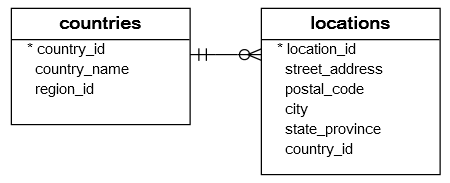
The following query uses the RIGHT JOIN clause to retrieve the country_name and city from the countries and locations tables:
SELECT
  country_name,
  city
FROM
  locations l
  RIGHT JOIN countries c ON c.country_id = l.country_id
ORDER BY
  city,
country_name;Code language: PostgreSQL SQL dialect and PL/pgSQL (pgsql)Output:
       country_name       |        city
--------------------------+---------------------
 United Kingdom           | London
 Germany                  | Munich
 United Kingdom           | Oxford
 United States of America | Seattle
 United States of America | South San Francisco
 United States of America | Southlake
 Canada                   | Toronto
 Argentina                | NULL
 Australia                | NULL
...Code language: PostgreSQL SQL dialect and PL/pgSQL (pgsql)
The result set includes all country names (from the countries table) and cities(from the locations table). For the country that does not have a city in the locations table, the city is NULL.
Joining three tables using RIGHT JOIN clauses #
Here are three tables: regions, countries, and locations from the HR sample database:
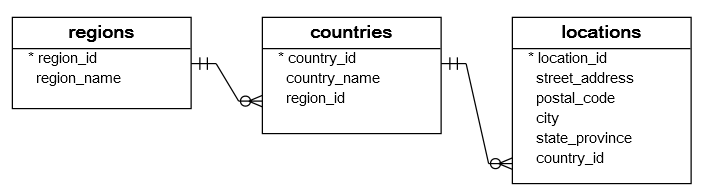
The following query uses the RIGHT JOIN clauses to retrieve data from the three tables:
SELECT
  region_name,
  country_name,
  city
FROM
  locations l
  RIGHT JOIN countries c ON c.country_id = l.country_id
  RIGHT JOIN regions r ON r.region_id = c.region_id
ORDER BY
region_name;Code language: PostgreSQL SQL dialect and PL/pgSQL (pgsql)Output:
      region_name       |       country_name       |        city
------------------------+--------------------------+---------------------
 Americas               | United States of America | South San Francisco
 Americas               | United States of America | Southlake
 Americas               | Mexico                   | NULL
 Americas               | Canada                   | Toronto
 Americas               | Brazil                   | NULL
 Americas               | United States of America | Seattle
 Americas               | Argentina                | NULL
 Asia                   | Australia                | NULL
 Asia                   | HongKong                 | NULL
...Code language: PostgreSQL SQL dialect and PL/pgSQL (pgsql)
Summary #
- Use a
RIGHT JOINclause to select rows to merge rows from two tables. TheRIGHT JOINclause always includes rows from the right table in the result set. - Use a
RIGHT JOINclause to find unmatching rows in the right table.
Quiz #
Databases #
- PostgreSQL RIGHT JOIN Clause
- MySQL RIGHT JOIN Clause
- SQLite RIGHT JOIN Clause
- Db2 RIGHT JOIN Clause
- Oracle RIGHT JOIN Clause
- SQL Server RIGHT JOIN Clause

