Summary: in this tutorial, you’ll learn how to use the SQL EXTRACT function to retrieve a specific part of a date or time value.
Introduction to the SQL EXTRACT function #
The SQL EXTRACT function allows you to extract a specific part of a date or time from a date and time value.
Here’s the syntax of the EXTRACT function:
EXTRACT(part FROM date_value)Code language: PostgreSQL SQL dialect and PL/pgSQL (pgsql)In this syntax:
part: The part of the date you want to extract. The part can be one of the following values:YEAR,MONTH,DAY,HOUR,MINUTE,SECOND,QUARTER,WEEK,DAYOFYEAR,DAYOFWEEK, etc.date_value: The date or timestamp value from which you want to extract the part.
You can find the EXTRACT function helpful for extracting date and time parts from a date or timestamp value.
SQL EXTRACT function examples #
Let’s use the employees table from the HR sample database to demonstrate the EXTRACT function:
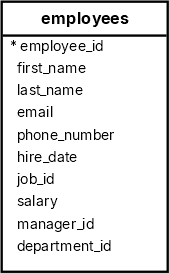
Extracting the Year from the Hire Date #
The following statement uses the EXTRACT function to extract the year from the hire_date of employees:
SELECT
  employee_id,
  first_name,
  last_name,
  EXTRACT( YEAR FROM  hire_date) AS hire_year
FROM
  employees
ORDER BY hire_year;Code language: PostgreSQL SQL dialect and PL/pgSQL (pgsql)This query returns the employee ID, first name, last name, and the year they joined the company:
 employee_id | first_name  |  last_name  | hire_year
-------------+-------------+-------------+-----------
         200 | Jennifer    | Whalen      |      1987
         100 | Steven      | King        |      1987
         101 | Neena       | Kochhar     |      1989
         103 | Alexander   | Hunold      |      1990
...Code language: PostgreSQL SQL dialect and PL/pgSQL (pgsql)
Finding Employees Hired in a Specific Year #
The following example uses the EXTRACT function in the WHERE clause to find all employees who were hired in the year 1990:
SELECT
  employee_id,
  first_name,
  last_name,
  hire_date
FROM
  employees
WHERE
EXTRACT(YEAR FROM hire_date) = 1999;Code language: PostgreSQL SQL dialect and PL/pgSQL (pgsql)Output:
 employee_id | first_name | last_name  | hire_date
-------------+------------+------------+------------
         107 | Diana      | Lorentz    | 1999-02-07
         113 | Luis       | Popp       | 1999-12-07
         119 | Karen      | Colmenares | 1999-08-10
         178 | Kimberely  | Grant      | 1999-05-24Code language: PostgreSQL SQL dialect and PL/pgSQL (pgsql)
Extracting the Month from the Hire Date #
The following statement uses the EXTRACT function to extract the month from the hire_date of employees:
SELECT
  employee_id,
  first_name,
  last_name,
  EXTRACT(MONTH FROM hire_date) AS hire_month
FROM
  employees
ORDER BY
first_name;Code language: PostgreSQL SQL dialect and PL/pgSQL (pgsql)The query returns the employee ID, first name, last name, and the month when the employee joined the company:
 employee_id | first_name  |  last_name  | hire_month
-------------+-------------+-------------+------------
         121 | Adam        | Fripp       |          4
         103 | Alexander   | Hunold      |          1
         115 | Alexander   | Khoo        |          5
         193 | Britney     | Everett     |          3
         104 | Bruce       | Ernst       |          5
...Code language: PostgreSQL SQL dialect and PL/pgSQL (pgsql)
Grouping Employees by Hire Month #
The following example uses the EXTRACT function with the GROUP BY clause to count the employees by the month they joined the company:
SELECT
  EXTRACT(MONTH FROM hire_date) AS hire_month,
  COUNT(*) AS employee_count
FROM
  employees
GROUP BY
  hire_month
ORDER BY
hire_month;Code language: PostgreSQL SQL dialect and PL/pgSQL (pgsql)The query returns the number of employees hired each month:
 hire_month | employee_count
------------+----------------
          1 |              4
          2 |              4
          3 |              3
          4 |              2
          5 |              4
          6 |              6
          7 |              2
          8 |              4
          9 |              5
         10 |              2
         11 |              1
         12 |              3Code language: PostgreSQL SQL dialect and PL/pgSQL (pgsql)
Extracting the Day from the Hire Date #
The following example extracts the day from the hire_date column:
SELECT
  employee_id,
  first_name,
  last_name,
  EXTRACT(DAY FROM hire_date) AS hire_day
FROM
employees;Code language: PostgreSQL SQL dialect and PL/pgSQL (pgsql)Output:
 employee_id | first_name  |  last_name  | hire_day
-------------+-------------+-------------+----------
         100 | Steven      | King        |       17
         101 | Neena       | Kochhar     |       21
         102 | Lex         | De Haan     |       13
         103 | Alexander   | Hunold      |        3
         104 | Bruce       | Ernst       |       21
...Code language: PostgreSQL SQL dialect and PL/pgSQL (pgsql)
Extracting all components from a timestamp #
The following query uses the EXTRACT function to extract time components from a timestamp:
SELECT
  EXTRACT(HOUR FROM  TIMESTAMP '2025-01-21 10:20:30') h,
  EXTRACT( MINUTE FROM TIMESTAMP '2025-01-21 10:20:30') m,
  EXTRACT(SECOND FROM  TIMESTAMP '2025-01-21 10:20:30') s;Code language: PostgreSQL SQL dialect and PL/pgSQL (pgsql)
Output:
 h  | m  |     s
----+----+-----------
 10 | 20 | 30.000000Code language: PostgreSQL SQL dialect and PL/pgSQL (pgsql)
Note that the TIMESTAMP instructs the database system that the literal value is a TIMESTAMP value.
Summary #
- Use the
EXTRACTfunction to extract a date or time component from a date or timestamp value.

