Summary: in this tutorial, you’ll learn how to use the SQL BETWEEN operator to check if a value falls within a specific range.
Introduction to SQL BETWEEN operator #
The BETWEEN operator is one of the logical operators in SQL. The BETWEEN operator checks if a value is within a range of values.
Here’s the syntax of the BETWEEN operator:
expression BETWEEN low AND high;Code language: SQL (Structured Query Language) (sql)The BETWEEN operator returns true if the expression is greater than or equal to ( >=) the low value and less than or equal to ( <=) the high value.
Technically, the BETWEEN is equivalent to the following expression that uses the greater than or equal to (>=) and less than or equal to (<=) operators:
expression >= low AND expression <= highCode language: SQL (Structured Query Language) (sql)To compare a value with an exclusive range, you can use the comparison operators less than (<) and greater than ( >).
NOT BETWEEN #
To negate the result of the BETWEEN operator, you use the NOT operator:
expression NOT BETWEEN low AND highCode language: SQL (Structured Query Language) (sql)The NOT BETWEEN returns true if the expression is less than low or greater than high; otherwise, it returns false.
Like the BETWEEN operator, you can rewrite the NOT BETWEEN operator using the less than (<) and greater than (>) operators with the OR operator as follows:
expression < low OR expression > highCode language: SQL (Structured Query Language) (sql)In practice, you often use the BETWEEN and NOT BETWEEN operator in the WHERE clause of the SELECT to select rows whose values of a column are within a specific range.
SQL BETWEEN operator examples #
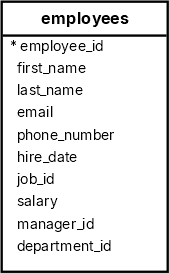
We’ll use the employees table from the sample database to illustrate how the BETWEEN operator works.
Selecting employees within a salary range #
The following query uses the BETWEEN operator to find employees with the salaries between 2,500 and 2,900:
SELECT
  employee_id,
  first_name,
  last_name,
  salary
FROM
  employees
WHERE
  salary BETWEEN 2500 AND 2900
ORDER BY
salary;Code language: SQL (Structured Query Language) (sql) employee_id | first_name | last_name | salary
-------------+------------+-------------+---------
119 | Karen | Colmenares | 2500.00
118 | Guy | Himuro | 2600.00
126 | Irene | Mikkilineni | 2700.00
117 | Sigal | Tobias | 2800.00
116 | Shelli | Baida | 2900.00Notice that the result set includes the employees whose salaries are 2,500 and 2,900.
The following query returns the same result set as the above query. However, it uses comparison operators greater than or equal to (>=) and less than or equal to (<=) instead:
SELECT
  employee_id,
  first_name,
  last_name,
  salary
FROM
  employees
WHERE
  salary >= 2500
  AND salary <= 2900
ORDER BY
salary;Code language: SQL (Structured Query Language) (sql)Using SQL NOT BETWEEN example #
The following statement uses the NOT BETWEEN operator to find all employees whose salaries are not in the range of 2,500 and 2,900:
SELECT
  employee_id,
  first_name,
  last_name,
  salary
FROM
  employees
WHERE
  salary NOT BETWEEN 2500 AND 2900
ORDER BY
salary;Code language: SQL (Structured Query Language) (sql) employee_id | first_name | last_name | salary
-------------+-------------+------------+----------
115 | Alexander | Khoo | 3100.00
193 | Britney | Everett | 3900.00
192 | Sarah | Bell | 4000.00
107 | Diana | Lorentz | 4200.00
200 | Jennifer | Whalen | 4400.00
...Using SQL BETWEEN operator with a date ranges #
The following example uses the BETWEEN operator to find all employees who joined the company between January 1, 1999, and December 31, 2000:
SELECT
  first_name,
  last_name,
  hire_date
FROM
  employees
WHERE
  hire_date BETWEEN '1999-01-01' AND '2000-12-31'
ORDER BY
hire_date;Code language: SQL (Structured Query Language) (sql) first_name | last_name | hire_date
------------+------------+------------
Diana | Lorentz | 1999-02-07
Kimberely | Grant | 1999-05-24
Karen | Colmenares | 1999-08-10
Luis | Popp | 1999-12-07
Charles | Johnson | 2000-01-04Code language: plaintext (plaintext)The following example uses the NOT BETWEEN operator to find employees joined the company before January 1, 1994 or after December 31, 1999:
SELECT
  first_name,
  last_name,
  hire_date
FROM
  employees
WHERE
  hire_date NOT BETWEEN '1994-01-01' AND '1999-12-31'
ORDER BY
hire_date;Code language: SQL (Structured Query Language) (sql) first_name | last_name | hire_date
------------+-----------+------------
Steven | King | 1987-06-17
Jennifer | Whalen | 1987-09-17
Neena | Kochhar | 1989-09-21
Alexander | Hunold | 1990-01-03
Bruce | Ernst | 1991-05-21
Lex | De Haan | 1993-01-13
Charles | Johnson | 2000-01-04Code language: plaintext (plaintext)Using SQL BETWEEN operator with a function example #
The following example uses the BETWEEN operator with the EXTRACT function to find employees who joined the company between 1999 and 2000:
SELECT
  first_name,
  last_name,
  EXTRACT(YEAR  FROM hire_date) joined_year
FROM
  employees
WHERE
  EXTRACT(YEAR  FROM hire_date) BETWEEN 1999 AND 2000
ORDER BY
hire_date;Code language: PostgreSQL SQL dialect and PL/pgSQL (pgsql)Output:
 first_name | last_name  | joined_year
------------+------------+-------------
 Diana      | Lorentz    |        1999
 Kimberely  | Grant      |        1999
 Karen      | Colmenares |        1999
 Luis       | Popp       |        1999
 Charles    | Johnson    |        2000Code language: plaintext (plaintext)
In this example:
- First, the
EXTRACT()function returns the year from the hire date. - Second, the
BETWEENoperator uses the result of theEXTRACTfunction and check if it is within the range1999and2000.
If your database system doesn’t support the EXTRACT() function, you must find a similar function that extracts a year from a date.
Summary #
- Use the
BETWEENoperator to check if a value is within a specific range. - Use the
NOToperator to negate theBETWEENoperator.
Databases #
- PostgreSQL BETWEEN operator
- Oracle BETWEEN operator
- SQL Server BETWEEN operator
- MySQL BETWEEN operator
- SQLite BETWEEN operator
- Db2 BETWEEN operator
- MariaDB BETWEEN operator

