Summary: in this tutorial, you will learn various ways to show tables from an SQLite database by using the SQLite command-line shell program or by querying data from sqlite_master tables.
Showing tables using the sqlite command line program
To show tables in a database using the sqlite command-line shell program, you follow these steps:
First, open the command prompt on Windows or Terminal on unix-like systems.
Second, navigate to the directory where the sqlite3 tool is located:
cd c:\sqliteIn this example, replace the C:\sqlite with the actual path that stores the sqlite3 tool.
Third, open the database file that you want to show the tables:
sqlite3 c:\sqlite\chinook.dbCode language: SQL (Structured Query Language) (sql)This statement opens the database file chinook.db located in the c:\sqlite\ directory.
Fourth, type the .tables command to show all the tables in the database:
.tablesCode language: SQL (Structured Query Language) (sql)The .tables command lists all tables in the chinook database
albums          employees       invoices        playlists
artists         genres          media_types     tracks
customers       invoice_items   playlist_trackCode language: SQL (Structured Query Language) (sql)
Note that both .tables, .table have the same effect. In addition, the command .ta should also work.
The .tables command also can be used to show temporary tables. See the following example:
First, create a new temporary table named temp_table1:
CREATE TEMPORARY TABLE temp_table1( name TEXT );Code language: SQL (Structured Query Language) (sql)Second, list all tables from the database:
.tablesCode language: SQL (Structured Query Language) (sql)Output:
albums            employees         invoices          playlists
artists           genres            media_types       temp.temp_table1
customers         invoice_items     playlist_track    tracksCode language: SQL (Structured Query Language) (sql)
Because the schema of temporary tables is temp, the .tables command shows the names of the schema and table of the temporary tables such as temp.temp_table1.
If you want to show tables with the specific name, you can add a matching pattern:
.tables patternCode language: SQL (Structured Query Language) (sql)The command works the same as LIKE operator. The pattern must be surrounded by single quotation marks ( ').
For example, to find tables whose names start with the letter ‘a’, you use the following command:
.tables 'a%'Code language: SQL (Structured Query Language) (sql)Output:
albums artistsCode language: plaintext (plaintext)To show the tables whose name contains the string ck, you use the %ck% pattern as shown in the following command:
.tables '%ck%'Code language: SQL (Structured Query Language) (sql)Output:
playlist_track tracksCode language: SQL (Structured Query Language) (sql)Showing tables using SQL statement
Alternatively, you can use an SQL statement to retrieve all tables in a database from the sqlite_schema table.
SELECT
    name
FROM
    sqlite_schema
WHERE
    type ='table' AND
    name NOT LIKE 'sqlite_%';Code language: SQL (Structured Query Language) (sql)
Output:
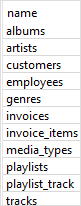
In this query, we filtered out all tables whose names start with sqlite_ such as sqlite_stat1 and sqlite_sequence tables. These tables are the system tables managed internally by SQLite.
Note that SQLite changed the table sqlite_master to sqlite_schema.
In this tutorial, you have learned how to show all tables in a database using the .tables command or by querying data from the sqlite_schema table.

