


Can someone really access your phone remotely? This guide is an eye-opener for anyone who wants to potentially understand how to stop someone from accessing your Phone remotely:
Are you noticing signs that make you worried that someone may have remote access to your phone? If that’s the case, you must take a solid step to stop this immediately.
Your phone not only contains your personal information but also your location history and financial details, and all these details need utmost security.
Table of Contents:
- How to Prevent Remote Connections on Your Phone
- Can Someone Access My iPhone Remotely?
- Why Would Someone Try to Get Access to Your Phone?
- How to Stop Someone From Accessing Your Phone Remotely
- Someone May be Mirroring Your Phone
- Measures to Prevent Cyber Threats Through Mobile
- Frequently Asked Questions
- Conclusion
How to Prevent Remote Connections on Your Phone

Since cyber crimes are at an alarming rate in today’s times, people MUST remain highly cautious about their phone’s security, as the mobile phone of a person can be used to extract almost all the information about him/her. Cyber crimes can take place in the form of cloud intrusions, device attacks, tech support scams, and more.
Further Reading => What is a DDoS Attack
This article aims to help mobile phone users in learning about:
- Cyber crimes
- How to know if they have been a victim of a cyber attack
- How to stop someone from accessing your phone remotely
- What measures should be taken to prevent cyberattacks in the future?
According to a report by Statista, December 2023 witnessed about 5.4 million mobile cyber attacks globally. This indicates that mobile devices around the world are being largely targeted for cyberattacks.
Watch this informative YouTube video to learn how to remove a hacker from your phone.
Can Someone Access My iPhone Remotely?
Yes. This is possible. Hackers do it through spywares, or if they get access to your iCloud details, etc. You must keep a check on your device’s performance to know whether your phone is hacked or not.
Suggested Reading => Top Spyware Removal Tools to Look For
Read the article to find out how to know if someone has access to your phone, and how to stop them from accessing your phone remotely.
What are the signs that indicate that someone may be accessing your phone remotely?
Here is a list of signs that you would notice when someone accesses your phone remotely:
- Your phone’s battery will drain at an unusual rate
- You will notice apps on your phone that you haven’t installed
- Someone may receive messages on your behalf
- Your phone may be showing suspicious notifications or pop-ups
- You may receive notifications about something happening in the background
- Your phone may be taking a lot of time to open apps
- You may see the small icon at the top of your screen that appears when you use your camera or microphone. If those icons appear automatically, even when you are not using the camera or microphone, then it can also be an alarming sign.
- Your phone may be getting unusually hot
- Your phone screen may turn ON automatically
- You may be noticing noises in the background while talking on calls through your phone.
- Your phone may be consuming a lot of data
- You may notice an unusual activity in your bank account.
Apart from all these signs, if something unusual happens, then it can also be a sign of someone having remote access to your phone.
Further Reading => Most Secure Remote Access Solutions
Why Would Someone Try to Get Access to Your Phone?
Hackers, criminals, or scammers may try to get access to your phone for the following purposes:
- To get access to your account details
- To extract your location history
- To get access to your personal data
- To spy on your activities
- To monitor your calls and other activities
How to Stop Someone From Accessing Your Phone Remotely
For Free
How to stop someone from accessing your phone remotely for free:
If you notice any of the above-stated points that indicate that someone is accessing your phone remotely, and you want to stop them without spending any money, then you MUST take the following steps immediately:
- First of all, turn the Airplane mode ON, so that they won’t be able to receive information about your activities.
- Uninstall the suspicious apps from your phone
- Uninstall the apps downloaded from third-party sources
- Go to your phone’s settings and go through app permissions. Stop giving unnecessary permissions to apps.
- Change your passwords
- Use reliable security apps to scan your phone
- There is a chance that the calls and messages made to your number are being forwarded to another number, without your knowledge. So, check the call forwarding settings in your phone to disable all call forwarding settings.
On Android
How to stop someone from accessing your phone remotely on Android:
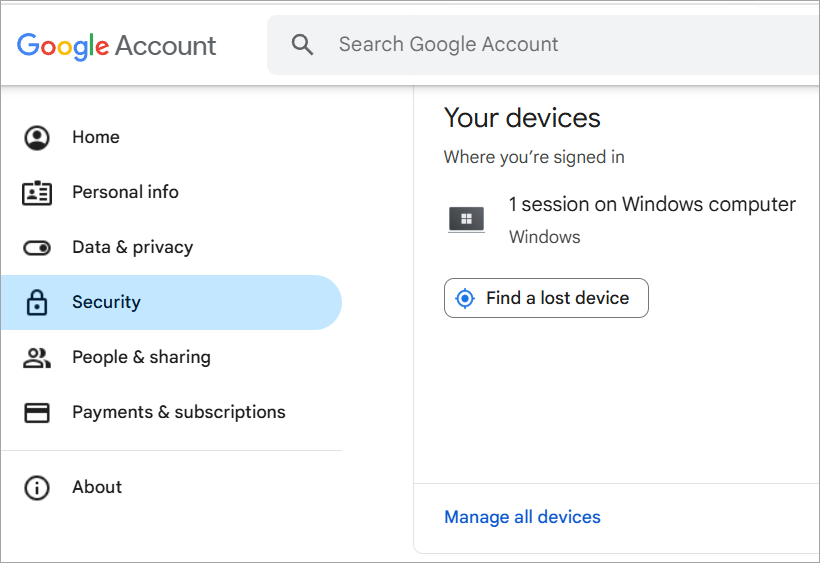
- Log out of your account from other devices. To log out of your Google account from other devices, follow these steps:
- Go to your Google account
- Now go to Security
- Click on your devices, then select Manage all devices.
- Now you will see the list of devices that are using your account.
- You can select any account from the list and click on Sign out to stop that device from syncing your activities.
On iPhone
How to stop someone from accessing your phone remotely on an iPhone:
To log out your Apple ID from other devices, follow these steps:
- Go to Settings
- Tap on your account
- Now tap on Devices
- Now your phone screen will show you the list of devices where your Apple ID is signed in. Please note that all of these devices will have access to your information.
- If there is an unfamiliar or unwanted device stated there, instantly tap on it to remove your account from it.
- Factory reset your phone if required.
Someone May be Mirroring Your Phone
Yes. That’s true. Someone can mirror your phone through malware, spyware, a link, etc. Plus, you must make sure that no stranger or a person with ill intentions towards you should get physical access to your phone. This can prove to be quite dangerous.
If someone is mirroring your phone, you will notice the same signs that indicate that someone is having remote access to your phone.
Further Reading => Top Screen Mirroring Apps for iPhone & Android
Measures to Prevent Cyber Threats Through Mobile
If you want to rest assured that no security breach will happen with you, then take proper measures, for example:
- Do NOT share your Google or iCloud account credentials with anyone.
- Change your passwords every once in a while and enable multi-factor authentication for accessing your account.
- Using a trusted security app can be very beneficial.
- Refrain from logging in to your account from untrustworthy devices.
- Keep a strong password for unlocking your phone.
- Restrain from clicking on any suspicious link.
- Do not open suspicious websites
- Do not download apps from third-party sources.
- Install apps from trusted sources only.
- Instantly take proper action if you notice something unusual happening in your phone.
- If you notice an app on your phone that you haven’t installed, then uninstall it immediately.
- Do not use suspicious WiFi networks.
Further Reading => Best WiFi Companies to Look For
Watch this useful YouTube video to learn about various ways to protect your phone from hackers.
Frequently Asked Questions
1. How to stop someone from mirroring your Android phone?
Answer: If you are noticing unusual activities in your phone (for example, the phone’s screen turns on automatically), someone may be mirroring your phone. You must take the following steps to stop them from doing so:
• Change your Google account password
• Open the Play Store, then go to Manage apps. Now check the list of apps; if there’s an app installed on your phone that you haven’t installed, then delete it immediately.
• Go to Settings and check app permissions. Stop giving unwanted permissions to apps
• Delete apps downloaded from third-party sources
• Factory reset your phone if required.
2. Can you tell if someone has remote access to your phone?
If someone has remote access to your phone, you will see some of these signs:
• Unusual battery drainage
• Your phone’s screen may freeze frequently
• You may see unusual notifications or pop-ups
• You may find new apps installed on your phone automatically
• Your phone may behave abnormally
• Your contacts may be receiving messages on your behalf when you haven’t actually sent them
• You may notice some unusual activity in your bank account
• Unusual heating up of your phone
• Slow loading of apps.
3. Can someone install spyware on my phone without me knowing?
Yes. Spyware can be installed on your phone if you click on phishy links or open suspicious websites. Plus, if someone gets physical access to your phone, then also, they can also install spyware in your phone to get remote access to it.
4. Can someone track my phone if my location is off?
Yes, your phone can be tracked even if your location is turned off. If a spyware or app is installed on your phone to keep an eye on your activities, it may be sending your information to another device. People are advised to restrain from connecting to untrusted Bluetooth devices and public WiFi networks, clicking on suspicious links, etc., to avoid becoming a victim of cyber crimes.
5. How do I know if my phone is synced to another device on my iPhone?
Your iPhone may be synced to another device if you have logged in to that device through your Apple ID, or if someone has hacked your ID somehow. To check whether your iPhone is synced to another device, follow these steps:
• Go to Settings
• Tap on your account
• Now tap on Devices
• Now your phone screen will show you the list of devices where your Apple ID is signed in. Please note that all of these devices will have access to your information.
• If there is an unfamiliar or unwanted device stated there, instantly tap on it to remove your account from it.
6. How to check who has access to my phone?
To check if someone has remote access to your phone, do as stated under:
• First of all, check the list of apps downloaded on your phone. If there is any suspicious app, uninstall it immediately.
• You can check if someone has access to your Google account by following these simple steps:
1. Open your Google account
2. In the navigation panel, there will be an option for Security
3. Now go to the Your devices panel and click on Manage all devices
4. Now you will see a list of devices on which you had signed on within the last few weeks. 5. You can select any device for more information about the duration of the session.
• If you are using an iPhone, you can check whether your iCloud account is signed in on unrecognised devices.
Conclusion
Having studied the drastic figures of cyber crimes happening all over the world, we were compelled to do a good study on the steps to be taken to keep our mobile phones safe from such threats.
In this article, we talked about reasons why these attacks happen, what the signs are that indicate someone is watching your phone activities remotely, how to stop them from doing so, and what steps should be taken to stop these incidents from happening in the future.
I would like to advise mobile phone users, especially kids and teenagers, to adopt a ZERO TRUST Solutions regarding their mobile phone security. Always keep a strong password on your phone, change your account password frequently, do NOT ignore the signs that indicate something is wrong with your phone, and keep checking now and then that no suspicious app is running in your phone in the background.
Was this helpful?
Recommended Reading
-

Are you searching for the best Hidden Spy Apps for Android? Read this review of the top Undetectable Spyware apps for Android smartphones to select the best option: A spy app can monitor the smartphone activities of your child. The apps let you monitor smartphone activities to protect your child.…
-

Read this comprehensive review to compare and select the right spyware for iPhone. Analyze the technical specifications & features to select the best iPhone spy apps of your choice: Spy apps refer to smartphone surveillance applications that are helpful for parental control and employee monitoring. There are many apps that…
-
This tutorial reviews the best WhatsApp Spy Apps for Android and iPhone to help understand how to spy on WhatsApp accounts and why you might need them: WhatsApp is one of the most popular messengers used for daily communication, particularly for personal conversations. It is a quick and free way…
-
Visualize real-time global cyber threats with the best Cyber attack maps. Explore the digital battlefield and know more about the top cyber threat maps to easily track online attacks: A cyber attack map is the same as a cyber threat map. It’s a tool that can get a real-time visual…


