


A Complete Guide to Cross-Site Scripting (XSS) Attack, how to prevent it, and XSS testing.
Cross-Site Scripting (XSS) is one of the most popular and vulnerable attacks which is known by every advanced tester. It is considered one of the riskiest attacks for web applications and can bring harmful consequences too.
XSS is often compared with similar client-side attacks, as client-side languages are mostly being used during this attack. However, an XSS attack is considered riskier, because of its ability to damage even less vulnerable technologies.
In this XSS attack tutorial, we will give you a complete overview of its types, tools, and preventive measures with perfect examples in simple terms for your easy understanding.
Table of Contents:
XSS Attack Tutorial

Introduction to XSS Attack
A cross-site scripting attack is a malicious code injection, which will be executed in the victim’s browser. The malicious script can be saved on the webserver and executed every time the user calls the appropriate functionality. It can also be performed with the other methods – without any saved script in the webserver.
The main purpose of this attack is to steal the other user’s identity data – cookies, session tokens, and other information. In most cases, this attack is being used to steal the other person’s cookies. As you know, cookies help us to log in automatically. Therefore, with stolen cookies, we can log in with the other identities. And this is one of the reasons why this attack is considered one of the riskiest attacks.
An XSS attack is being performed on the client-side. It can be performed with different client-side programming languages. However, most often this attack is performed with Javascript and HTML.
Recommended read => HTML Injection tutorial
Recommended Tools
#1) ManageEngine Vulnerability Management Plus

With ManageEngine Vulnerability Manager Plus, you get software that protects your IT infrastructure against OS, third-party, and Zero-Day vulnerabilities. The software’s quite effective at scanning and discovering areas on local and remote endpoints that are susceptible to cyber-attacks. It then arms you with attacker-based analytics to prioritize your actions.
The tool can prioritize vulnerabilities on the basis of severity, age, affected system count, and exploitability. The software also audits your systems to make sure that they are in compliance with over 75 CSI benchmarks. What the tool really excels at, however, is in the patch management department.
You’ll have absolutely no issues using the tool to customize, orchestrate and automatically deploy patches to fix OS and third-party application vulnerabilities.
#2) Intruder

Intruder is a powerful vulnerability scanner that finds cybersecurity weaknesses in your digital estate, explains the risks and helps with remediation before a breach can occur. Running over 140,000 security checks, Intruder scans your systems for weaknesses such as cross-site scripting (XSS), SQL injection, missing patches, misconfigurations, and more.
Using the same best-in-class scanning engines as big banks and government agencies, Intruder removes the hassle of vulnerability management, so you can focus on what truly matters. It saves time by prioritizing results based on their business context as well as proactively scanning your systems for the latest vulnerabilities so that you can stay ahead of attackers.
Intruder integrates with all the major cloud providers as well as apps and integrations like Slack and Jira.
How is XSS Being Performed?
Cross-Site Scripting attack means sending and injecting malicious code or script. Malicious code is usually written in client-side programming languages such as Javascript, HTML, VBScript, Flash, etc. However, Javascript and HTML are mostly used to perform this attack.
This attack can be performed in different ways. Depending upon the type of XSS attack, the malicious script may be reflected on the victim’s browser or stored in the database and executed every time, when the user calls the appropriate function.
The main reason for this attack is inappropriate user input validation, where malicious input can get into the output. A malicious user can enter a script, which will be injected into the website’s code. Then the browser is not able to know if the executed code is malicious or not.
Therefore malicious scripts are being executed in the victim’s browser or any faked form is being displayed for the users. There are several forms in which XSS attacks can occur.
The main forms of Cross Site Scripting are as follows:
- Cross-Site Scripting can occur on the malicious script executed on the client side.
- Fake pages or forms displayed to the user (where the victim types credentials or clicks a malicious link).
- On the websites with displayed advertisements.
- Malicious emails sent to the victim.
This attack occurs when the malicious user finds the vulnerable parts of the website and sends it as appropriate malicious input. A malicious script is being injected into the code and then sent as the output to the final user.
Let’s analyze a simple Example: Consider we have a website with a search field.

If the search field is vulnerable, when the user enters any script, then it will be executed.
Consider, a user enters a very simple script as shown below:
<script>alert(‘XSS’)</script>

Then after clicking on the “Search” button, the entered script will be executed.
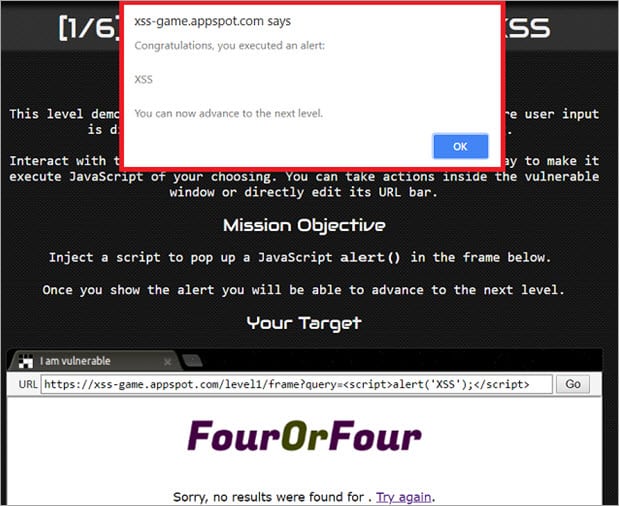
As you can see in the Example, the script typed into the search field gets executed. This just shows the vulnerability of the XSS attack. However, a more harmful script may be typed as well.
Many testers mix up Cross Site Scripting attacks with Javascript Injection, which is also being performed on the client side. In both, the attack’s malicious script is being injected. However, in the XSS attack case <script> tags are not necessary to execute the script.
For Example:
<body onload=alert(‘something’)>;
It can also be executed at another event.
For example: On a mouse hover.
<b onmouseover=alert(‘XSS testing!‘)></b>
Let us analyze another Example: Consider, we have a page where the latest book review is being displayed on the website.
The code on this page will look as shown below:
print "<html>"
print "<h1>Latest book review</h1>"
print database.latestReview
print "</html>"
Therefore, in the review field if a malicious user types something harmful, then it will be loaded on this page.
For example: Consider that in the review field if a hacker types the code below.
<script>destroyWebsite();</script>
Then on the page load function destroyWebsite(); it will be called and it will perform its harmful actions.
As most of us know, this attack is mostly used to gather the other person’s cookies, which can be used to log in with the other identities. Let us analyze another example of a possible XSS script with possible cookie theft.
For example, through the vulnerable website’s field, the hacker injects the appropriate code.
<script type=”text/javascript”>
var test=’../example.php?cookie_data=’+escape(document.cookie);
</script>
As seen in the indicated Example, cookies are escaped and sent to example.php script’s variable ‘cookie_data’. If the malicious user would inject this script into the website’s code, then it will be executed in the user’s browser and cookies will be sent to the malicious user.
Types of Cross Site Scripting Attacks
The prime purpose of performing an XSS attack is to steal another person’s identity. As mentioned, it may be cookies, session tokens, etc. XSS also may be used to display faked pages or forms for the victim. However, this attack can be performed in several ways.
This attack is divided into three main categories as shown below:
#1) Reflected XSS – This attack occurs when a malicious script is not being saved on the webserver but is reflected in the website’s results.
#2) Stored XSS – This attack occurs when a malicious script is being saved on the webserver permanently.
#3) DOM – This occurs when the DOM environment is being changed, but the code remains the same.
Let’s take an in-depth look at them.
#1) Reflected XSS
This occurs when malicious results are being returned after entering the malicious code. Reflected XSS code is not being saved permanently. In this case, the malicious code is being reflected in any website result. The attack code can be included in the faked URL or HTTP parameters.
It can affect the victim in different ways – by displaying fake malicious pages or by sending a malicious email.
Let us analyze an Example: Consider, we have a login page where the user has to type his username and password.

In some websites when wrong credentials are typed, an error message like “Sorry your username or your credentials are wrong” will be displayed.
In this example, the username is a parameter that is typed by the user in the login form. Including the username parameter in the output is a mistake. This way an attacker can type a malicious script instead of the correct username or email address.

For example, a script may be sent to the user’s malicious email letter, where the victim may click the faked link.
#2) Stored XSS
This attack can be considered riskier and it provides more damage.
In this type of attack, the malicious code or script is being saved on the webserver (for example, in the database) and executed every time the users call the appropriate functionality. This way stored XSS attacks can affect many users. Also, as the script is being stored on the webserver, it will affect the website for a longer time.
In order to perform stored XSS attack, the malicious script should be sent through the vulnerable input form (For Example, the comment field or review field). This way the appropriate script will be saved in the database and executed on the page load or appropriate function calling.
Consider having a page where the latest user opinion is being loaded. Therefore, in the opinion or comment field it would be typed with the script as shown below.
<script>alert(document.cookie)</script>
This will be saved in the database and executed on the page load, as the latest user opinion will be displayed on the page. If a website is vulnerable to XSS, then the page will load a popup window with cookies. This script is quite simple and less harmful. However, instead of this script, a more harmful code may be entered.
For example, cookies may be sent to a malicious user or a fake page may be displayed in the victim’s browser.
#3) DOM XSS
This type of attack occurs when the DOM environment is being changed, but the client-side code does not change. If the DOM environment is being modified in the victim’s browser, then the client side code executes differently.
In order to get a better understanding of how the XSS DOM attack is being performed, let us analyze the following Example.
Consider, there is a webpage with URL http://testing.com/book.html?default=1. As we know, “default” is a parameter and “1” is its value. Therefore, in order to perform an XSS DOM attack, we would send a script as the parameter.
For Example:
http://testing.com/book.html?default=<script>alert(document.cookie)</script>
In this Example, the request is sent for the page book.html?default=<script>alert(document.cookie)</script> to testing.com. Therefore for that page, a DOM object is being created by the browser, where the document location object will contain the appropriate string.
http://testing.com/book.html?default=<script>alert(document.cookie)</script>

This way the DOM environment is being affected. Of course, instead of this simple script, something more harmful may also be entered.
How to Test Against XSS?
Firstly, in order to test against XSS attack, black box testing can be performed.
This means that it can be tested without a code review. However, code review is always a recommended practice and it brings more reliable results too. Based on my software testing experience, I would like to add that if a good black box testing technique is selected and performed accurately, then this should be enough.
While starting testing, a tester should consider which website’s parts are vulnerable to the possible XSS attack.
It is best to list them in any testing document and this way we will be sure that nothing will be missed. The tester should plan for what code or script input fields have to be checked. It is important to remember, what results mean, that the application is vulnerable and it analyzes the results thoroughly.
While testing for possible attacks, it is important to check how they are being responded to the typed scripts and if those scripts were executed or not etc.
For example, a tester may try to type in a browser script like:
<script>alert(document.cookie)</script>

If this script is being executed, then there is a huge possibility that XSS is possible.
Also, while testing manually for possible Cross Site Scripting attacks, it is important to remember that encoded brackets should also be tried.
For Example:
%3cscript%3ealert(document.cookie)%3c/script%3e

Some people try to protect the websites and systems from various attacks by changing the brackets into double.
For Example, if the input field would be typed with bracket “<”, then it would be changed to double “<<”. Therefore, it is important to remember that testing with encoded brackets should also be executed.
You should not forget to test the website’s URL.
For example, we have a request:
http://www.testing.com/test.asp?pageid=2&title=Testing%20Title

If this attack is possible, then the HTML code will include <h1>Testing Title</h1>. If this vulnerability is present in the web application, an indicated text will be inserted in <h1></h1> tags.
Trying to pass some code through HTTP request as this is also a method to check if this attack is possible.
Generally, while testing for possible XSS attack, input validation should be checked and the tester should be conscious while checking the website’s output. Also, if a code review is being performed, it is important to find out how input can get into the output.
XSS Testing Tools
Cross-Site Scripting is one of the most popular risky attacks, there are plenty of tools to test it automatically. We can find various scanners to check for possible XSS attack vulnerabilities – like, Nesus and Nikto. Both of which are considered quite reliable.
Based on my software testing career, I would like to mention the SOAP UI tool. SOAP UI can be considered a quite strong tool for checking against possible XSS attacks. It contains ready templates for checking against this attack. It really simplifies the testing process.
However, in order to test for this vulnerability with the SOAP UI tool, API level testing should already be automated with that tool. Another solution to test against XSS can be browser plugins. However, plugins are considered quite a weak tool to check against this type of attack.
Even while testing automatically, the tester should have good knowledge of this attack type and should be able to analyze the results appropriately.
Good knowledge is also helpful while selecting the testing tool. Also, it is important to know that while performing scanning for security vulnerabilities with an automatic tool, testing manually is also a good practice and this way the tester will be able to see the results and analyze them.
Comparison with Other Attacks
XSS is considered to be one of the riskiest attacks, as its main purpose is to steal the website’s or system’s user identities. Also, XSS attacks can be performed with different client-side languages like Javascript, HTML, VBScript, Flash, etc. This makes it more harmful and widespread than the other possible attacks.
Testing for XSS attacks is quite similar to testing for the other possible client-side attacks. However, it is important to remember what additional cases should be checked while testing for XSS.
Another thing that makes this attack riskier is the possibility to be stored in the web service – this way it can affect many users for a longer period of time. XSS can sometimes be performed to even less vulnerable systems and its vulnerabilities are sometimes difficult to find.
Also, compared with the other attacks, XSS has many ways to be performed and affects the website as well.
Ways to Prevent XSS
Though this type of attack is considered to be one of the most dangerous and risky ones, still a prevention plan should be prepared. Because of the popularity of this attack, there are quite many ways to prevent it.
Commonly used main prevention methods include:
- Data validation
- Filtering
- Escaping
The first step in the prevention of this attack is input validation. Everything that is entered by the user should be precisely validated, because the user’s input may find its way to the output. Data validation can be named as the basis for ensuring the system’s security. I would like to remind you that the idea of validation does not allow inappropriate input.
Therefore it just helps to reduce the risks, but may not be enough to prevent the possible XSS vulnerability.
Another good prevention method is user input filtering. The idea of the filtering is to search for risky keywords in the user’s input and remove them or replace them with empty strings.
The keywords may be:
- <script></script> tags
- Javascript commands
- HTML markup
Input filtering is quite easy to practice. It can be performed in different ways too.
Like:
- by developers who have written server-side code.
- An appropriate programming language library is being used.
In this case, some developers write their own code to search for appropriate keywords and remove them. However, the easier way would be to select an appropriate programming language library to filter the user’s input. I would like to comment, that using libraries is a more reliable way, as those libraries were used and tested by many developers.
Another possible prevention method is character escape. In this practice, appropriate characters are being changed by special codes. For Example, < escaped character may look like <. It is important to know that we can find appropriate libraries to escape the characters.
Meanwhile, good testing should not be forgotten as well. It should be invested in good software testers’ knowledge and reliable software testing tools. This way good software quality will be better assured.
Prevention According to Technologies
As already discussed, filtering and character escaping are the main prevention methods. However, it can be performed differently in different programming languages. Some programming languages have appropriate filtering libraries and some do not.
It should be mentioned, that filtering can be performed quite easily in Java and PHP programming languages, as they have appropriate libraries for it.
Java technology is quite widely used, therefore there are many solutions to it. If you are using Spring technology and would like to escape HTML for the whole application, then you have to write the appropriate code in the project’s web.xml file.
<context-param>
<param-name>defaultHtmlEscape</param-name>
<param-value>true</param-value>
</context-param>
This code will switch to HTML escape for the entire application.
If you would like to switch to HTML escaping for the appropriate page forms, then the code should be written as follows:
<spring:htmlEscape defaultHtmlEscape="true" />
There are many ready XSS filters in the form of a .jar file. I wanted to remind you that the .jar file has to be added to your project and only then will its libraries be used. One such XSS filter is xssflt.jar, which is a servlet filter. This .jar file can be easily downloaded from the internet and added to your project.
This filter checks every request that is sent to the application and cleans it from a potential injection.
When an external.jar file is added to the project, it also has to be described in the web.xml file:
<filter>
<filter-name>XSSFilter</filter-name>
<filter-class>com.cj.xss.XSSFilter</filter-class>
</filter>
Another possible solution is the ESAPI library. ESAPI library is compatible with many programming languages. You can find ESAPI libraries for Java and PHP programming languages. It is an open-source and free library, which helps to control the application’s security.
XSS Cheat Sheets
XSS Cheat Sheets can be very helpful for cross-site scripting prevention. It is a guideline for the developers on how to prevent XSS attacks. The rules are very helpful and should not be forgotten while developing. XSS Cheat Sheets can be found in internet communities such as OWASP (The Open Web Application Security Project).
Different types of Cheat Sheets:
- XSS Prevention Cheat Sheet
- DOM XSS Cheat Sheet
- XSS Filter Evasion Cheat Sheet
The main guideline would be the XSS Prevention Cheat Sheet, as it provides common rules for XSS attack prevention. If you would follow DOM XSS Cheat Sheet and XSS Filter Evasion Cheat Sheet rules, you still would have to follow XSS Prevention Cheat Sheet.
As stated, XSS Prevention Cheat Sheet can be found in the OWASP community. This Cheat Sheet provides us with a list of rules, that would help us to reduce the risks of possible XSS attacks. The coding rules include security vulnerabilities on a prevention basis.
A few of the rules include:
- Untrusted data should not be inserted.
- HTML should be escaped before inserting any untrusted data.
- The attribute should be escaped before inserting untrusted data, etc.
Hence, the Cheat Sheet may be very helpful in preventing this type of attack.
Conclusion
While testing, it is highly recommended to evaluate the risks that bring possible XSS attacks. XSS attacks can affect web applications, that seem to be secure as well.
It is considered to be one of the most harmful and risky attacks. Hence, we should not forget this type of testing. While performing testing against XSS, it is important to have good knowledge about this attack. This is the basis to analyze the testing results correctly and choose the appropriate testing tools.
Are you a tester who has dealt with cross-site scripting XSS attacks? Do you have any interesting facts about XSS attacks that would help our readers too? Feel free to share your experiences with us in the comments section below !!
Was this helpful?
Recommended Reading
-

Web Service Scripting using the Web Services Protocol in LoadRunner VuGen: In this LoadRunner Training Tutorials for Beginners, we learned more about LoadRunner Functions. This tutorial is an addendum to our VuGen scripting series, here we will learn to script in one of the most important protocols (other than Web-HTTP/HTML…
-

Alpha and Beta testing are Customer Validation methodologies (Acceptance Testing types) that help in building confidence to launch the product and thereby result in the success of the product in the market. Even though they both rely on real users and different team feedback, they are driven by distinct processes,…
-
Definition - What is Compliance Testing? "Compliance testing" also known as Conformance testing is non-functional. testing technique which is done to validate, whether the system developed meets the organization’s prescribed standards or not. There is a separate category of testing known as “Non-Functional Testing”. Nonfunctional testing, as the name suggests,…
-
I am happy to share the "Manual Testing Help" eBook prepared by one of our readers. The content of this eBook is very useful to understand manual testing concepts, testing methodologies and preparing for Software Testing interviews. Here are some of the topics covered in this book: Fundamentals of software…


Examples are good. Thanks for sharing.
hey shreedhar or shraidar….your scam website needs upgrade bro. ….greetings from syscr4shers we are at your website server 😉
enjoy being hacked ^_^
var x = document.getElementById(“email”); document.write(x.value)
This is a very detailed tutorial covering many things.