
Bytecode in Java is a highly optimized, platform-independent set of instructions generated by the Java compiler (javac) and stored in a .class file.
In simple words, bytecode is an intermediate, platform-independent set of binary code generated by the Java compiler during the compilation of a Java program. This bytecode is read and executed by the Java Virtual Machine (JVM) rather than directly by the underlying hardware or operating system.
When you compile a human-readable Java source code file (with a .java extension), it does not convert directly into machine code. Instead, the Java compiler (javac) converts Java source code (.java files) into bytecode, which is saved in .class files.
This bytecode file contains a set of instructions that are understood and executed by the Java Virtual Machine to run Java program. Therefore, when you write any Java program, it does not run directly on the operating system like C or C++, but runs through the JVM.
Why Java Uses Bytecode?
Java uses bytecode to achieve its most powerful feature, “platform independence”. Bytecode is not native machine code for any specific platform, such as hardware or operating system.
Bytecode acts as an intermediate language between Java source code and machine-specific instructions that is platform (machine) independent.
The same bytecode can run on any computer system that has a compatible JVM, regardless of any specific operating system or hardware. This is how Java follows the famous principle “Write Once, Run Anywhere”. As a result, Java programs are highly portable, secure, and reliable.
The JVM executes bytecode with the help of a combination of interpretation and Just-In-Time (JIT) compilation, and converts it into native machine code at runtime for enhanced performance.
Characteristics of Bytecode in Java
Here are some key characteristics of bytecode in Java:
1. Platform Independence
- The Java compiler converts Java source code (.java files) into bytecode (.class files).
- This bytecode is platform-independent, meaning the same .class file can run on any operating system such as Windows, Linux, or macOS, provided a compatible Java Virtual Machine (JVM) is installed.
- This is why Java follows the principle “Write Once, Run Anywhere (WORA)”.
2. Execution Model
- Java bytecode is not native machine code and is not directly executable by operating system or CPU processor.
- Instead, it is executed by the Java Virtual Machine, which acts as an intermediary between the bytecode and the underlying hardware.
- The JVM interprets the bytecode and dynamically converts frequently executed bytecode instructions into native machine code with the help of Just-In-Time (JIT) compilation at runtime.
- The JVM provides the runtime environment required to execute Java programs by managing memory, loading classes, verifying bytecode, and coordinating execution with the underlying operating system and hardware. Due to this, the JVM plays an important role in the execution of Java programs.
3. Optimization
- Modern Java Virtual Machines use Just-In-Time (JIT) compilation to highly optimize Java bytecode for efficient execution during runtime.
- JVMs apply various optimizations such as method inlining, dead code elimination, and adaptive compilation.
- These optimizations significantly improve performance while maintaining platform independence, portability, and security, which are fundamental characteristics of the Java platform.
4. Stack-based Architecture
- The JVM is a stack-based machine, and Java bytecode follows this stack-based architecture, where most operations are performed using an operand stack rather than CPU registers.
- Bytecode instructions push values onto the stack and pop them off to perform operations such as arithmetic calculations, method calls, and data manipulation.
- This design simplifies bytecode generation and makes the JVM easier to implement across different hardware platforms.
Java Compilation and Execution Process
Let us understand how Java source code becomes a running program. Look at the below figure to understand the whole compilation and execution process better.
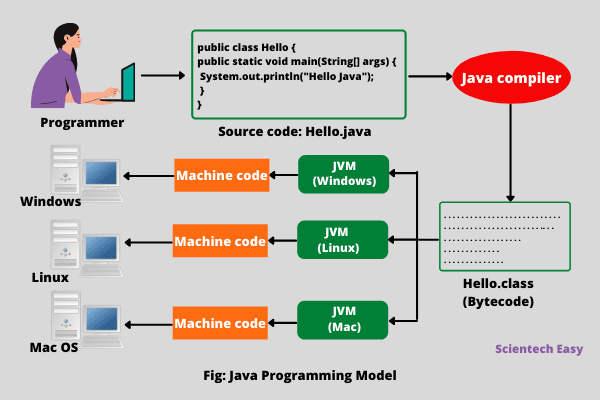
Step 1: Writing Source Code
When you write a Java program in a file with a .java extension, it is saved the file with Hello.java.
class Hello {
   public static void main(String[] args) {
      System.out.println("Hello Java");
   }
}
Step 2: Compilation (javac)
When you compile a Java source code file (Hello.java) using the Java compiler with the command javac Hello.java, the compiler converts the source code into bytecode and generates a file named Hello.class. This .class file contains Java bytecode, not native machine code.
Step 3: Execution (java)
The runtime environment (JVM) loads the .class file and executes the bytecode contained within it. This execution process involves several steps:
- The class loader subsystem locates and loads the required .class files into memory.
- The bytecode verifier checks the loaded bytecode for security and correctness, and the JVM allocates memory for class structures.
- The execution engine interprets the bytecode or uses the Just-In-Time compiler to compile frequently executed bytecode into native machine code for faster execution.
Thus, this execution model allows Java programs to run consistently across different operating systems and hardware platforms. Java is both a compiled and an interpreted language that helps to move Java programs easily from one computer system to another.
Any changes and upgrades in operating systems, processors, and system resources do not affect the Java program, as long as a compatible JVM is installed.
This is the reason why Java has become one of the most widely used programming languages for building applications in the world that operate different kinds of systems worldwide on the internet.
What Is Inside a Bytecode File?
A .class file contains Java bytecode and metadata in a structured binary format, not human-readable text. This structured binary format includes:
- Magic Number – A unique hexadecimal value (0xCAFEBABE) used to identify a valid Java class file.
- Version Information – Specifies the minor and major version numbers of the Java compiler used to generate the bytecode.
- Constant Pool – A central repository of constants such as class names, method names, field names, string literals, numeric constants, and symbolic references used throughout the class file.
- Access Flags (Modifiers) – Define the class and its members using modifiers such as public, final, abstract, static, and others, which determine accessibility and behavior.
- Field Information – Provides details about class variables, including their types and access modifiers.
- Method Information – Contains method signatures and the actual bytecode instructions that the JVM executes.
- Attributes – Additional metadata such as exception handling information, debugging data (LineNumberTable), annotations, and other JVM-specific attributes.
Bytecode Instructions (Opcodes)
Bytecode consists of opcode instructions that tell the JVM what to do. Some examples of Bytecode Instructions are as:
- iload – Load integer
- istore – Store integer
- iadd – Add integers
- invokevirtual – Call method
- return – Return from method
Each instruction is 1 byte long, which is why it is called bytecode in Java.
Role of JVM in Bytecode Execution
The Java Virtual Machine (JVM) plays a crucial role in the execution of Java bytecode. The responsibilities of the JVM include:
- Loading bytecode – JVM loads the required .class files into memory using the class loader subsystem.
- Verifying bytecode – Bytecode verifier verifies the bytecode to ensure security, correctness, and compliance with JVM specifications. It checks:
- No illegal memory access
- No stack overflow
- Correct data types
- Proper method calls
- This verification prevent viruses, unauthorized memory access, and runtime crashes. This is why Java is considered a secure language.
- Interpreting or compiling bytecode – JVM interprets bytecode instructions and uses Just-In-Time (JIT) compilation to convert frequently executed bytecode into native machine code.
- Executing instructions – JVM executes the resulting instructions and manages program execution at runtime.
Advantages of Java Bytecode
Java Bytecode has mainly two advantages that are as:
- Bytecode makes the Java program portable across the different hardware (processors) and operating system platforms. The poly requirement is that Java Virtual Machine must be installed on them.
- The second advantage is that it increases security of code because of control of JVM over the execution of bytecode file.
Difference between Bytecode vs Machine code
The main difference between the byte code and machine code is that byte code can be run only on JVM whereas machine code is a set of instructions in machine language that can be directly run by the CPU.
Difference between .java and .class
Java source code file (with a .java extension) are compiled into bytecode (with a .class extension), which is then interpreted and executed by a Java processor called JVM.
Key Takeaways
- Bytecode is generated by the Java compiler (javac).
- It is stored in .class files.
- Bytecode is executed by the Java Virtual Machine (JVM).
- It is platform-independent.
- Bytecode is secure and optimized at runtime using Just-In-Time (JIT) compilation.
We hope this tutorial has helped you to understand the basic definition of bytecode in Java and its various key characteristics.


