
The conditional operator in Java provides a one-line approach for creating a simple conditional statement. It is commonly used as a shorthand method for the if-else statement. It makes the code much simpler, shorter, and more readable.
The conditional operator in Java is represented by ?:. It is also known as a ternary operator because it takes three operands and performs a conditional test.
Instead of writing multiple lines using an if-else statement, the ternary operator allows you to evaluate a condition and return a value in a single line. Therefore, it can also be used directly within expressions.
Syntax of Conditional Operator in Java
The basic syntax to use a conditional (ternary) operator in a Java is:
variable = (condition) ? expression_if_true : expression_if_false;In the above syntax:
- The condition is a boolean expression that must return either true or false.
- The expression_if_true executes when the condition is true. The result of this expression is assigned to the variable.
- The expression_if_false executes when the condition is false. The result of this expression is assigned to the variable.
Working of Conditional Operator in Java
The conditional operator ?: works as follows:
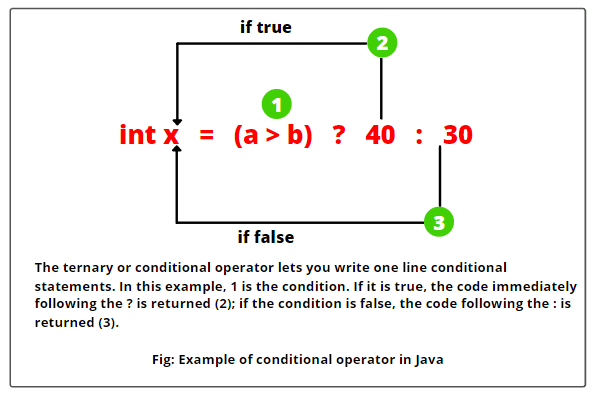
First, the condition is evaluated. If it is true, the expression expression_if_true is evaluated, and its value is stored in the variable. If the condition is false, the expression expression_if_false is evaluated, and its value is stored in the variable.
Consider an example below.
public class TernaryOperatorExample {
   public static void main(String[] args) {
      int a = 40;
      int b = 30;

   // Using conditional operator.
      int x = (a > b) ? a : b;
   // Display result
      System.out.println("The maximum value is: " + x);
  }
}
In this example:
- The conditional expression (a > b) is evaluated first.
- Since the value 40 of a is greater than the value 30 of b, the condition is true. Therefore, the value 40 of a is assigned to the variable x. In other words, the value of a is stored in the variable x.
- In case the conditional expression evaluates to false, the value of b is stored in the variable x.
- Finally, the program prints the result.
Why Is the Conditional Operator Called Ternary Operator?
In the above example, we have used three operands:
- (a > b) → condition
- The value of a if the condition is true.
- The value of b if the condition is false.
That’s why it is called ternary operator in Java.
[blocksy-content-block id=”12371″]
Equivalent if-else Statement
You can also achieve this by using the if-else statement as follows:
int x;
if (a > b) {
     x = a;
} else {
     x = b;
}
Examples based on Conditional (Ternary) Operator
Let us take some important example programs based on the use of the conditional (ternary) operator in Java.
Example 1: Greatest Number between the Two Numbers
public class Test {
   public static void main(String[] args)
   {
      int x = 20;
      int y = 10;
      int z = (x > y) ? x : y;
      System.out.println("Greatest number: " +z);
   }
}
Output:
Greatest number: 20
Let us consider another simple example program where we will check whether a person is eligible to vote or not using the concept of conditional operator. We will take age as an input from the user using Scanner class.
Example 2: Eligible to Vote or Not
import java.util.Scanner;
public class EligibleToVote {
public static void main(String[] args)
{
// Create a Scanner class object to accept input from the user.
   Scanner sc = new Scanner(System.in);

// Prompt the user to input age for voting.
   System.out.println("Enter your age: ");
   int age = sc.nextInt();

   String str = "You are eligible to vote.";
   String str2 = "You are not eligible to vote.";
   String eligible = (age >= 18) ? str : str2;
   System.out.println(eligible);
  }
}
Output:
Enter your age:
25
You are eligible to vote.
Enter your age:
17
You are not eligible to vote.
In this example:
- We have created an instance of the Scanner class that is used to read input from the standard input stream (usually the keyboard).
- The Scanner class is part of the Java API and is commonly used for this purpose.
- Then, we have displayed a message on the console prompting the user to enter his age.
- The nextInt() method of the Scanner class reads an integer value from the user and stores it in a variable named age.
- We have used two string variables named str and str2. The variable str holds a message, “You are eligible to vote.” and the variable str2 holds a message, “You are not eligible to vote.”.
- After that, we have applied the condition (age >= 18) using the Java conditional operator (? :).
- If this condition is true, the variable ‘eligible’ will be assigned or stored the value of str (“You are eligible to vote.”).
- If the condition is false, the variable ‘eligible’ will be assigned the value of str2 (“You are not eligible to vote.”).
[blocksy-content-block id=”12121″]
Let us take an example program in which we will check whether a year is a leap year or not using the concept of ternary operator in Java.
Example 3: Checking a Year is a Leap Year or Not
import java.util.Scanner;
public class LeapYearCheck {
public static void main(String[] args)
{
// Create a Scanner class object to accept input from the user.
   Scanner sc = new Scanner(System.in);

// Prompt the user to input year.
   System.out.println("Enter a year: ");

   int year = sc.nextInt();
   int check4 = year % 4 == 0 ? 1 : 0;
   int check100 = year % 100 == 0 ? -1: 0;

   int check400 = year % 400 == 0 ? 1 : 0;
   int total = check4 + check100 + check400;

// Creating strings.
   String s = "Leap year";
   String str = "Not leap year";
   String leapYear = total == 1 ? s : str;
   System.out.println(leapYear);
  }
}
Output:
Enter a year:
2016
Leap year
In this example program, we have used the following logic to test leap years. They are:
- If the entered year is divisible by 4, add 1.
- If the entered year is divisible by 100, subtract 1.
- If the entered year is divisible by 400, add 1.
- If the total is 1, the year is a leap year; otherwise, it is not a leap year.
The general rule to check a leap year is that a year is a leap year if it is divisible by 4 but not divisible by 100, unless it is also divisible by 400.
For example, the years 1900 and 2100 are divisible by 100 but not by 400, so they are not leap years. However, the year 2000 is divisible by 400, so it is a leap year.
[blocksy-content-block id=”12153″]
Example 4: Check Even or Odd
public class EvenOddExample {
public static void main(String[] args) {
int num = 7;

String result = (num % 2 == 0) ? "Even" : "Odd";

System.out.println("Number is: " + result);
}
}
Output:
Number is: Odd
In this example:
- The condition (num % 2 == 0) checks if the number is divisible by 2.
- If the condition is true, the value “Even” is stored in the variable result.
- If the condition is false, the value “Odd” is stored in the variable result.
- Since the condition evaluates to false, the output is Odd.
Example 5: Check Positive or Negative Number
public class PositiveNegativeExample {
   public static void main(String[] args) {
     int number = -5;
     String result = (number >= 0) ? "Positive" : "Negative";
     System.out.println("Number is: " + result);
   }
}
Output:
Number is: Positive
In this example:
- The condition (number >= 0) checks if the number is non-negative.
- If the condition evaluates to true, the value “Positive” is stored in the variable result.
- If the condition evaluates to false, the value “Negative” is stored in the variable result.
- Since the condition is false for -5, the output is Negative.
Example 6: Largest Among Three Numbers
public class LargestNumberExample {
    public static void main(String[] args) {
       int a = 10, b = 25, c = 15;
       int largest = (a > b)
                      ? (a > c ? a : c)
                      : (b > c ? b : c);
       System.out.println("Largest number is: " + largest);
    }
}
Output:
Largest number is: 25
This is an example of nested comparison (ternary) operator in Java. In this example:
- If the condition (a > b) is true, the program compares a with c. It returns a if a > c; otherwise, it returns c.
- Since the condition is false, the program compares b with c. It evaluates 25 > 15, which is true. Therefore, it returns the value 25 of b.
- The program assigns the value 25 to the variable largest.
- The nested ternary operator in Java replaces multiple if-else statements with a single line of code.
Example 7: String Comparison
public class StringExample {
   public static void main(String[] args) {
      String username = "admin";
      String message = (username.equals("admin"))
                         ? "Welcome Admin"
                         : "Welcome User";
      System.out.println(message);
   }
}
Output:
Welcome Admin
Example 8: Checking Pass or Fail
public class PassFailExample {
    public static void main(String[] args) {
        int marks = 45;
        String result = (marks >= 50) ? "Pass" : "Fail";
        System.out.println("Result: " + result);
    }
}
Output:
Result: Fail
Example 9: Method Call with Conditional Operator
public class MethodExample {
    static int square(int x) {
        return x * x;
    }
    public static void main(String[] args) {
        int num = 5;
        int result = (num > 0) ? square(num) : 0;
        System.out.println("Result: " + result);
    }
}
Output:
Result: 25
Example 10: Checking Age Category
public class AgeCategoryExample {
    public static void main(String[] args) {
        int age = 16;
     // Uses nested ternary operators with multiple conditions.
        String category = (age < 13) ? "Child" :
                          (age < 20) ? "Teenager" :
                                       "Adult";
        System.out.println("Category: " + category);
    }
}
Output:
Category: Teenager
Advanced Examples for Best Practice
Here, we have given some advanced examples based on the use of conditional (ternary) operator and unary operators in Java that you should try yourself.
Example 11:
public class Test {
public static void main(String[] args)
{
   int x = 20;
   int y = 20;
   ++x;
   y--;
   int z = x < y ? x : y;
   System.out.println(z);
 }
}
Example 12:
public class Test {
public static void main(String[] args)
{
   int x = 2;
   int y = 4;
   int z = ++x < y-- - 1 ? x : y;
   System.out.println(z);
 }
}
Example 13:
public class Test {
public static void main(String[] args)
{
  int x = 2;
  int y = 4;
  int z = x++/2 == y-- % 3 ? x : y;
  System.out.println(z);
 }
}
Advantages of Conditional Operator in Java
The following are the advantages of using the conditional operator in Java:
- The conditional operator makes code concise by reducing multiple lines into a single line.
- It improves readability by providing a cleaner syntax for simple decisions.
- It allows us to use conditions directly within expressions.
Disadvantages of Conditional Operator in Java
The following are the disadvantages of using the conditional operator in Java:
- The conditional operator becomes difficult to read when you overuse it, especially with nested conditions.
- It is not suitable for complex logic. In such cases, you should use if-else statements for better clarity.
- It makes debugging more difficult compared to standard conditional statements.


