Summary: in this tutorial, you’ll learn how to use the Tkinter ScrolledText widget that consists of a Text widget and vertical Scrollbar widget.
Introduction to the Tkinter ScrolledText widget #
So far, you’ve learned how to create a Text widget and how to link a vertical Scrollbar to it. To make it more convenient, Tkinter provides you with the ScrolledText widget which does the same things as a Text widget linked to a vertical Scrollbar widget.
To create aScrolledText widget, you follow these steps:
First, import the ScrolledText class from the tkinter.scrolledtext module:
from tkinter.scrolledtext import ScrolledTextCode language: JavaScript (javascript)Second, create a new instance of the ScrolledText widget:
text = ScrolledText(master=None,**kw)In this syntax:
masteris the parent widget (a window or frame) where you want to place theScrolledTextwidget.**kwis one or more keyword arguments that specifies theScrolledTextwidget’s configuration such aswidthandheight.
The ScrolledText widget inherits from the Text widget, therefore, it has all the properties of the the Text widget.
Features of the ScrolledText widget #
- Automatic Scrollbar: The
ScrolledTextwidget has a vertical scrollbar so you don’t need to create a scrollbar and link it to the widget manually. - Text Editing: You can add, remove, and change text like in a
Textwidget. - Configurable Appearance: You can set font styles, colors, and cursor styles in the
ScrolledTextwidget.
Tkinter ScrolledText widget example #
The following program illustrates how to create a ScrolledText widget:
import tkinter as tk
from tkinter.scrolledtext import ScrolledText

root = tk.Tk()
root.title("ScrolledText Widget")

text = ScrolledText(root, width=80,  height=8)
text.pack(padx = 10, pady=10,  fill=tk.BOTH, side=tk.LEFT, expand=True)

root.mainloop()Code language: JavaScript (javascript)
Output:
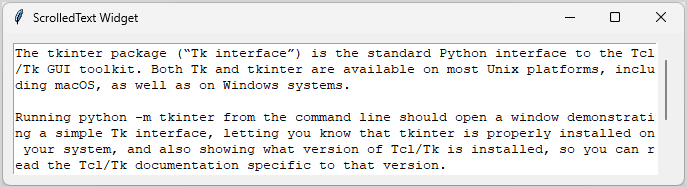
How it works.
First, import the ScrolledText class from the tkinter.scrolledtext module:
from tkinter.scrolledtext import ScrolledTextCode language: JavaScript (javascript)Second, create a new ScrolledText widget instance
text = ScrolledText(root, width=50, height=10)Third, pack it on the main window:
text.pack(padx = 10, pady=10, fill=tk.BOTH, side=tk.LEFT, expand=True)Code language: PHP (php)Summary #
- Use the Tkinter
ScrolledTextwidget to create aTextwidget with an integrated verticalScrollbar.

