Summary: in this tutorial, you will learn how to use the MariaDB update statement to modify data in a table.
Introduction to MariaDB update statement
The update statement allows you to modify data of one or more columns in a table. The following shows the syntax of the update statement:
update table_name
set column1 = value1,
column2 = value2,
...
[where search_condition];
Code language: SQL (Structured Query Language) (sql)In this syntax:
- First, specify the name of the table in which you want to update data after the
updatekeyword. - Second, specify one or more columns with new values in the set clause
- Third, use an optional
whereclause to specify which rows you want to modify data. If you skip thewhereclause, the update statement will modify the data of all rows in the table.
MariaDB update statement examples
We’ll use the table contacts created in the previous tutorial for the demonstration:
create table if not exists contacts(
    id int auto_increment,
    first_name varchar(50) not null,
    last_name varchar(50) not null,
    full_name varchar(101)
        as (concat(first_name, ' ', last_name)) virtual,
    phone varchar(100),
    contact_group varchar(50) default 'General',
    primary key(id)
);
Code language: SQL (Structured Query Language) (sql)
Here are the contents of the contacts table:
select * from contacts;
Code language: SQL (Structured Query Language) (sql)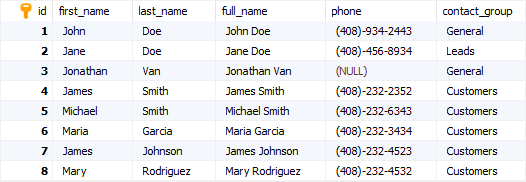
A) Using MariaDB update to modify a single row example
The following example uses the update statement to change the last name of the row with id 1 to 'Smith';
update contacts
set last_name = 'Smith'
where id = 1;
Code language: SQL (Structured Query Language) (sql)
MariaDB issued the following message:
Affected rows: 1  Found rows: 0  Warnings: 0  Duration for 1 query: 0.000 sec.
Code language: SQL (Structured Query Language) (sql)
The number of affected rows is 1. It means that one row has been updated successfully.
To verify the update, you can use the following query:
select * from contacts
where id = 1;
Code language: SQL (Structured Query Language) (sql)
B) Using MariaDB update to modify multiple rows example
The following example uses the update statement to modify the phone area code of contacts in the 'Customers' group from 408 to 510:
update
    contacts
set
    phone = replace(phone,'(408)','(510)')
where
    contact_group = 'Customers';
Code language: SQL (Structured Query Language) (sql)
In this example, the where clause returns all contacts whose groups are 'Customers'. The set clause uses the replace() function that replaces the string '(408)' in the phone column with the string '(510)'.
To verify the update, you can query the contacts whose groups are 'Customers':
select * from contacts
where contact_group = 'Customers';
Code language: SQL (Structured Query Language) (sql)
C) Using MariaDB update to modify all rows example
The following example uses the update statement to replace all the character '-' in the phone column with space:
update
    contacts
set
    phone = replace(phone,'-',' ')
Code language: SQL (Structured Query Language) (sql)
The update statement in this example does not use a where clause, therefore, it updates all rows of the contacts table.
This query returns all rows from contacts table:
select * from contacts;
Code language: SQL (Structured Query Language) (sql)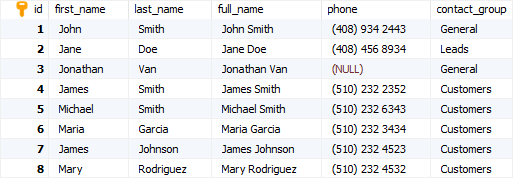
In this tutorial, you have learned how to use the MariaDB update statement to modify data of the existing rows in a table.

