Summary: in this tutorial, you will learn how to use the MariaDB like operator to search for strings that match a specific pattern.
Introduction to MariaDB like operator
The MariaDB like operator is a logical operator that returns true if a string matches a specific pattern.
A pattern includes regular characters and special characters. The special characters are called wildcards.
MariaDB supports two wildcards: percent (%) and underscore (_):
- The percent wildcard (
%) matches any string of zero or more characters. - The underscore (
_) wildcard matches any single character.
The following illustrates the syntax of the like operator:
expression like pattern
Code language: SQL (Structured Query Language) (sql)The like operator is used in the where clause of the select, update, and delete statements to form a predicate for filtering rows based on a pattern.
MariaDB like operator examples
We’ll use the countries table from the sample database to demonstrate the like operator.
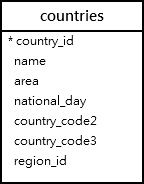
A) Using the MariaDB like operator with the percentage (%) wildcard examples
This statement uses the percentage (%) wildcard to find countries whose names start with the letter 'D':
select
    name
from
    countries
where
    name like 'd%'
order by
    name;
Code language: SQL (Structured Query Language) (sql)
The following example finds countries whose names end with the string 'tan':
select
    name
from
    countries
where
    name like '%tan'
order by
    name;
Code language: SQL (Structured Query Language) (sql)
The following statement finds countries whose names contain the string 'state':
select
    name
from
    countries
where
    name like '%state%'
order by
    name;
Code language: SQL (Structured Query Language) (sql)
B) Using the MariaDB like operator with the _ wildcard examples
The following example finds countries whose names start with any character, followed by the n character, and ends with any number of characters:
select
    name
from
    countries
where
    name like '_n%'
order by
    name;
Code language: SQL (Structured Query Language) (sql)
The escape clause
Sometimes, the data that you want to match may contain the wildcard characters such as 10% or 10_12.
MariaDB uses the backslash character (\) as the default escape character.
The following statement returns 1 because V_2019 matches the pattern '%\_20%'. The \ is the escape character that instructs the like operator to treat the underscore _ as a regular character.
select 'V_2019' like '%\_20%';
Code language: SQL (Structured Query Language) (sql)
To change the default escape character, you use the escape clause:
expression like pattern
    escape escape_characters
Code language: SQL (Structured Query Language) (sql)
The following statement uses the escape clause to change the default character to #:
select 'V_2019' like '%#_20%' escape '#';
Code language: SQL (Structured Query Language) (sql)
In this tutorial, you have learned how to use the MariaDB like operator to check if a value matches a specific pattern.

