Summary: in this tutorial, you will learn how to use the MariaDB except operator to return the difference between two or more result sets.
Introduction to MariaDB except operator
The except operator compares result sets of two (or more) select statements and returns the distinct rows from the first select statement which are not output by the second select statement.
Simply put, the except operator subtracts the result set of a query from another.
The following illustrates the syntax of the except operator:
select-statement
except
select-statement;
Code language: SQL (Structured Query Language) (sql)In this syntax:
- First, specify at least two or more
selectstatements that you want to compare their result sets. - Second, use the
exceptoperator to connect twoselectstatements.
The columns of the select statements must meet the following rules:
- The number and order of columns must be the same in the
selectstatements. - The data types of the corresponding columns must be the same.
The following picture illustrates the except operation of the two result sets T1 (1,2,3) and T2 (2,3,4):
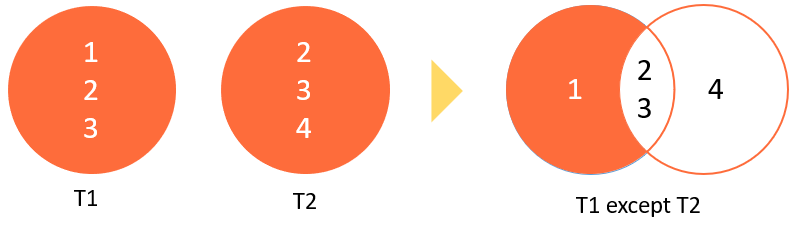
MariaDB except operator example
We’ll use the guests and vips tables from the sample database for the demonstration:
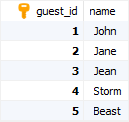
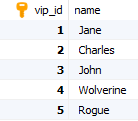
The following example uses the except operator to find names of the guests that are not in the vips table:
select name from guests
except
select name from vips
order by name;
Code language: SQL (Structured Query Language) (sql)
In this tutorial, you learned how to use the MariaDB except operator to return the difference between two or more result sets.

