In macOS Monterey 12.1, which is available in a beta capacity right now, Apple introduced its new SharePlay feature to FaceTime. Previously only available on iPhone and iPad, SharePlay allows you to share your Mac's screen with other people on a FaceTime call, which opens up new possibilities for sharing experiences with friends, family, and co-workers.

shareplay macos
Thanks to SharePlay, you and others on the same FaceTime call as you can listen to music or watch TV movies and shows together. You can even share your screen or a specific app window on your Mac's desktop with the people you're chatting with to discuss a piece of work or provide remote tech support, or simply to enjoy looking at a photo album together.

The following steps guide you through the new SharePlay screen sharing feature in FaceTime on macOS Monterey 12.1:

  1. Launch FaceTime on your Mac.
  2. Click New FaceTime and add the contacts that you want to share your screen with, then click the FaceTime button. Alternately, select a recent contact to initiate a video call.
    shareplay

  3. When the call has connected, click the SharePlay button in the control overlay.
    SharePlay

  4. To share your entire screen or a specific window, click either Window or Screen in the FaceTime menu bar item dropdown. If you chose Window, click the window in question that you want to share.
    shareplay

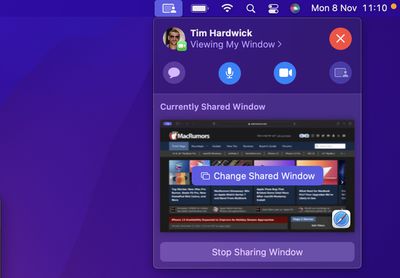
  5. To stop sharing the window or screen, click Stop Sharing Window/Screen in the FaceTime menu bar item dropdown, where you can also change the window being shared.
    shareplay

  6. When sharing a window, you can also click the SharePlay button in the top-right corner of the window to reveal three options: Stop Sharing Window, Change Shared Window, and Share Entire Display.

    SharePlay

The introduction of SharePlay on Mac also means you can listen to music or watch movies and TV together over FaceTime, and everyone on the call will see the same synced playback and controls.

SharePlay
In addition to first-party Apple experiences like Apple TV and Apple Music, SharePlay is also compatible with third-party app experiences. Developers have already been building SharePlay experiences for iOS devices, and now they can build SharePlay features into Mac apps as well. For more on what you can do with ‌FaceTime‌ in iOS 15.1 and iPadOS 15.1, we have a dedicated guide that highlights all of the new features.

Note: The SharePlay feature in FaceTime requires macOS Monterey 12.1, which is only available to beta testers as of writing. Expect Monterey 12.1 to be released to all users in late fall 2021.


Related Forum: macOS Monterey

Top Rated Comments

Benjamin Nabulsi Avatar
54 months ago
? this will make my life easier when I help my mom..
Score: 5 Votes (Like | Disagree)
indros Avatar
54 months ago
For folks curious about how to share screen without 15.1, you can share screen via Messages already via clicking on a message thread, clicking the "i" icon in the top right and selecting "share." I'd heard about the FaceTime thing and found this when looking it up.

https://support.apple.com/guide/messages/screen-sharing-icht11883/mac
Score: 4 Votes (Like | Disagree)
TheYayAreaLiving ?️ Avatar
54 months ago
Hopefully tomorrow is the day for new beta to be released.
Score: 4 Votes (Like | Disagree)
sirozha Avatar
54 months ago
Man, this is revolutionary! I can’t believe it’s now possible to share a screen while on a video call. I can only imagine the tech we are going to be able to have in 2010!
Score: 3 Votes (Like | Disagree)
TheDailyApple Avatar
54 months ago
So… am I the only one who misread the title as “How to Share Your Scream on a FaceTime Call”?
Score: 2 Votes (Like | Disagree)
sirozha Avatar
54 months ago

Ok daddy? ?
You are again posting in these forums instead of finishing your med school. I will stop paying for it just like I promised before. Enough is enough.
Score: 2 Votes (Like | Disagree)

Popular Stories

apple intelligence black

Report: Apple's AI Strategy Could Finally Pay Off in 2026

Tuesday December 30, 2025 9:01 am PST by
Apple's restrained artificial intelligence strategy may pay off in 2026 amid the arrival of a revamped Siri and concerns around the AI market "bubble" bursting, The Information argues. The speculative report notes that Apple has taken a restrained approach with AI innovations compared with peers such as OpenAI, Google, and Meta, which are investing hundreds of billions of dollars in data...
apple fitness 2026 1

Apple Teases 'Something Big' Coming Soon to Apple Fitness+

Tuesday December 30, 2025 2:11 pm PST by
The Apple Fitness+ Instagram account today teased that the service has "big plans" for 2026. In a video, several Apple Fitness+ trainers are shown holding up newspapers with headlines related to Apple Fitness+. What's Apple Fitness+ Planning for the New Year? Something Big is Coming to Apple Fitness+ The Countdown Begins. Apple Fitness+ 2026 is Almost Here 2026 Plans Still Under ...
maxresdefault

Hands-On With a Rough iPhone Fold Mockup

Monday December 29, 2025 10:55 am PST by
Apple is rumored to be introducing a foldable iPhone in September 2026, and since it will bring the biggest form factor change since the iPhone was introduced in 2007, curiosity about the design is high. A 3D designer created an iPhone Fold design based on rumors, and we printed it out to see how it compares to Apple's current iPhones. Subscribe to the MacRumors YouTube channel for more ...
maxresdefault

Where's the New Apple TV?

Monday December 22, 2025 11:30 am PST by
Apple hasn't updated the Apple TV 4K since 2022, and 2025 was supposed to be the year that we got a refresh. There were rumors suggesting Apple would release the new Apple TV before the end of 2025, but it looks like that's not going to happen now. Subscribe to the MacRumors YouTube channel for more videos. Bloomberg's Mark Gurman said several times across 2024 and 2025 that Apple would...
iphone 17 pro dark blue 1

iPhone 17 Pro and Pro Max Users Report Static Speaker Noise While Charging

Tuesday December 30, 2025 10:39 am PST by
iPhone 17 Pro and Pro Max owners are having trouble with the speakers of their devices, and have complained about a static or hissing noise that occurs when the iPhone is charging. There are multiple discussions about the issue on Reddit, the MacRumors forums, and Apple's Support Community, where affected users say there is a noticeable static noise "like an old radio." Some people report...
iPhone Top Left Hole Punch Face ID Feature Purple

iPhone 18 Pro Launching Next Year With These 12 New Features

Tuesday December 23, 2025 8:36 am PST by
While the iPhone 18 Pro and iPhone 18 Pro Max are not expected to launch for another nine months, there are already plenty of rumors about the devices. Below, we have recapped 12 features rumored for the iPhone 18 Pro models. The same overall design is expected, with 6.3-inch and 6.9-inch display sizes, and a "plateau" housing three rear cameras Under-screen Face ID Front camera in...
Mac Pro Feature Blue

What's Happening With the Mac Pro?

Wednesday December 31, 2025 9:59 am PST by
Apple hasn't updated the Mac Pro since 2023, and according to recent rumors, there's no update coming in the near future. In fact, Apple might be finished with the Mac Pro. Bloomberg recently said that the Mac Pro is "on the back burner" and has been "largely written off" by Apple. Apple apparently views the more compact Mac Studio as the ideal high-end pro-level desktop, and it has almost...
macbook air march 2020

Apple Says Final Intel MacBook Air and Apple Watch Series 5 Now 'Vintage'

Wednesday December 31, 2025 8:39 am PST by
Apple today added the final 13-inch MacBook Air powered by Intel processors, the Apple Watch Series 5, and additional products to its vintage products list. The iPhone 11 Pro was also added to the list after the iPhone 11 Pro Max was added back in September. The full list of products added to Apple's vintage and obsolete list today: MacBook Air (Retina, 13-inch, 2020) iPhone 8 Plus 128GB ...