
iPhone Mirroring offers a seamless way to control your iPhone from your Mac, allowing you to respond to notifications, send messages, and navigate iOS apps without touching your phone. The feature is particularly useful for tasks that require extensive typing, such as composing long emails or editing documents on your iPhone. If you're experiencing issues with iPhone Mirroring, follow these steps to get it working again.

iPhone Mirroring Thumb 2

Check System Requirements

First, ensure your devices meet the minimum requirements for iPhone Mirroring:

  • Your Mac has an Apple silicon chip or T2 security chip
  • Your Mac is running macOS Sequoia or later
  • Your iPhone is running iOS 18 or later

Check Your Apple Account
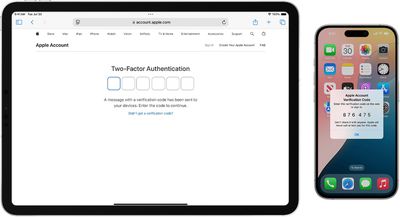
ios 18 iphone 15 pro ipad pro two factor authentication
For iPhone Mirroring to work, both your Mac and iPhone must be signed in to the same Apple Account, and two-factor authentication needs to be enabled for the account.

Check Proximity and Connectivity
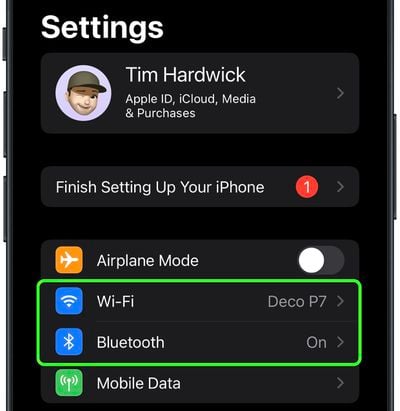
settings
Keep your iPhone close to your Mac, as iPhone Mirroring relies on Bluetooth. Make sure both Bluetooth and Wi-Fi are turned on for both devices. If either is off, enable them in System Settings on your Mac and in Settings on your iPhone.

Additionally, make sure Personal Hotspot is not in use on your iPhone, and that your Mac is not sharing its internet connection or using AirPlay or Sidecar.

Restart Both Devices

A simple restart can often resolve connectivity issues. Power off both your Mac and iPhone, then turn them back on after a minute.

Check for Software Updates
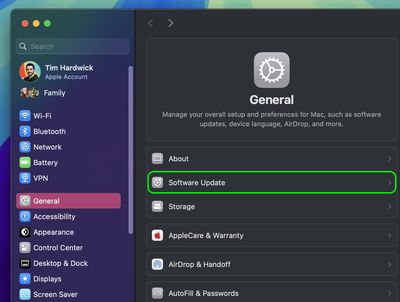
settings
Ensure both your Mac and iPhone are running the latest software versions. On your Mac, go to System Settings ➝ General ➝ Software Update. On your iPhone, go to Settings ➝ General ➝ Software Update.

Disable VPN and Security Software

settings
Temporarily turn off any VPN services or third-party security software on both devices, as these can interfere with the connection.

Reset iPhone Mirroring
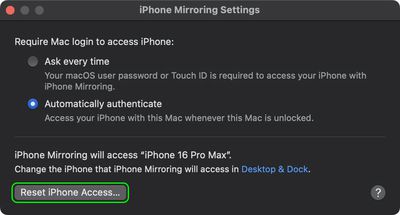
iphone mirroring reset settings
If issues persist, reset iPhone Mirroring settings. In the iPhone Mirroring app, go to iPhone Mirroring ➝ Settings, and click Reset iPhone Access. This will clear existing settings and allow you to set up the feature again from scratch.

Drag and Drop Won't Work?
finder
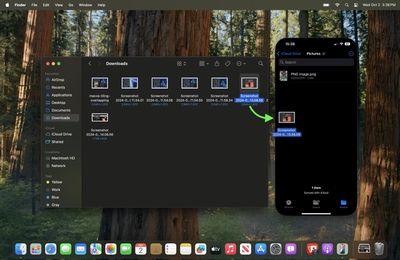
As of writing, Apple has not enabled file transfers for iPhone Mirroring, so you cannot currently transfer files, photos, and videos from your Mac to your ‌iPhone‌ and vice versa using drag and drop gestures. This capability will be enabled in Apple's forthcoming macOS Sequoia 15.1 update, which is expected to drop in late October 2024.

How Are Your Settings?

Depending on your issue, adjusting these iPhone Mirroring settings might help:

  1. Open the iPhone Mirroring app on your Mac.
  2. Go to iPhone Mirroring ➝ Settings in the menu bar.
  3. Choose between Ask Every Time or Authenticate Automatically for Mac login authentication.
settings

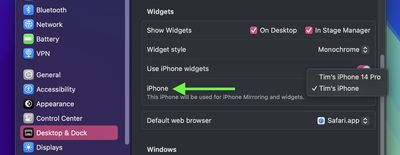
It's also worth noting that in System Settings ➝ Desktop & Dock, under the "Widgets" section, you'll find an option to select which iPhone to use if you have multiple devices.

No Luck?

If you've tried all these troubleshooting tips and iPhone Mirroring still isn't working, you may need to contact Apple Support for further assistance.

Popular Stories

iphone 17 models

No iPhone 18 Launch This Year, Reports Suggest

Thursday January 1, 2026 8:43 am PST by
Apple is not expected to release a standard iPhone 18 model this year, according to a growing number of reports that suggest the company is planning a significant change to its long-standing annual iPhone launch cycle. Despite the immense success of the iPhone 17 in 2025, the iPhone 18 is not expected to arrive until the spring of 2027, leaving the iPhone 17 in the lineup as the latest...
apple intelligence black

Report: Apple's AI Strategy Could Finally Pay Off in 2026

Tuesday December 30, 2025 9:01 am PST by
Apple's restrained artificial intelligence strategy may pay off in 2026 amid the arrival of a revamped Siri and concerns around the AI market "bubble" bursting, The Information argues. The speculative report notes that Apple has taken a restrained approach with AI innovations compared with peers such as OpenAI, Google, and Meta, which are investing hundreds of billions of dollars in data...
apple fitness 2026 1

Apple Teases 'Something Big' Coming Soon to Apple Fitness+

Tuesday December 30, 2025 2:11 pm PST by
The Apple Fitness+ Instagram account today teased that the service has "big plans" for 2026. In a video, several Apple Fitness+ trainers are shown holding up newspapers with headlines related to Apple Fitness+. What's Apple Fitness+ Planning for the New Year? Something Big is Coming to Apple Fitness+ The Countdown Begins. Apple Fitness+ 2026 is Almost Here 2026 Plans Still Under ...
iphone 17 pro dark blue 1

iPhone 17 Pro and Pro Max Users Report Static Speaker Noise While Charging

Tuesday December 30, 2025 10:39 am PST by
iPhone 17 Pro and Pro Max owners are having trouble with the speakers of their devices, and have complained about a static or hissing noise that occurs when the iPhone is charging. There are multiple discussions about the issue on Reddit, the MacRumors forums, and Apple's Support Community, where affected users say there is a noticeable static noise "like an old radio." Some people report...
maxresdefault

Hands-On With a Rough iPhone Fold Mockup

Monday December 29, 2025 10:55 am PST by
Apple is rumored to be introducing a foldable iPhone in September 2026, and since it will bring the biggest form factor change since the iPhone was introduced in 2007, curiosity about the design is high. A 3D designer created an iPhone Fold design based on rumors, and we printed it out to see how it compares to Apple's current iPhones. Subscribe to the MacRumors YouTube channel for more ...
maxresdefault

Where's the New Apple TV?

Monday December 22, 2025 11:30 am PST by
Apple hasn't updated the Apple TV 4K since 2022, and 2025 was supposed to be the year that we got a refresh. There were rumors suggesting Apple would release the new Apple TV before the end of 2025, but it looks like that's not going to happen now. Subscribe to the MacRumors YouTube channel for more videos. Bloomberg's Mark Gurman said several times across 2024 and 2025 that Apple would...
Mac Pro Feature Blue

What's Happening With the Mac Pro?

Wednesday December 31, 2025 9:59 am PST by
Apple hasn't updated the Mac Pro since 2023, and according to recent rumors, there's no update coming in the near future. In fact, Apple might be finished with the Mac Pro. Bloomberg recently said that the Mac Pro is "on the back burner" and has been "largely written off" by Apple. Apple apparently views the more compact Mac Studio as the ideal high-end pro-level desktop, and it has almost...
macbook air march 2020

Apple Says Final Intel MacBook Air and Apple Watch Series 5 Now 'Vintage'

Wednesday December 31, 2025 8:39 am PST by
Apple today added the final 13-inch MacBook Air powered by Intel processors, the Apple Watch Series 5, and additional products to its vintage products list. The iPhone 11 Pro was also added to the list after the iPhone 11 Pro Max was added back in September. The full list of products added to Apple's vintage and obsolete list today: MacBook Air (Retina, 13-inch, 2020) iPhone 8 Plus 128GB ...