- 入门基础
- 进阶教程
- 面向对象
- SQL教程
 《Python3入门教程》
 Python创建表

在本教程的这一部分中,无涯教程将创建新表Employee。建立连接对象时,必须提及数据库名称。
可以使用SQL的CREATE TABLE语句创建新表。在数据库PythonDB中,表Employee最初具有四列,即name,id,salary和department_id。
以下查询用于创建新表Employee。
> create table Employee (name varchar(20) not null, id int primary key, salary float not null, Dept_Id int not null)
示例
import mysql.connector

#创建连接对象
myconn = mysql.connector.connect(host = "localhost", user = "root",passwd = "Learnfk",database = "PythonDB")

#创建光标对象
cur = myconn.cursor()

try:
    #创建一个名为 Employee 的表,该表具有四列,即名称、id、salary和Dept_id
    dbs = cur.execute("create table Employee(name varchar(20) not null, id int(20) not null primary key, salary float not null, Dept_id int not null)")
except:
    myconn.rollback()

myconn.close()

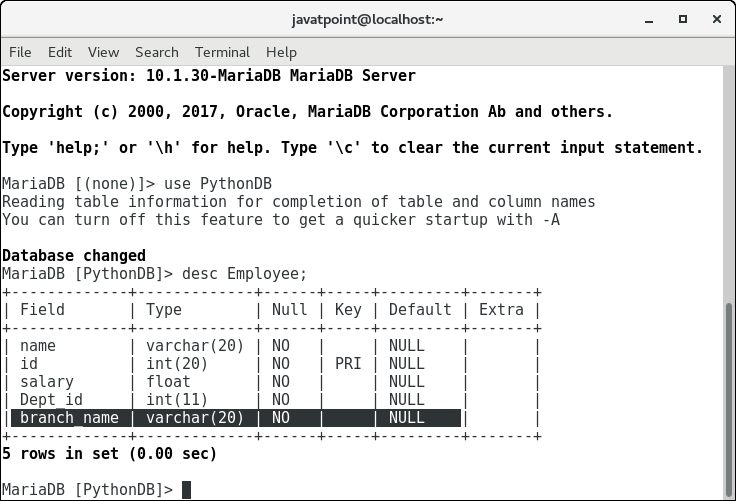
现在,可以检查表Employee是否存在于数据库中。
修改表
alter table Employee add branch_name varchar(20) not null
考虑以下示例。
import mysql.connector

#创建连接对象
myconn = mysql.connector.connect(host = "localhost", user = "root",passwd = "Learnfk",database = "PythonDB")

#创建光标对象
cur = myconn.cursor()

try:
    #将列branch_name添加到表 Employee
    cur.execute("alter table Employee add branch_name varchar(20) not null")
except:
    myconn.rollback()

myconn.close()
祝学习愉快!(内容编辑有误?请选中要编辑内容 -> 右键 -> 修改 -> 提交!)
好记忆不如烂笔头。留下您的足迹吧 :)