- 基础教程
- 高级教程
- 布局教程
- 基础教程
- Flexbox布局
 《CSS入门教程》
 CSS轮廓(Outlines)

轮廓与边框非常相似,但是也没有什么主要区别-
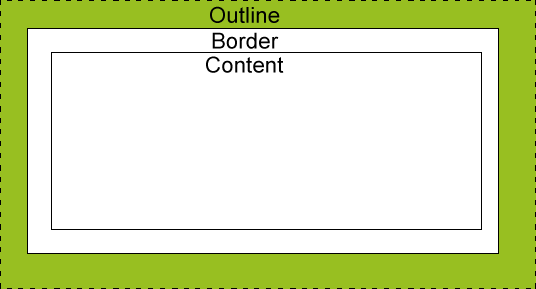
轮廓不占用空间。
轮廓不必一定是矩形的。
您可以使用CSS设置以下大纲属性。
outline-width : 属性用于设置轮廓的宽度。
ouylinr-style : 属性用于设置轮廓的线条样式。
outline-color : 属性用于设置轮廓的颜色。
outline : 简写属性,用于在单个语句中设置以上所有三个属性。
outline-width 属性
outline-width属性指定要添加到框的轮廓的宽度。就像border-width属性一样,其值应为thin,medium或thick,零像素的宽度表示没有轮廓。
<html>
   <head>
   </head>

   <body>
      <p style="outline-width:thin; outline-style:solid;">
         This text is having thin outline.
      </p>
      <br />

      <p style="outline-width:thick; outline-style:solid;">
         This text is having thick outline.
      </p>
      <br />

      <p style="outline-width:5px; outline-style:solid;">
         This text is having 5x outline.
      </p>
   </body>
</html>
它将产生以下输出-
outline-style 属性
outline-style 属性指定围绕元素的line(solid,dotted或dashed)的样式。它可以采用以下值之一-
none - 无边框。 (相当于outline-width:0;)
solid - 轮廓是一条实线。
dotted - 轮廓是一系列点。
dashed - 轮廓是一系列短线。
double - 轮廓是两条实线。
groove - 轮廓看起来像刻在页面上。
ridge - 轮廓与凹槽相反。
inset - 轮廓使框看起来像嵌入在页面中。
outset - 轮廓使框看起来像是从画布中出来的。
hidden - 跟none相同。
<html>
   <head>
   </head>

   <body>
      <p style="outline-width:thin; outline-style:solid;">
         This text is having thin solid  outline.
      </p>
      <br />

      <p style="outline-width:thick; outline-style:dashed;">
         This text is having thick dashed outline.
      </p>
      <br />

      <p style="outline-width:5px;outline-style:dotted;">
         This text is having 5x dotted outline.
      </p>
   </body>
</html>
它将产生以下输出-
outline-color 属性
outline-color 属性允许您指定轮廓的颜色。与color和border-color属性一样,其值应该是颜色名称,十六进制颜色或RGB值。
<html>
   <head>
   </head>

   <body>
      <p style="outline-width:thin; outline-style:solid;outline-color:red">
         This text is having thin solid red  outline.
      </p>
      <br />

      <p style="outline-width:thick; outline-style:dashed;outline-color:#009900">
         This text is having thick dashed green outline.
      </p>
      <br />

      <p style="outline-width:5px;outline-style:dotted;outline-color:rgb(13,33,232)">
         This text is having 5x dotted blue outline.
      </p>
   </body>
</html>
它将产生以下输出-
outline 属性
outline属性是一种简写属性,它允许您以任何顺序(单个语句)为前面讨论的三个属性中的任何一个指定值。
<html>
   <head>
   </head>

   <body>
      <p style="outline:thin solid red;">
         This text is having thin solid red outline.
      </p>
      <br />

      <p style="outline:thick dashed #009900;">
         This text is having thick dashed green outline.
      </p>
      <br />

      <p style="outline:5px dotted rgb(13,33,232);">
         This text is having 5x dotted blue outline.
      </p>
   </body>
</html>
它将产生以下输出-
祝学习愉快!(内容编辑有误?请选中要编辑内容 -> 右键 -> 修改 -> 提交!)