
Spring Batch provides essential functionalities such as transaction management, job processing statistics, job restart capabilities, and more. One of its key features is the ability to handle large volumes of data efficiently. In this article, we’ll delve into using Spring Batch for reading from and writing to XML files with StaxEventItemReader and StaxEventItemWriter.
1. Introduction
When it comes to XML file processing, Spring Batch makes it straightforward to read XML records, map them to Java objects, and write Java objects back as XML records. This is accomplished using StaxEventItemReader for reading and StaxEventItemWriter for writing, with the help of Jakarta Binding formerly known as JAXB (Java Architecture for XML Binding) for marshalling and unmarshalling XML data.
The StaxEventItemReader reads XML files and is suitable for processing large XML files. It uses JAXB to unmarshal XML data into Java objects. Similarly, the StaxEventItemWriter marshals Java objects back into XML format using JAXB and writes them to an XML file.
In the following sections, we will demonstrate how to set up a Spring Batch project with Maven, define our XML schema and corresponding Java model classes, configure the reader and writer, and execute a complete batch job.
2. Project Setup
Maven pom.xml Configuration
First, let’s set up our Maven pom.xml file with the necessary dependencies:
    <dependencies>
        <dependency>
            <groupId>org.springframework.boot</groupId>
            <artifactId>spring-boot-starter-batch</artifactId>
        </dependency>

        <!-- JAXB dependencies -->
        <dependency>
            <groupId>jakarta.xml.bind</groupId>
            <artifactId>jakarta.xml.bind-api</artifactId>
        </dependency>
        <dependency>
            <groupId>org.glassfish.jaxb</groupId>
            <artifactId>jaxb-runtime</artifactId>
        </dependency>

        <!-- Spring OXM (Object/XML Mapping) -->
        <dependency>
            <groupId>org.springframework</groupId>
            <artifactId>spring-oxm</artifactId>
        </dependency>

        <dependency>
            <groupId>com.h2database</groupId>
            <artifactId>h2</artifactId>
            <scope>runtime</scope>
        </dependency>
    </dependencies>
- Spring Batch Dependencies: These dependencies include the core and infrastructure libraries required for Spring Batch functionality.
- Spring OXM: This dependency includes the Spring Object/XML Mapping module, which integrates JAXB with Spring Batch.
- JAXB Dependencies: These dependencies include the JAXB API and runtime implementations, enabling the marshalling and unmarshalling of XML data to and from Java objects.
Example XML File
Let’s define a sample XML file (input.xml) that we will read and process:
<?xml version="1.0" encoding="UTF-8"?>
<employees>
    <employee>
        <id>1</id>
        <name>John Franklin</name>
        <department>Sales</department>
    </employee>
    <employee>
        <id>2</id>
        <name>Thomas Smith</name>
        <department>HR</department>
    </employee>
    <employee>
        <id>3</id>
        <name>Adams Jefferson</name>
        <department>Accounts</department>
    </employee>
</employees>
Next, define the data model class and the Jakarta Binding (JAXB) annotations for XML binding.
@XmlRootElement(name = "employee")
public class Employee {

    private int id;
    private String name;
    private String department;

    public Employee() {
    }

    public Employee(int id, String name, String department) {
        this.id = id;
        this.name = name;
        this.department = department;
    }

    @XmlElement(name = "id")
    public int getId() {
        return id;
    }

    public void setId(int id) {
        this.id = id;
    }

    @XmlElement(name = "name")
    public String getName() {
        return name;
    }

    public void setName(String name) {
        this.name = name;
    }

    @XmlElement(name = "department")
    public String getDepartment() {
        return department;
    }

    public void setDepartment(String department) {
        this.department = department;
    }

    @Override
    public String toString() {
        return "Employee [id=" + id + ", name=" + name + ", department=" + department + "]";
    }
}
The above Employee class is annotated with JAXB annotations to map its fields to XML elements. Here’s a breakdown of the annotations used:
- @XmlRootElement: This annotation specifies the root element of the XML structure.
- @XmlElement: This annotation is used on getter methods to specify that the corresponding field should be an XML element. Each field (id, name, department) in the
Employeeclass is annotated with@XmlElement, indicating that they should be mapped to XML elements with the same name as the fields.
3. StaxEventItemReader Configuration
Before we dive into the full batch job configuration, let’s separate and focus on the configuration of the XML reader. This configuration ensures that our application can efficiently read and map XML records to Java objects.
@Configuration
public class ReaderConfig {

    @Bean
    @StepScope
    public StaxEventItemReader<Employee> reader() {

        Jaxb2Marshaller unmarshaller = new Jaxb2Marshaller();
        unmarshaller.setClassesToBeBound(Employee.class);

        return new StaxEventItemReaderBuilder<Employee>()
                .name("employeeReader")
                .resource(new ClassPathResource("input.xml"))
                .addFragmentRootElements("employee")
                .unmarshaller(unmarshaller)
                .build();
    }
}
The above ReaderConfig class configures the StaxEventItemReader for reading XML files. It uses Jaxb2Marshaller to unmarshal XML data into Employee objects. Here is an explanation of what the reader method does:
- Jaxb2Marshaller: This is configured with the
Employeeclass to handle the unmarshalling process. - StaxEventItemReaderBuilder: This builds the
StaxEventItemReaderwith the specified name, resource (input XML file), root element (employee), and the configuredunmarshaller.
4. StaxEventItemWriter Configuration
Next, let’s configure the XML writer. This setup allows our application to marshal Java objects back into an XML format and write them to a specified file.
@Configuration
public class WriterConfig {

    @Bean
    public StaxEventItemWriter<Employee> writer() {
        Jaxb2Marshaller marshaller = new Jaxb2Marshaller();
        marshaller.setClassesToBeBound(Employee.class);

        return new StaxEventItemWriterBuilder<Employee>()
                .name("employeeWriter")
                .resource(new FileSystemResource("output.xml"))
                .marshaller(marshaller)
                .rootTagName("employees")
                .build();
    }
}
The above WriterConfig class configures the StaxEventItemWriter for writing XML files. It uses Jaxb2Marshaller to marshal Employee objects into XML data. Here is an explanation of what the writer method does:
- Jaxb2Marshaller: This is configured with the
Employeeclass to handle the marshalling process. - StaxEventItemWriterBuilder: This builds the
StaxEventItemWriterwith the specified name, resource (output XML file), marshaller, and the root tag name (employees).
5. Full Batch Configuration
Now that we have separated configurations for reading and writing XML files, let’s integrate these components into a complete batch job. This configuration will define the job, steps, and necessary processors to process the data from start to finish.
@SpringBootApplication
public class SpringBatchXmlApplication {

    @Bean
    @StepScope
    public StaxEventItemReader reader() {

        Jaxb2Marshaller unmarshaller = new Jaxb2Marshaller();
        unmarshaller.setClassesToBeBound(Employee.class);

        return new StaxEventItemReaderBuilder()
                .name("employeeReader")
                .resource(new ClassPathResource("input.xml"))
                .addFragmentRootElements("employee")
                .unmarshaller(unmarshaller)
                .build();
    }

    @Bean
    public StaxEventItemWriter writer() {
        Jaxb2Marshaller marshaller = new Jaxb2Marshaller();
        marshaller.setClassesToBeBound(Employee.class);

        return new StaxEventItemWriterBuilder()
                .name("employeeWriter")
                .resource(new FileSystemResource("output.xml"))
                .marshaller(marshaller)
                .rootTagName("employees")
                .build();
    }

    @Bean
    public ItemProcessor processor() {
        return employee -> {
            // Example processor logic
            employee.setName(employee.getName().toUpperCase());
            System.out.println("Name: " + employee.getName() + ", Department: " + employee.getDepartment() );
            return employee;
        };
    }

    @Bean
    Job job(Step step1, JobRepository jobRepository) {

        var builder = new JobBuilder("job", jobRepository);
        return builder
                .start(step1)
                .build();
    }

    @Bean
    public Step step1(StaxEventItemReader reader,
            StaxEventItemWriter writer,
            JobRepository jobRepository,
            PlatformTransactionManager transactionManager) {

        var builder = new StepBuilder("step1", jobRepository);
        return builder
                .chunk(1, transactionManager)
                .reader(reader)
                .processor(processor())
                .writer(writer)
                .build();
    }

    public static void main(String[] args) {
        SpringApplication.run(SpringBatchXmlApplication.class, args);
    }

}
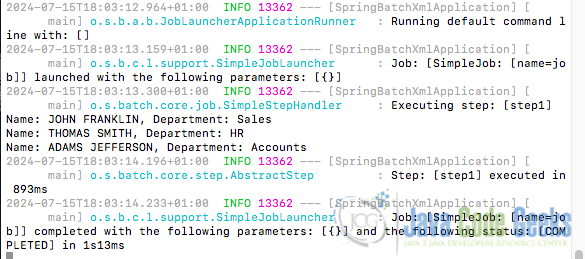
This block of code configures a batch job to read from an XML file, process the data, and write the results back to another XML file. In addition to the StaxEventItemReader and StaxEventItemWriter, we define a bean for ItemProcessor which processes each Employee object by converting the employee’s name to uppercase and prints the employee’s name and department.
The job method defines a batch job that starts with step1. The job builder uses a JobRepository to manage job execution details.
The step1 method defines a step named step1. It uses the reader, processor, and writer beans, with a chunk size of 1. The StepBuilder manages step execution details using the JobRepository and PlatformTransactionManager.
Log Output
When the application code is run, the console log output is:
6. Conclusion
In this article, we explored how to leverage Spring Batch for XML file processing using StaxEventItemReader and StaxEventItemWriter. We started by configuring our Maven project with the necessary dependencies, and then we defined our data model class with JAXB annotations for XML binding.
We demonstrated how to set up StaxEventItemReader to read XML files and map them to Java objects, and the StaxEventItemWriter to marshal Java objects back into XML format. The provided batch configuration integrated these components into a complete Spring Batch job, including a simple processor for data transformation.
7. Download the Source Code
This was an article on XML item reader and writer.
You can download the full source code of this example here: XML Item Reader and Writer


