
1. Introduction
Spring Validation Framework includes the Validator interface that handles data validation. It is used to implement custom validation logic. In this example, I will create a Spring MVC rest controller and implement the Spring validator interface to validate the create request.
2. Setup
In this step, I will create a gradle project along with lombok and Junit libraries.
build.gradle
plugins {
	id 'java'
	id 'org.springframework.boot' version '3.3.3'
	id 'io.spring.dependency-management' version '1.1.6'
}

group = 'org.zheng.demo.validator'
version = '0.0.1-SNAPSHOT'

java {
	toolchain {
		languageVersion = JavaLanguageVersion.of(17)
	}
}

configurations {
	compileOnly {
		extendsFrom annotationProcessor
	}
}


repositories {
	mavenCentral()
}

dependencies {
	implementation 'org.springframework.boot:spring-boot-starter-web'
	compileOnly 'org.projectlombok:lombok'
	annotationProcessor 'org.projectlombok:lombok'
	testImplementation 'org.springframework.boot:spring-boot-starter-test'
	testRuntimeOnly 'org.junit.platform:junit-platform-launcher'
}

tasks.named('test') {
	useJUnitPlatform()
}
3. Implement Spring Validator Interface
3.1 UserData
In this step, I will create a UserData class which has three data fields: userId, name, and email. The lombok annotations: @Data and @NoArgsConstructor are used to reduce boilerplate code.
UserData
package org.zheng.demo.validator.model;

import lombok.Data;
import lombok.NoArgsConstructor;

@Data
@NoArgsConstructor
public class UserData {
	private String userId;
	private String name;
	private String email;
}
3.2 UserDataValidator
In this step, I will create a UserDataValidator class that implements the Validator interface from the org.springframework.validation package. It overrides both supports and validate methods for the UserData class defined in step 3.1.
UserDataValidator.java
package org.zheng.demo.validator.model;

import org.springframework.stereotype.Component;
import org.springframework.validation.Errors;
import org.springframework.validation.ValidationUtils;
import org.springframework.validation.Validator;

@Component
public class UserDataValidator implements Validator {

	@Override
	public boolean supports(Class<?> clazz) {
		return UserData.class.isAssignableFrom(clazz);
	}

	@Override
	public void validate(Object target, Errors errors) {
		ValidationUtils.rejectIfEmptyOrWhitespace(errors, "userId", "missing userId.");
		ValidationUtils.rejectIfEmptyOrWhitespace(errors, "name", "missing name.");
	}
}
- Line 12: the
supportsmethod checks if thevalidatorcan validate instances of the given class. In this example, it supports the validation at theUserDataclass. - Line 17: the
validatemethod performs the actual validation on the giventargetobject and records any validation errors in the givenerrorsobject. In this example, it utilizes theValidationUtils.rejectIfEmptyOrWhitespaceto validate theuserIdandnamefields.
3.3 UserDataValidatorTest
In this step, I will create a UserDataValidatorTest class to test the validation defined in step 3.2.
UserDataValidatorTest.java
package org.zheng.demo.validator.model;

import static org.junit.jupiter.api.Assertions.assertFalse;
import static org.junit.jupiter.api.Assertions.assertTrue;

import org.junit.jupiter.api.Test;
import org.springframework.validation.BeanPropertyBindingResult;
import org.springframework.validation.Errors;

class UserDataValidatorTest {
	private UserDataValidator testClass = new UserDataValidator();

	@Test
	void test_invalidUser() {
		UserData user = new UserData();
		Errors error = new BeanPropertyBindingResult(user, "userData");

		testClass.validate(user, error);
		assertTrue(error.hasErrors());
	}

	@Test
	void test_validUser() {
		UserData user = new UserData();
		user.setUserId("userId");
		user.setName("Zheng");
		Errors error = new BeanPropertyBindingResult(user, "userData");

		testClass.validate(user, error);
		assertFalse(error.hasErrors());
	}
}
- Line 11: create an instance of the
UserDataValidatorclass. - Line 18, 29: validate the
userDataobject.
4. User RestController
In this step, I will create a UserRestController class that utilizes the UserDataValidator defined in step 3.2 to validate the user request when creating a user.
UserReestController.java
package org.zheng.demo.validator.controller;

import org.springframework.beans.factory.annotation.Autowired;
import org.springframework.http.HttpStatus;
import org.springframework.http.ResponseEntity;
import org.springframework.validation.BeanPropertyBindingResult;
import org.springframework.validation.Errors;
import org.springframework.web.bind.annotation.GetMapping;
import org.springframework.web.bind.annotation.PostMapping;
import org.springframework.web.bind.annotation.RequestBody;
import org.springframework.web.bind.annotation.RequestMapping;
import org.springframework.web.bind.annotation.RestController;
import org.zheng.demo.validator.model.UserData;
import org.zheng.demo.validator.model.UserDataValidator;

@RestController
@RequestMapping("/api")
public class UserRestController {
	@Autowired
	private UserDataValidator ud;

	@GetMapping("/ping")
	public String ping() {
		return "ok";
	}

	@PostMapping("/user")
	public ResponseEntity<?> createUser(@RequestBody UserData user) {
		Errors errors = new BeanPropertyBindingResult(user, "userData");
		ud.validate(user, errors);
		if (errors.hasErrors()) {
			return ResponseEntity.badRequest().body(errors.getAllErrors());
		}
		//continue with other tasks, for now, just return for demo
		return new ResponseEntity<>(user, HttpStatus.OK);
	}
}
- Line 20: injects a
UserDataValidatorinstance. - Line 30: invokes the
validatemethod to validate the create request user data.
4.1 UserRestControllerTest
In this step, I will create a UserRestControllerTest and test via @SpringBootTest and @AutoConfigureMockMvc.
UserRestControllerTest.java
package org.zheng.demo.validator.controller;

import static org.springframework.test.web.servlet.request.MockMvcRequestBuilders.get;
import static org.springframework.test.web.servlet.request.MockMvcRequestBuilders.post;
import static org.springframework.test.web.servlet.result.MockMvcResultMatchers.content;
import static org.springframework.test.web.servlet.result.MockMvcResultMatchers.status;

import org.junit.jupiter.api.Test;
import org.springframework.beans.factory.annotation.Autowired;
import org.springframework.boot.test.autoconfigure.web.servlet.AutoConfigureMockMvc;
import org.springframework.boot.test.context.SpringBootTest;
import org.springframework.test.web.servlet.MockMvc;
import org.zheng.demo.validator.model.UserData;

import com.fasterxml.jackson.databind.ObjectMapper;

@SpringBootTest
@AutoConfigureMockMvc
class UserRestControllerTest {

	@Autowired
	private MockMvc mockMvc;

	@Autowired
	private ObjectMapper ob;

	@Test
	void test_ping() throws Exception {
		mockMvc.perform(get("/api/ping")).andExpect(status().isOk()).andExpect(content().string("ok"));
	}

	@Test
	void test_create_invalid() throws Exception {
		UserData user = new UserData();

		mockMvc.perform(post("/api/user").contentType("application/json").content(ob.writeValueAsString(user)))
				.andExpect(status().isBadRequest());
	}

	@Test
	void test_create_invalid_missingName() throws Exception {
		UserData user = new UserData();
		user.setUserId("test");
		mockMvc.perform(post("/api/user").contentType("application/json").content(ob.writeValueAsString(user)))
				.andExpect(status().isBadRequest());
	}


	@Test
	void test_create_ok() throws Exception {
		UserData user = new UserData();
		user.setUserId("test");
		user.setName("testName");
		mockMvc.perform(post("/api/user").contentType("application/json").content(ob.writeValueAsString(user)))
				.andExpect(status().isOk());
	}
}
- Line 36: validate the create request with an empty
userIdandnamewill receive the bad_request code. - Line 44: validate the create request with a missing
namewill receive the bad_request code. - Line 54: validate the create request with both
userIdandnamewill receive the ok status.
5. Demo
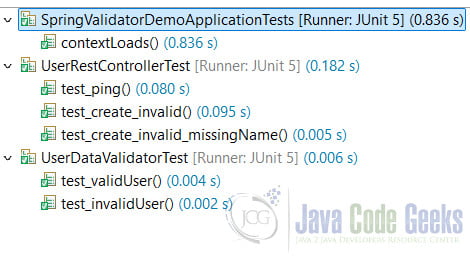
5.1 Junit Tests
Execute the junit test and capture the test results.
5.2 Rest Test
In this step, I will start the spring boot application and confirm the server is up at port 8080 via the server log.
server log
  .   ____          _            __ _ _
 /\\ / ___'_ __ _ _(_)_ __  __ _ \ \ \ \
( ( )\___ | '_ | '_| | '_ \/ _` | \ \ \ \
 \\/  ___)| |_)| | | | | || (_| |  ) ) ) )
  '  |____| .__|_| |_|_| |_\__, | / / / /
 =========|_|==============|___/=/_/_/_/

 :: Spring Boot ::                (v3.3.3)

2024-09-14T05:00:35.697-05:00  INFO 23180 --- [spring-validator-demo] [           main] o.z.d.v.SpringValidatorDemoApplication   : Starting SpringValidatorDemoApplication using Java 17.0.11 with PID 23180 (C:\MaryTools\workspace\spring-validator-demo\bin\main started by azpm0 in C:\MaryTools\workspace\spring-validator-demo)
2024-09-14T05:00:35.705-05:00  INFO 23180 --- [spring-validator-demo] [           main] o.z.d.v.SpringValidatorDemoApplication   : No active profile set, falling back to 1 default profile: "default"
2024-09-14T05:00:36.672-05:00  INFO 23180 --- [spring-validator-demo] [           main] o.s.b.w.embedded.tomcat.TomcatWebServer  : Tomcat initialized with port 8080 (http)
2024-09-14T05:00:36.688-05:00  INFO 23180 --- [spring-validator-demo] [           main] o.apache.catalina.core.StandardService   : Starting service [Tomcat]
2024-09-14T05:00:36.688-05:00  INFO 23180 --- [spring-validator-demo] [           main] o.apache.catalina.core.StandardEngine    : Starting Servlet engine: [Apache Tomcat/10.1.28]
2024-09-14T05:00:36.771-05:00  INFO 23180 --- [spring-validator-demo] [           main] o.a.c.c.C.[Tomcat].[localhost].[/]       : Initializing Spring embedded WebApplicationContext
2024-09-14T05:00:36.776-05:00  INFO 23180 --- [spring-validator-demo] [           main] w.s.c.ServletWebServerApplicationContext : Root WebApplicationContext: initialization completed in 1015 ms
2024-09-14T05:00:37.148-05:00  INFO 23180 --- [spring-validator-demo] [           main] o.s.b.w.embedded.tomcat.TomcatWebServer  : Tomcat started on port 8080 (http) with context path '/'
2024-09-14T05:00:37.158-05:00  INFO 23180 --- [spring-validator-demo] [           main] o.z.d.v.SpringValidatorDemoApplication   : Started SpringValidatorDemoApplication in 1.826 seconds (process running for 2.222)
Once the server is started, navigate to a web browser and validate with the “http://localhost:8080/api/ping“. It should return the “ok” string.
In this step, I will use the Thunder Client plugin in Visual Studio Code to test the create user request.
Figure 2 shows the bad request error when the request body is missing.

Capture the generated curl command for no body request:
curl command for no body content request
curl  -X POST \
  'http://localhost:8080/api/user' \
  --header 'Accept: */*' \
  --header 'User-Agent: Thunder Client (https://www.thunderclient.com)' \
  --header 'Content-Type: application/json'
Figure 3 shows the missing name validation.

Capture the generated curl command for missing the name field request:
curl command for missing name
curl  -X POST \
  'http://localhost:8080/api/user' \
  --header 'Accept: */*' \
  --header 'User-Agent: Thunder Client (https://www.thunderclient.com)' \
  --header 'Content-Type: application/json' \
  --data-raw '{"userId":"test"}'
Figure 4 shows a valid request.

Capture the generated curl command for a valid request:
curl command for a valid request
curl  -X POST \
  'http://localhost:8080/api/user' \
  --header 'Accept: */*' \
  --header 'User-Agent: Thunder Client (https://www.thunderclient.com)' \
  --header 'Content-Type: application/json' \
  --data-raw '{
  "userId": "test",
  "name": "zheng"
}'
6. Conclusion
In this example, I created a spring boot application for a Rest controller. The controller utilized the Spring validator interface to validate the request.
7. Download
This was an example of a gradle project which includes the Spring Validator interface.
You can download the full source code of this example here: Spring Validator Validation Example


