

 The Widgets Control plugin for WordPress is a toolbox that features visibility management for all widgets, sidebars, sections of content and content blocks.
It allows to show widgets and sidebars based on conditions – you can choose to show them only on certain pages or exclude them from being displayed.
Sections of content can also be restricted by using this plugin’s [widgets_control] shortcode.
You can also define new WYSIWYG Content Blocks that can be used in widgets, sidebars and with shortcodes.
Features
 Widgets Control features visibility management for every widget, sidebar, sections of content and content blocks.
It allows to show or hide these based on conditions and you can choose to show them only on certain pages or devices or exclude them from being displayed.
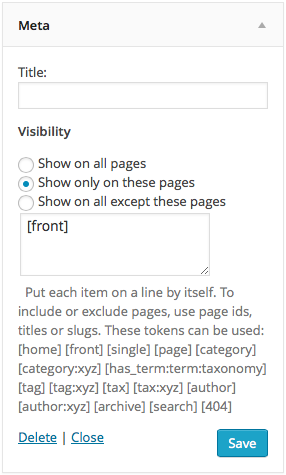
For each widget and sidebar, you can decide where it should be displayed:
- show it on all pages
- show it on some pages
- show it on all except some pages
… you can target small, medium or large screens for mobile, tablet and desktop users.
To include or exclude pages, the plugin allows you to indicate page ids, titles or slugs and tokens that identify the front page, categories, tags, etc.
In addition to page ids, titles and slugs, useful tokens are available to determine where a widget should or should not be displayed. Among these:
[home] [front] [single] [page] [category] … please refer to the Documentation for more details.
On sites using WPML, widgets can be shown conditionally based on the language viewed.
The [widgets_control] shortcode is used to embed content and show it conditionally similar to the visibility options used for widgets and sidebars. For example:
[widgets_control conditions="{archive}"]This text is shown only when the content is displayed on an archive page.[/widgets_control]
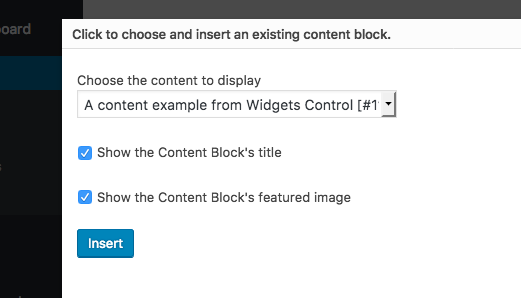
Widgets Control also provides flexible WYSIWYG Content Blocks and a proper widget that can be used to place them in sidebars, the [widgets_control_content] shortcode to embed freely created blocks anywhere on your pages and API functions that allow to include these blocks in PHP templates of your theme. For even more flexible control, use Widgets Control Pro which provides freely definable additional sidebars.
Use display conditions to show or hide content on devices with small, medium or large displays, useful to adapt the display to mobile, tablet and desktop viewers.
See the documentation for more details.
Documentation
You can install the plugin directly from your WordPress Dashboard. Please refer to the Widgets Control documentation pages.
Screenshots




Leave a Reply