The Modern Tool That Unifies
Packaging, Deployment & Patching

Backed by 20+ years of expertise from the team behind Advanced Installer

Free for 30 days. Instant access.
No forms required.

See PacKit in Action.

PacKit has been a great addition to our workflow, simplifying the creation of .intunewin files and automating the upload and assignment of applications to MECM and Intune.
— Matt
I absolutely love the concept of PacKit!
— John
PacKit has been a great addition to our workflow, simplifying the creation of .intunewin files and automating the upload and assignment of applications to MECM and Intune.
— Marc
I liked the WinGet command line. The GUI has a modern look.
— Peter
The ability to target specific groups and devices directly from PacKit provides a streamlined approach to application deployment, making it a valuable tool for IT professionals and students alike.
— Marc
I highly recommend Advanced Installer and PacKit!
— Marc

PacKit is More Than Patching

It’s Packaging, Deployment & Patching – All in One Workflow

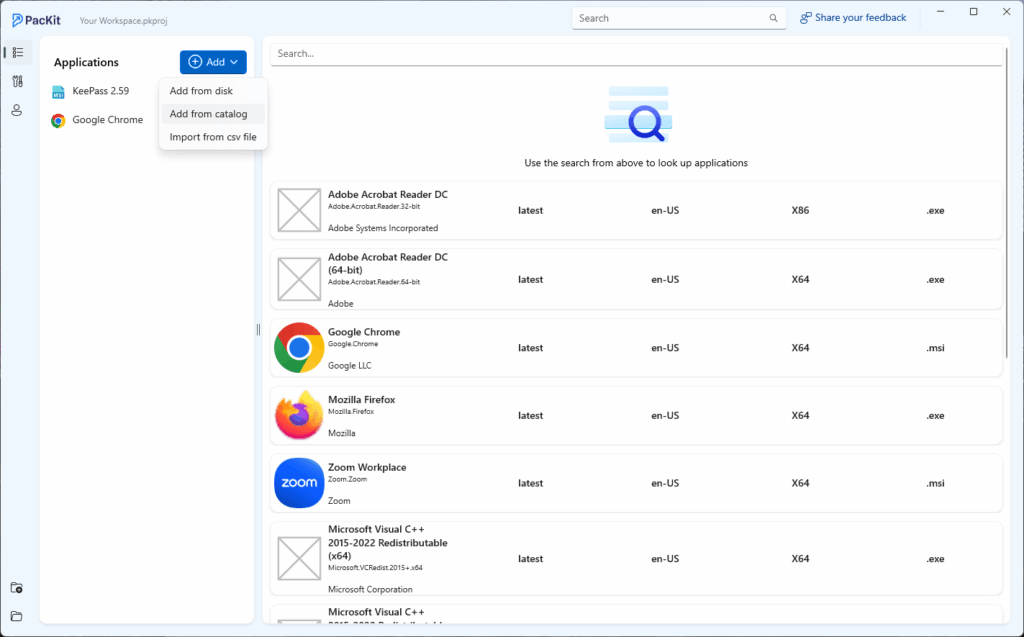
WinGet Integration
WinGet Integration
WinGet Integration
psadt integration
Silent Install Command Line Finder
Digital Signing

Feedback program (Limited spots)

You’re One Demo Away 
From Getting PacKit Plus at 90% Off

Share your honest feedback in a 1:1 with Bogdan, PacKit’s Product Manager


Get 12 months of PacKit Plus at 90% off

After the call, you’ll immediately unlock:

Built to Cut Down Repetitive Work

Designed for IT Pros
by IT Pros

PacKit offers an intuitive interface, and our focus on usability ensures that both seasoned IT professionals and newcomers can navigate and use PacKit with ease.

User-Centric

We commit to monthly updates with exciting features and enhancements based on real feedback.

Windows-Based

PacKit is specifically designed for Windows platforms, ensuring seamless integration and compatibility.

Easy Setup

Our easy setup process allows you to quickly install and configure PacKit, so you can focus on what matters most— managing your applications, deployments, and updates efficiently.

Command Lines and Silent Switches Repository

Gain instant access to a vast repository of command lines and silent switches, streamlining your deployment processes.

One-click Upload to
MECM & Intune

Deploy your applications to MECM (former SCCM) and Intune with just one click, and benefit from a simplified deployment process.

Excellent Support

PacKit offers excellent support, backed by our team of experienced professionals.

Whether you need help with setup, troubleshooting, or optimizing your deployment processes, our support team is here to assist you every step of the way.

Focused Features

We implement only what matters.

At PacKit, we focus on delivering the essential features exceptionally well, providing a streamlined and efficient deployment experience

20+ Years of Experience in Application Packaging and Deployment

PacKit is developed by the same team as Advanced Installer, leveraging over 20 years of application packaging and deployment expertise.

Ready to Experience Unified  Packaging, Deployment & Patching?

Free for 30 days.


Instant access. No forms required.

Current Progress and Upcoming Features

Advanced Installer Architect Users 
Get PacKit Plus Free for 1 Year

Are you eligible?

Whenever in need, we have TONS of resources 
to help you get started with PacKit, and more.

Blog

Deploying Apps with PSADT and Intune

Avoid These Issues When Deploying Apps with PSADT and Intune

As application packaging increasingly relies on PSADT and Intune for managing and deploying application packages to devices, you should be aware of the potential issues you may encounter and how to avoid them.  In this article, I’ll go over some cases I encountered during my packaging work. Application Fails in Autopilot You just packaged your application, and it works fine during local tests and standard deployments, but it fails when used in Autopilot (Enrollment Status

Migration from Psadt v3.x to v4.1

Migration from Psadt v3.x to v4.1: Is it worth it?

The PowerShell App Deployment Toolkit is an open-source tool that wraps your setup installer, allowing you to create complex installation and uninstallation logic using built-in commandlets and functions. It has gained popularity among software packagers and system administrators. This article will cover its evolution, focusing on key changes and whether migrating to version V4.1 might be worthwhile for you. I will wrap up this article by showing you some examples of .ps1 scripts for popular

Wrapping Win32 apps with PSADT for Intune Deployment

PSADT is an open-source toolkit used to simplify and standardize application deployment with PowerShell. It is widely used in enterprise environments to wrap installers (MSI, EXE, etc.) with custom logic for installation, uninstallation, and user interaction. It also comes with robust logging and error handling, as well as powerful scripting capabilities for both silent and interactive installs and uninstalls. When using tools like Intune to deploy your applications, you must wrap your app binaries and

Videos

Deploying Apps with PSADT and Intune

Avoid These Issues When Deploying Apps with PSADT and Intune

As application packaging increasingly relies on PSADT and Intune for managing and deploying application packages to devices, you should be aware of the potential issues you may encounter and how to avoid them.  In this article, I’ll go over some cases I encountered during my packaging work. Application Fails in Autopilot You just packaged your application, and it works fine during local tests and standard deployments, but it fails when used in Autopilot (Enrollment Status

Migration from Psadt v3.x to v4.1

Migration from Psadt v3.x to v4.1: Is it worth it?

The PowerShell App Deployment Toolkit is an open-source tool that wraps your setup installer, allowing you to create complex installation and uninstallation logic using built-in commandlets and functions. It has gained popularity among software packagers and system administrators. This article will cover its evolution, focusing on key changes and whether migrating to version V4.1 might be worthwhile for you. I will wrap up this article by showing you some examples of .ps1 scripts for popular

Wrapping Win32 apps with PSADT for Intune Deployment

PSADT is an open-source toolkit used to simplify and standardize application deployment with PowerShell. It is widely used in enterprise environments to wrap installers (MSI, EXE, etc.) with custom logic for installation, uninstallation, and user interaction. It also comes with robust logging and error handling, as well as powerful scripting capabilities for both silent and interactive installs and uninstalls. When using tools like Intune to deploy your applications, you must wrap your app binaries and

Useful Tools Included In PacKit Free

Generate .intunewin

Generate the .intunewine file for your packages automatically using our simple GUI.

MSIX Troubleshoot
Diagnose, analyze, and fix MSIX issues during the installation process.
Run inside MSIX container
Run natively installed applications inside an MSIX container.

Frequently Asked Questions

A knowledge base of questions and issues that appear most often.

What is PacKit?

PacKit is a user-centric, Windows-based tool designed for centralized post-packaging configuration and deployment. It streamlines the process of managing application packages, integrating seamlessly with tools like Intune and MECM.

PacKit offers 1-click deployment to MECM (Microsoft Endpoint Configuration Manager) and Intune, allowing you to seamlessly deploy your applications with minimal effort. It supports automatic Intunewin file generation, making the integration process smooth and efficient.

PacKit integrates with the PSAppDeployToolkit to automate script generation. This minimizes errors and saves time by ensuring that your deployment scripts are consistently and correctly applied.

PacKit is designed for easy setup. The installation process is quick and straightforward, allowing you to get started with managing and deploying your applications without hassle.
PacKit focuses on core functionalities of package management and deployment, ensuring they work seamlessly. Unlike other tools that try to do too many things at once, PacKit concentrates on delivering the essential features and customer service exceptionally well.

Yes, you can try PacKit for free. This allows you to experience its features and benefits firsthand without any initial cost.

PacKit is ideal for Windows IT professionals and Managed Service Providers (MSPs) who need an efficient solution for managing and deploying application packages. It simplifies workflows, reduces manual effort, and ensures consistent deployments.
Project-Based Workspaces in PacKit allow you to organize and manage your application packages based on specific projects or departments. This feature helps keep your deployments structured and easy to navigate.

Yes, PacKit includes a Silent Switch Finder that efficiently locates silent switches for your application installations. It also simplifies managing silent install command lines, making your software deployment processes more streamlined.

PacKit provides excellent customer support backed by a team of experienced professionals. You can access 24/7 support, comprehensive knowledge bases, and direct assistance through email and phone.

PacKit is powered by Advanced Installer, which has over 20 years of experience in application packaging and deployment. This rich history and expertise ensure that PacKit is a reliable and effective solution for your deployment needs.

PacKit offers a variety of resources including user guides, video tutorials, and blog updates to help you get started and make the most of the tool.