

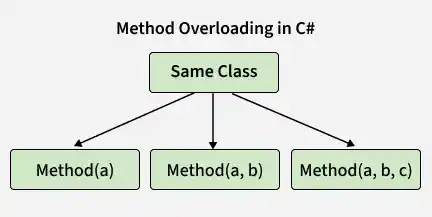
Method overloading allows a class to have multiple methods with the same name but different parameter lists. It is a form of compile-time polymorphism, where the compiler determines which overloaded method to call based on the arguments passed.
- The parameter list must be different.
- Parameters can differ in number, type, or order.
- Changing only the return type does not create method overloading.
using System;

class Calculator
{
    public int Add(int a, int b)
    {
        return a + b;
    }

    public int Add(int a, int b, int c)
    {
        return a + b + c;
    }

    public double Add(double a, double b)
    {
        return a + b;
    }
}

class GFG
{
    static void Main()
    {
        Calculator calc = new Calculator();

        Console.WriteLine(calc.Add(10, 20));
        Console.WriteLine(calc.Add(10, 20, 30));
        Console.WriteLine(calc.Add(10.5, 20.5));
    }
}
Output
30
60
31
Explanation: The Calculator class has three Add() methods with different parameter lists. The compiler determines which method to execute based on the number and type of arguments passed.
Ways of Method Overloading
Method overloading in C# can be achieved mainly in the following ways:
1. Changing the Number of Parameters
Method overloading can be achieved by changing the number of parameters. Each overloaded method can perform the same operation with a different number of arguments.
using System;

class Product
{
    // Multiplying two integer values
    public int Multiply(int a, int b)
    {
        return a * b;
    }

    // Multiplying three integer values
    public int Multiply(int a, int b, int c)
    {
        return a * b * c;
    }
}

class GFG
{
    static void Main()
    {
        Product ob = new Product();

        // Calling method to multiply 2 numbers
        int prod1 = ob.Multiply(1, 2);

        Console.WriteLine(
            "Product of the two integer values: " + prod1);

        // Calling method to multiply 3 numbers
        int prod2 = ob.Multiply(1, 2, 3);

        Console.WriteLine(
            "Product of the three integer values: " + prod2);
    }
}
Output
Product of the two integer values: 2
Product of the three integer values: 6
Explanation:
- Both methods have the same name, Multiply().
- The first methTypes od accepts two parameters.
- The second method accepts three parameters.
- The compiler selects the appropriate method based on the number of arguments.
2. Changing Data of Parameters
Methods can also be overloaded by changing the data types of parameters. This allows the same method name to work with different types of values.
using System;

class Product
{
    public int Prod(int a, int b, int c)
    {
        return a * b * c;
    }

    public double Prod(double a, double b, double c)
    {
        return a * b * c;
    }
}

class GFG
{
    static void Main()
    {
        Product p = new Product();

        Console.WriteLine(p.Prod(1, 2, 3));
        Console.WriteLine(p.Prod(1.0, 2.0, 3.0));
    }
}
Output
6
6
Explanation:
- Both methods have the same name, Prod().
- One accepts int parameters.
- The other accepts double parameters.
- The compiler selects the method based on the argument types.
3. Changing the Order of Parameters
Method overloading can also be achieved by changing the order of parameters, provided their types are different. This allows methods with the same name to accept arguments in different sequences.
using System;

class Student
{
    public void StudentId(string name, int rollNo)
    {
        Console.WriteLine(
            "Name: " + name + ", Roll-No: " + rollNo);
    }

    public void StudentId(int rollNo, string name)
    {
        Console.WriteLine(
            "Roll-No: " + rollNo + ", Name: " + name);
    }
}

class GFG
{
    static void Main()
    {
        Student s = new Student();

        s.StudentId("Sweta", 1);
        s.StudentId(2, "Gudly");
    }
}
Output
Name: Sweta, Roll-No: 1
Roll-No: 2, Name: Gudly
Explanation:
- Both methods have the same name, StudentId().
- The parameter types are the same but their order is different.
- The compiler identifies the appropriate method based on the sequence of arguments.
Note: Hybrid overloading is also possible, where the number, type, or order of parameters can change in different combinations.
What if the Exact Parameter Types Do Not Match?
When an exact overloaded method is not available, C# can perform certain implicit conversions to find a compatible overloaded method.
For example:
- byte can be implicitly converted to int.
- int can be implicitly converted to long.
- int can be implicitly converted to float.
- char can be implicitly converted to int.
using System;

class Demo
{
    public void Show(int x)
    {
        Console.WriteLine("In int: " + x);
    }

    public void Show(string s)
    {
        Console.WriteLine("In String: " + s);
    }

    public void Show(byte b)
    {
        Console.WriteLine("In byte: " + b);
    }
}

class UseDemo
{
    static void Main()
    {
        Demo obj = new Demo();

        obj.Show((byte)25);
        obj.Show("hello");
        obj.Show(250);
        obj.Show('A');

        // obj.Show(7.5);
        // Error: no suitable method for double
    }
}
Output
In byte: 25
In String: hello
In int: 250
In int: 65
Explanation:
- obj.Show((byte)25) calls Show(byte) because the argument is explicitly a byte.
- obj.Show("hello") calls Show(string) because the argument is a string.
- obj.Show(250) calls Show(int) because an integer literal is int by default.
- obj.Show('A') calls Show(int) because char can be implicitly converted to int.
- obj.Show(7.5) causes a compilation error because 7.5 is a double, and there is no Show(double) method. C# does not implicitly narrow double to int or byte.
Overloading vs Overriding
| Method Overloading | Method Overriding |
|---|---|
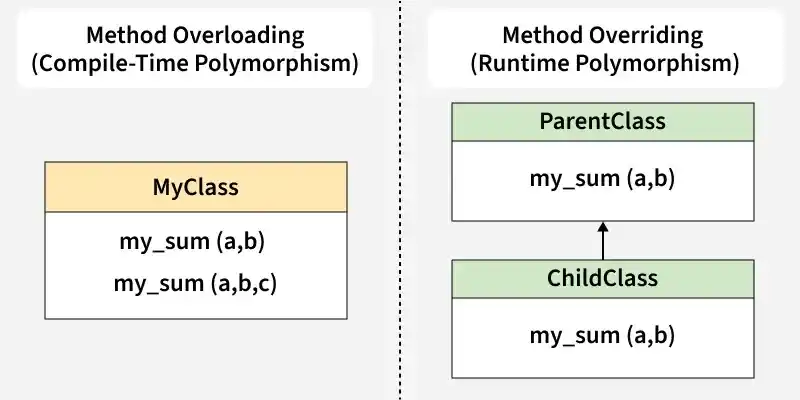
| Same method name, different parameters | Same method signature in parent and child classes |
| Usually occurs within the same class | Requires inheritance |
| Compile-time polymorphism | Runtime polymorphism |
| Compiler selects the overloaded method | Runtime selects the overridden method |
| Parameters must differ | Parameters must match |
| Return type alone cannot distinguish overloads | Return type must be compatible with the overridden method |
| Does not require virtual/override | Typically uses virtual and override keywords |