Summary: in this tutorial, you will learn how to use the Db2 SUBSTRING() function to extract a substring from a string.
Db2 SUBSTRING() function overview
The SUBSTRING() function allows you to extract a substring from a string. The basic syntax of the SUBSTRING() function is the following:
SUBSTRING( source_string, start_position [, substring_length ] );
Code language: SQL (Structured Query Language) (sql)
The SUBSTRING() function returns a substring from the source_string starting at start_position with the substring_length length.
The following explains the meanings of the three arguments:
source_string
The source_string is the source string from which you want to extract a substring.
start_position
The start_position is a positive integer that specifies the location where the substring starts.
substring_length
The substring_length specifies the number of characters of the substring to be extracted.
If you skip the substring_length, the function returns the rest of the source_string starting from the start_position location.
Db2 SUBSTRING() function examples
Let’s take some examples of using the SUBSTRING() function to understand it better.
1) Using Db2 SUBSTRING() function to extract a substring example
This example uses the SUBSTRING() function to extract a substring whose length is 3 starting from the first character of the source string:
SELECT
    SUBSTRING( 'Db2 Substring', 1, 3 ) Result
FROM
    sysibm.sysdummy1;
Code language: SQL (Structured Query Language) (sql)
Here is the output:
RESULT
-------------
Db2
Code language: SQL (Structured Query Language) (sql)
2) Using Db2 SUBSTRING() function with no substring’s length argument example
This example extracts a substring from the fifth position of the string 'Db2 Substring' to the rest of the string.
SELECT
    SUBSTRING( 'Db2 Substring', 5 ) Result
FROM
    sysibm.sysdummy1;
Code language: SQL (Structured Query Language) (sql)
The following shows the output:
RESULT
-------------
Substring
Code language: SQL (Structured Query Language) (sql)
3) Using Db2 SUBSTRING() function with table data example
Consider the following authors table in the sample database:

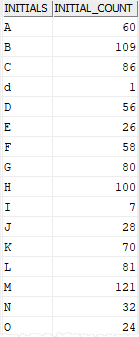
This example uses the SUBSTRING() to extract the initials of the author’s last names and the initial count for each initial.
SELECT
    SUBSTRING( first_name, 1, 1 ) initials ,
    COUNT(*)  initial_count
FROM
    authors
GROUP BY
    SUBSTRING( first_name, 1, 1 )
ORDER BY
    initials;
Code language: SQL (Structured Query Language) (sql)
This picture shows the partial result set:
In this tutorial, you have learned how to use the Db2 SUBSTRING() function to extract a substring from a string.

