Summary: in this tutorial, you will learn how to use the Db2 CREATE INDEX statement to define a new index on a table.
Introduction to Db2 CREATE INDEX statement
To define an index for a table, you use the CREATE INDEX statement. The basic syntax of CREATE INDEX statement is the following:
CREATE INDEX index_name
ON table_name(column1, column2, ...);
Code language: SQL (Structured Query Language) (sql)
In this syntax:
- First, specify the name of the index after the
CREATE INDEXkeywords. - Then, specify the table to which the index belongs and one or more columns included in the index.
Db2 CREATE INDEX examples
We’ll use the authors table from the sample database for the demonstration.

1) Using Db2 CREATE INDEX statement to create an index on one column example
This statement finds the authors whose last name is Anderson.
SELECT
    first_name,
    last_name
FROM
    authors
WHERE
    last_name = 'Anderson';
Code language: SQL (Structured Query Language) (sql)
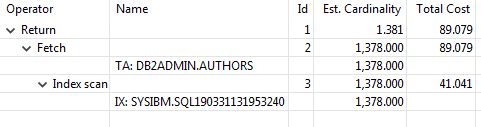
The query optimizer had to scan the whole authors able to locate the authors whose the last name is Anderson.
Here is the query plan of the query:
To improve the speed of the query, you can create an index on the last_name column as follows:
CREATE INDEX ix_last_name
ON authors(last_name);
Code language: SQL (Structured Query Language) (sql)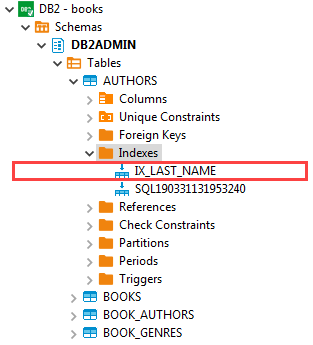
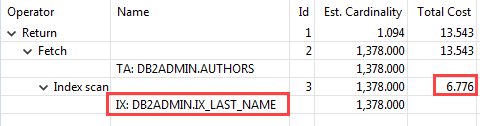
Once the ix_last_name index created, you can execute the query that finds the authors whose last name is Anderson again.
This time the query optimizer uses the ix_last_name to find the authors. As you can see, the cost of locating the authors is reduced significantly.
2) Using Db2 CREATE INDEX statement to create an index on multiple columns example
First, delete the idx_last_name by using the DROP INDEX statement:
DROP INDEX ix_last_name;
Code language: SQL (Structured Query Language) (sql)
And then create a new index that includes both last_name and first_name columns:
CREATE INDEX ix_name
ON authors(last_name, first_name);
Code language: SQL (Structured Query Language) (sql)
The following query finds the author whose last name is Anderson and the first name is Thomas:
SELECT
    author_id,
    first_name,
    last_name
FROM
    authors
WHERE
    last_name = 'Anderson' AND
    first_name = 'Thomas';Code language: SQL (Structured Query Language) (sql)
The query optimizer can use the ix_name index for searching. Here is the query plan:

This query finds authors whose last name is Brown:
SELECT
    author_id,
    first_name,
    last_name
FROM
    authors
WHERE
    last_name = 'Amy'
Code language: SQL (Structured Query Language) (sql)
The query optimizer also can use the index ix_name for searching because the last_name column is the leftmost column of the index.
However, if you find the authors by the first name, the query optimizer is not able to leverage the ix_name index:
SELECT
    author_id,
    first_name,
    last_name
FROM
    authors
WHERE
    first_name = 'Amy'
Code language: SQL (Structured Query Language) (sql)
So, when you create an index on multiple columns, the order of the columns in the index definition is important. It is a good practice to place the columns that are often used in the WHERE clause or join condition at the beginning of the list.
In this tutorial, you have learned how to use the Db2 CREATE INDEX statement to create a new index on a table.

