Summary: in this tutorial, you will learn how to use the Db2 SELECT DISTINCT to prevent duplicate rows returned by a query.
Introduction to Db2 SELECT DISTINCT
Sometimes, you want to select distinct values from one or more columns of a table. To do this, you use the DISTINCT keyword in the SELECT clause as follows:
SELECT
    DISTINCT column_name
FROM
    table_name;Code language: SQL (Structured Query Language) (sql)
The DISTINCT keyword appears after the SELECT keyword but before any column or expression in the select list. The query above returns distinct values in the column_name from the table_name.
If you have multiple column names listed after the DISTINCT keyword like the following query:
SELECT
    DISTINCT
        column_name1,
        column_name2, ...
FROM
    table_name;Code language: SQL (Structured Query Language) (sql)
The DISTINCT keyword is applied to all columns. It means that the query will use the combination of values in all columns to evaluate the distinction.
If you want to select distinct values of some columns in the select list, you should use the GROUP BY clause.
In case a column contains multiple NULL values, DISTINCT will keep only one NULL in the result set.
Db2 SELECT DISTINCT examples
We will use the authors table from the sample database for the demonstration.

1) Using Db2 SELECT DISTINCT with one column
The following query returns all last names of authors from the authors table:
SELECT
    last_name
FROM
    authors
ORDER BY
    last_name;Code language: SQL (Structured Query Language) (sql)
Here is the result set:
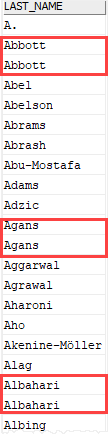
As clearly shown in the output, we had many authors with the same last name e.g., Abbott, Agans, and Albahari.
To get unique author’s last names, you add the DISTINCT keyword as shown in the following query:
SELECT DISTINCT
    last_name
FROM
    authors
ORDER BY
    last_name;Code language: SQL (Structured Query Language) (sql)
Here is the output:
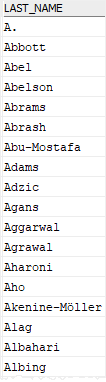
As you can see clearly from the output, the DISTINCT operator keeps one value for each group of duplicates.
2) Using Db2 SELECT DISTINCT with NULL values
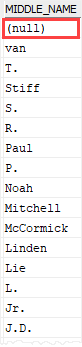
The middle_name column of the authors table contains many rows with NULL values. When we apply the DISTINCT to the middle_name column, only one instance of NULL is included in the result set as shown in the result set of the following query;
SELECT DISTINCT
    middle_name
FROM
    authors
ORDER BY
    middle_name DESC;
Code language: SQL (Structured Query Language) (sql)
Here is the output:
3) Using Db2 SELECT DISTINCT with multiple columns
Let’s set up a new table for the demonstration.
First, create a new table named book_inventories:
CREATE TABLE book_inventories
(
    book_id  INT NOT NULL,
    store_id INT NOT NULL,
    quantity INT NOT NULL,
    PRIMARY KEY(book_id, store_id)
);Code language: SQL (Structured Query Language) (sql)
Second, insert some rows into the table:
INSERT INTO book_inventories(book_id, store_id, quantity)
VALUES(100, 1, 15);
INSERT INTO book_inventories(book_id, store_id, quantity)
VALUES(100, 2, 20);
INSERT INTO book_inventories(book_id, store_id, quantity)
VALUES(200, 1, 25);
INSERT INTO book_inventories(book_id, store_id, quantity)
VALUES(200, 2, 30);Code language: SQL (Structured Query Language) (sql)
Third, query data from the book_inventories table:
SELECT *
FROM book_inventories;
Code language: SQL (Structured Query Language) (sql)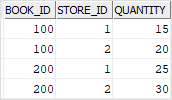
If you use the DISTINCT keyword on the book_id, you will get two values 100 and 200 as shown in the output of the following query:
SELECT DISTINCT
    book_id
FROM
    book_inventories;
Code language: SQL (Structured Query Language) (sql)
BOOK_ID
-----------
100
200However, when you add the store_id column to the query as follows:
SELECT DISTINCT
    book_id,
    store_id
FROM
    book_inventories;
Code language: SQL (Structured Query Language) (sql)
BOOK_ID STORE_ID
----------- -----------
100 1
100 2
200 1
200 2It returns the distinct values of both book_id and store_id.
In this tutorial, you have learned how to use the Db2 SELECT DISTINCT to remove duplicate rows in the result set of a query.

