Summary: in this tutorial, you will learn how to use the Db2 OR operator to query rows that satisfy either or both predicates of the search condition.
Introduction Db2 OR operator
The OR operator is a logical operator that combines two Boolean expressions or predicates. the OR operator is often used in the WHERE clause of the SELECT, UPDATE, and DELETE statements to specify a search condition for rows to be selected, updated, and deleted.
Here is the syntax of the OR operator:
boolean_expression1 OR boolean_expression2
Code language: SQL (Structured Query Language) (sql)
In this syntax, the boolean_expression1 and boolean_expression2 are the Boolean expressions that evaluate to true, false, and unknown.
The following table shows the result when combining true, false, and unknown values using the OR operator:
| TRUE | FALSE | UNKNOWN | |
|---|---|---|---|
| TRUE | TRUE | TRUE | TRUE |
| FALSE | TRUE | FALSE | UNKNOWN |
| UNKNOWN | TRUE | UNKNOWN | UNKNOWN |
If you use both OR and AND operators in an expression, Db2 always evaluates the AND operator first. To change the order of evaluation, you can use the parentheses.
To negate the OR operator, you use the NOT operator as follows:
NOT (boolean_expression1 OR boolean_expression2)
Code language: SQL (Structured Query Language) (sql)
Db2 OR operator examples
Let’s use the books table from the sample database to demonstrate the OR operator.

1) Db2 OR operator example
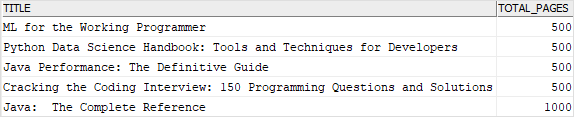
This example uses the OR operator to find the books that have the number of pages 500 or 1,000:
SELECT
    title,
    total_pages
FROM
    books
WHERE total_pages = 500
        OR total_pages = 1000
ORDER BY
    total_pages;
Code language: SQL (Structured Query Language) (sql)
The query scans every row and returns the rows whose value in the total_pages column is 500 or 1000.
Here is the result set:
Note that you can use the IN operator to achieve the same result:
SELECT
    title,
    total_pages
FROM
    books
WHERE
    total_pages IN (500, 1000)
ORDER BY
    total_pages;
Code language: SQL (Structured Query Language) (sql)
2) Using multiple Db2 OR operators example
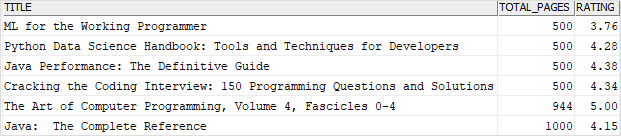
This example uses two OR operators to find books whose ratings are 5 and the number of pages is 500 or 1000:
SELECT
    title,
    total_pages,
    rating
FROM
    books
WHERE total_pages = 500
        OR total_pages = 1000
        OR rating = 5
ORDER BY
    total_pages;
Code language: SQL (Structured Query Language) (sql)
Here is the output:
3) Using Db2 OR operator with parentheses
If you use the OR and AND operators with more than two conditions, you can use parentheses to explicitly specify the evaluation order.
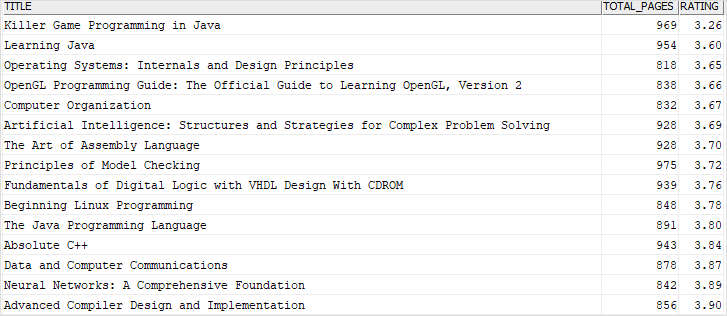
The following example uses both OR and AND operators to find books that satisfy either of the following conditions:
- The number of pages is greater than 800 and less than 1,000
- The rating is greater than 4.7
Here is the query:
SELECT
    title,
    total_pages,
    rating
FROM
    books
WHERE(total_pages > 800
        AND total_pages < 1000)
    OR rating > 4.7
ORDER BY
    rating,
    total_pages;
Code language: SQL (Structured Query Language) (sql)
The following picture shows the partial output:
4) Using Db2 NOT OR operator example
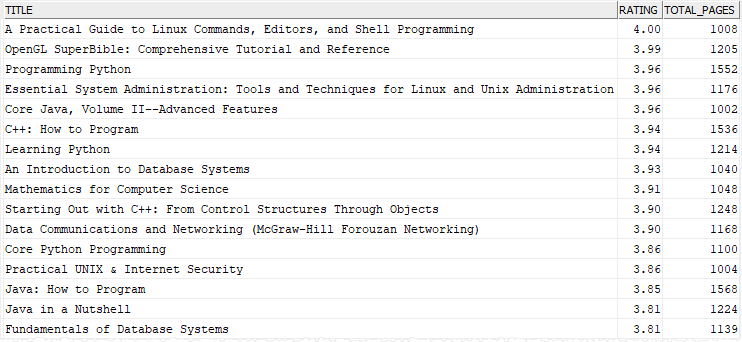
This example uses the NOT OR operator to find books that have the number of pages greater than or equal 1000 and rating less than or equal 4:
SELECT
    title,
    rating,
    total_pages
FROM
    books
WHERE NOT (rating > 4 OR total_pages < 1000)
ORDER BY
    rating desc,
    total_pages desc;
Code language: SQL (Structured Query Language) (sql)
Here is the partial result set:
Note that based on the De Morgan’s laws, NOT (A OR B) is equivalent to (NOT A AND NOT B). In this case, the following conditions are equivalent:
NOT (rating > 4 OR total_pages < 1000)
Code language: SQL (Structured Query Language) (sql)
and
rating <= 4 AND total_pages >= 1000)
Code language: SQL (Structured Query Language) (sql)
In this tutorial, you have learned how to use the Db2 OR operator to query rows that satisfy either or both predicates of the search condition.

