Summary: in this tutorial, you will learn how to use the Db2 FETCH clause to limit the number of rows returned by a query.
Introduction to Db2 FETCH clause
When you use the SELECT statement to query data from a table, you may get a large number of rows. However, you only need a small subset of these rows. Therefore, to limit the rows returned by a query, you use the FETCH clause as follows:
OFFSET n ROWS
FETCH {FIRST | NEXT } m {ROW | ROWS} ONLY
Code language: SQL (Structured Query Language) (sql)
In this syntax:
nis the number of rows to skip.mis the number of rows to return. TheFIRSTandNEXT,ROWandROWSare interchangeable respectively. They are used for the semantic purpose.
Notice that the FETCH clause is an ANSI-SQL version of the LIMIT clause.
Similar to the LIMIT clause, you should always use the FETCH clause with the ORDER BY clause to get the returned rows in a specified order.
Db2 FETCH clause examples
We will use the books table from the sample database to demonstrate the FETCH clause.

1) Using Db2 FETCH clause to get the top-N rows
This example uses the FETCH clause to get the top 10 books by ratings:
SELECT
    title,
    rating
FROM
    books
ORDER BY
    rating DESC
FETCH FIRST 10 ROWS ONLY;
Code language: SQL (Structured Query Language) (sql)
The following picture shows the output:
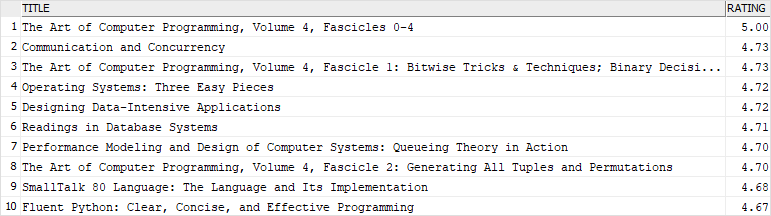
In this example:
- The
ORDER BYclause sorts books by ratings from high to low. - The
FETCHclause picks only the first 10 rows, which have the highest ratings.
2) Using Db2 OFFSET FETCH for pagination example
Suppose, you want to display books in pages sorted by ratings, each page has 10 books.
The following query uses the OFFSET FETCH clause to get the books on the second page:
SELECT
    title,
    rating
FROM
    books
ORDER BY
    rating DESC
OFFSET 10 ROWS
FETCH NEXT 10 ROWS ONLY;
Code language: SQL (Structured Query Language) (sql)
Here is the result set:
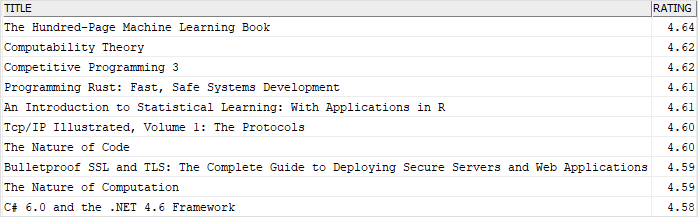
In this example:
- The
OFFSETclause skips the first 10 rows which are on the first page. - The
FETCHclause picks the next 10 rows.
In this tutorial, you have learned how to use the Db2 FETCH clause to limit the number of rows returned by a query.

